Installation and Operation Manual
ECN: 003155
Date: 06/4/2013
27
AC-SmartStart-7608-Series_IOM Rev 04
Windows Conguration & Control Utility
6.6.4 PDU AUXILIARY SETTINGS
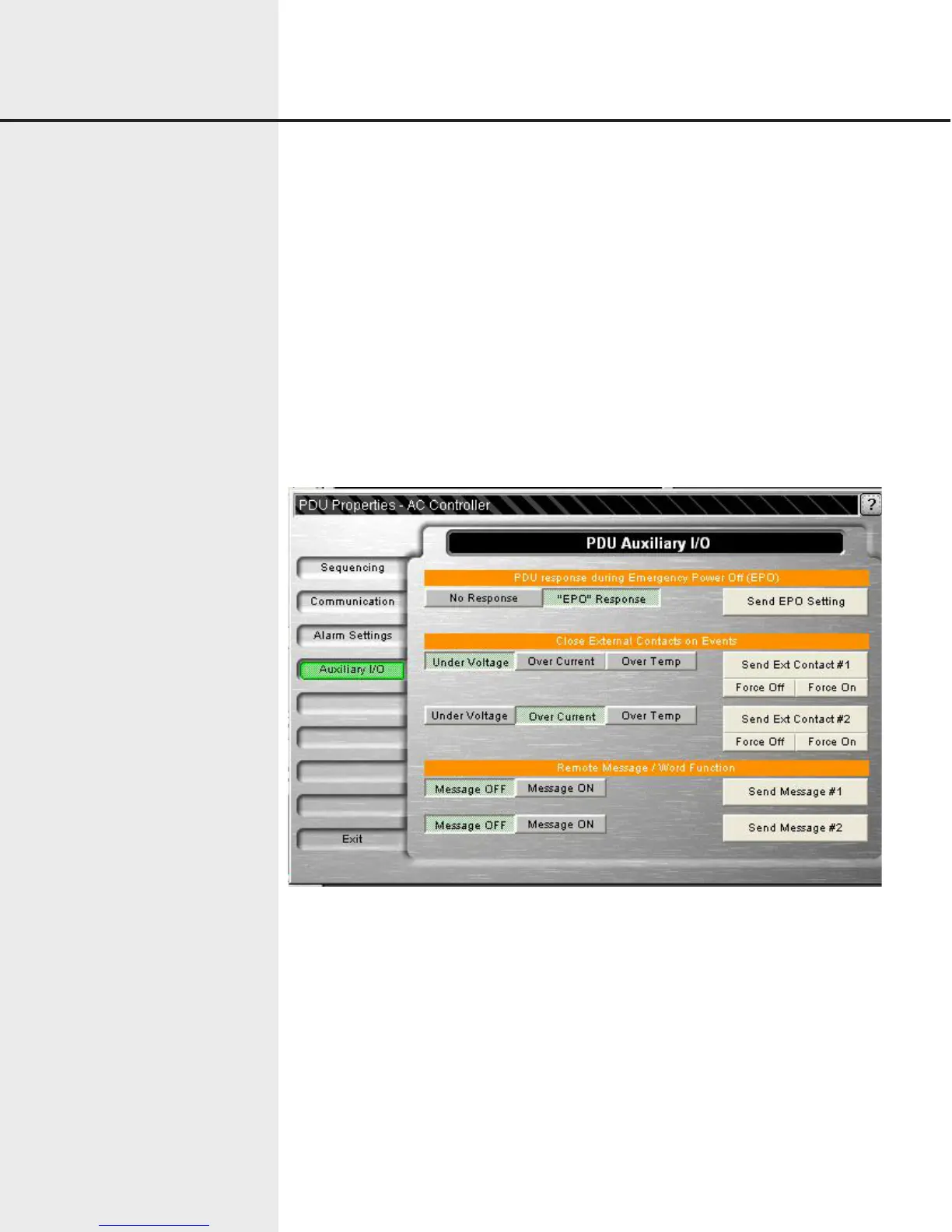
The auxiliary settings window allows the user to change the emergency power off (EPO)
function, external contact trigger information, and external messaging. See Figure 6.14.
The EPO function is an option that is configured at the factory. If the unit is equipped
with the EPO option, the unit can respond differently based on the configuration setting.
When enabled to a setting of “no response” and when the EPO circuit is opened, all out-
puts are turned off. The unit will not respond to any commands. When the EPO condi-
tion is returned to normal, the unit will automatically return back to its prior state.
When configured to “EPO Response,” the unit will turn off all the outputs and a message
of “UFFEPO” will be returned with any command response. Once the EPO condition is
returned to normal, the unit will automatically return back to its prior state.
Figure 6.14 Auxiliary Settings


 To Next Page