Installation and Operation Manual
ECN: 003155
Date: 06/4/2013
46
AC-SmartStart-7608-Series_IOM Rev 04
LAN Module & Communications
7.8.6 Outlet Control
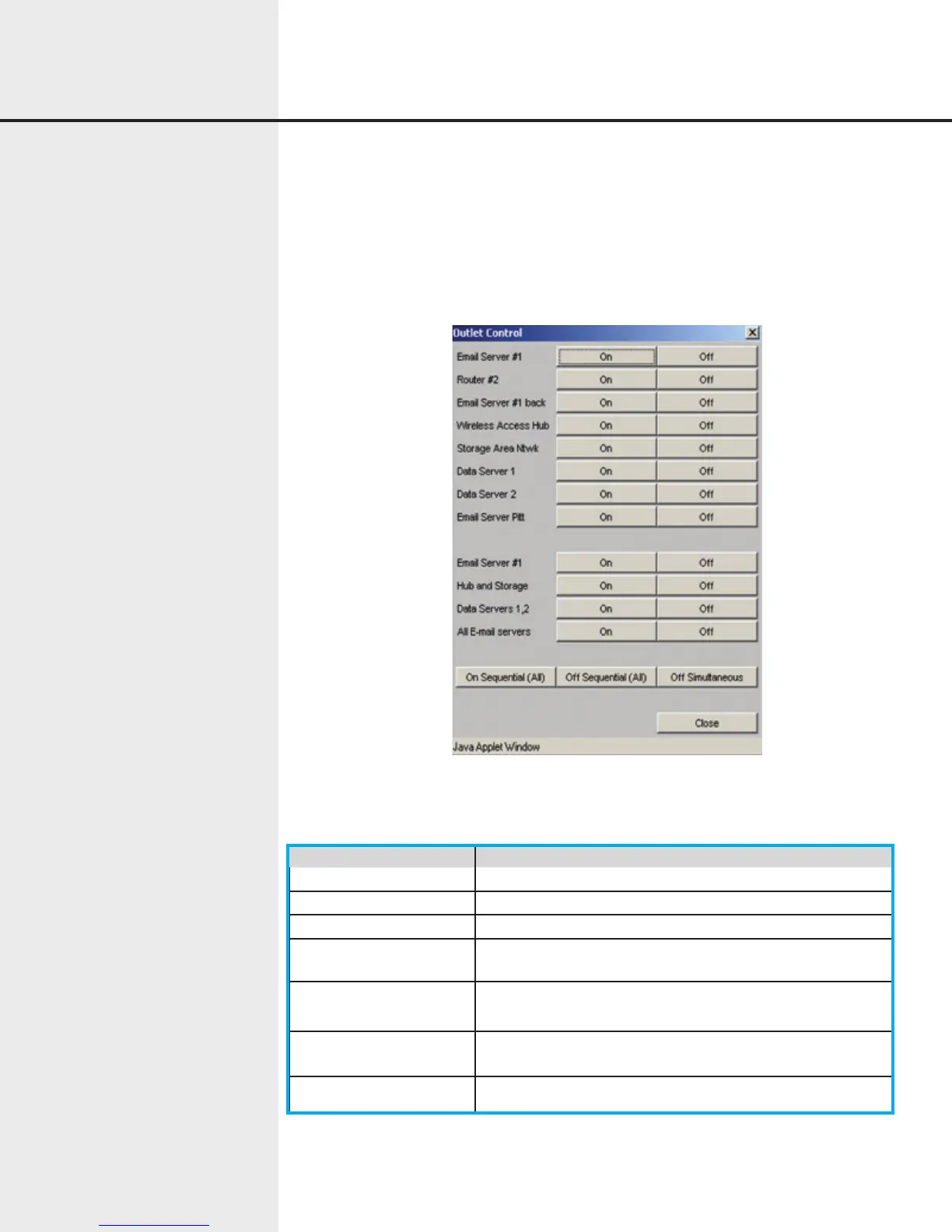
The Outlet Control dialog allows direct control of the PDU outlets, either individually
or in sequenced operations. The exact items displayed and whether they are enabled
depends on the type of unit (1x8 or 2x4) and the privileges of the currently logged-in
user. If an outlet is manually turned off, it will not be included in the automatic or power
on sequences
Figure 7.17 Web Interface Outlet Control
The Outlet Control dialog contains the following items:
Item Function
Outlet Names Names of outlets as defined in the Unit Setup dialog.
Outlet On/Off Buttons Turns the associated outlet on or off
Outlet Group Names Names of outlet groups as defined in the Unit Setup dialog.
Outlet Group On/Off
Buttons
Turns the associated outlet group on or off
On Sequential Buttons Sequences on outlets (all outlets, channel A outlets, or
channel B outlets)
Off Sequential Buttons Sequences off outlets (all outlets, channel A outlets, or chan-
nel B outlets)
Off Simultaneous Turns off all outlets simultaneously.


 To Next Page