Installation and Operation Manual
ECN: 003155
Date: 06/4/2013
45
AC-SmartStart-7608-Series_IOM Rev 04
LAN Module & Communications
7.8.5 User Setup
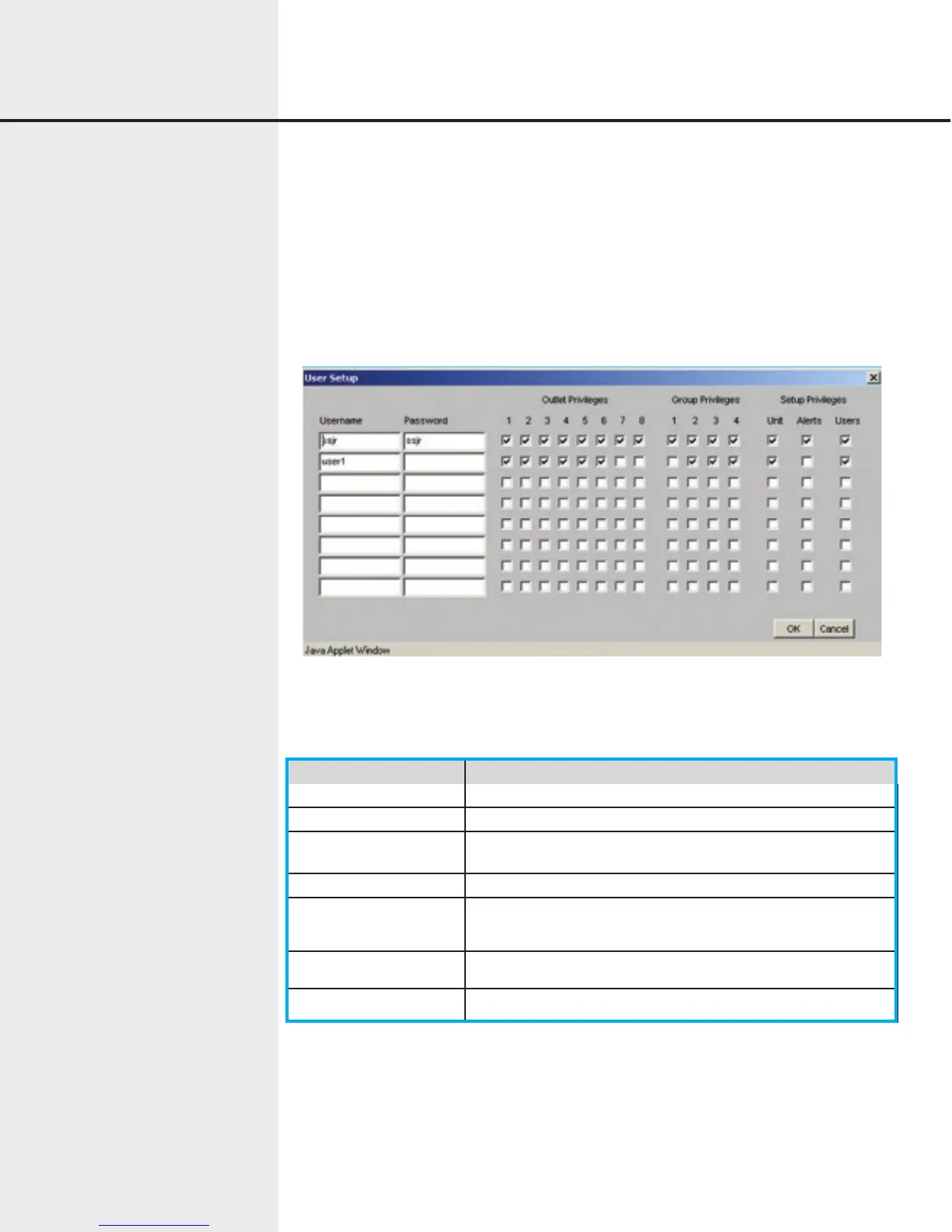
The User Setup Dialog allows usernames, passwords, and privileges to be set up and
maintained for up to eight users. When a user logs in, the functions he or she can
perform are determined by the privileges established in the User Setup Dialog. By
default (on new units, for example), a single user “ssjr”, password “ssjr” is defined with
full privileges. Do not use “Non standard” characters, use numbers and letters only when
creating usernames and passwords.
Figure 7.16 WEB User Setup Screen
Item Function
Username Case-sensitive user name.
Password Case-sensitive password.
Outlet Control Privi-
leges 1-8
If checked, the user may turn the specified outlet on or off,
including sequenced operations.
Group Setup Privilege If checked, the user may turn the specified group on or off.
Unit Setup Privilege If checked, the user may set up and maintain basic unit
parameters
Alert Setup Privilege If checked, the user may set up and maintain alerts.
User Setup Privilege If checked, the user may set up and maintain users.
The User Setup dialog contains the following items for each defined user::


 To Next Page