Installation and Operation Manual
ECN: 003155
Date: 06/4/2013
44
AC-SmartStart-7608-Series_IOM Rev 04
LAN Module & Communications
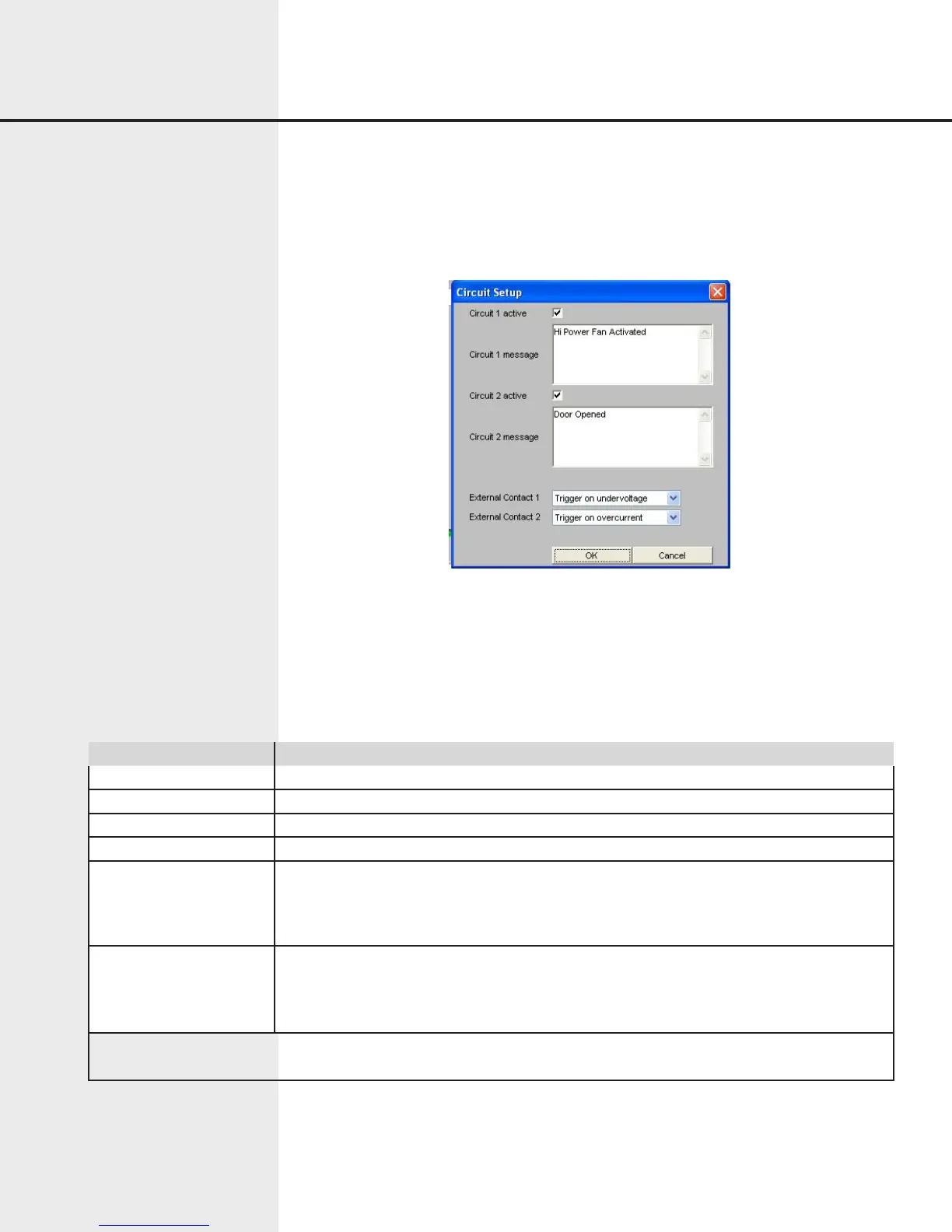
Figure 7.15 Web Interface External Circuit Setup
Alerts and related actions can be set up for the following events:
• External circuit 1 opened
• External circuit 2 opened
• External contact 1 voltage/current/temperature
• External contact 2 voltage/current/temperature
Item Function
Circuit 1 Active Checkbox indicating whether external circuit 1 is being monitored.
Circuit 1 Message Message sent with alerts when circuit 1 is opened while monitored.
Circuit 2 Active Checkbox indicating whether external circuit 2 is being monitored.
Circuit 2 Message Message sent with alerts when circuit 2 is opened while monitored.
External Contact 1 Select variable when external contact change state (Voltage/Current/Temperature/or
Manual)
Values used for trigger points are based on settings in the unit setup screen. Note when
2X4 configuration is used Contact 1 is tied to Channel A.
External Contact 2 Select variable when external contact change state (Voltage/Current/Temperature/or
Manual) Values used for trigger points are based on settings in the unit setup screen. Note
when 2X4 configuration is used Contact 2 is tied to Channel B.
Values used for trigger points are based on settings in the unit setup screen. Note when 2X4 configuration is used
Contact 2 is tied to Channel B.
NOTE: To set the temperature setpoint, you must use the PDU Manager Interface or
command line command AFFK. (See page 14)
The Circuit Setup dialog contains the following items:
7.8.4 Circuit Setup
The Circuit Setup dialog lets the user set up and maintain conditions that cause alerts,
recipients who receive alerts, and other information related to alerts.


 To Next Page