APOGEE ELECTRONICS
10
AD-16X – User’s Guide
Standard and Advanced Option Routing - continued
Advanced Option Routing –
Expanded Interface Choices
When an X-Option card is installed in an AD-16X, Advanced Option
routing offers the possibility to connect a second interface using the
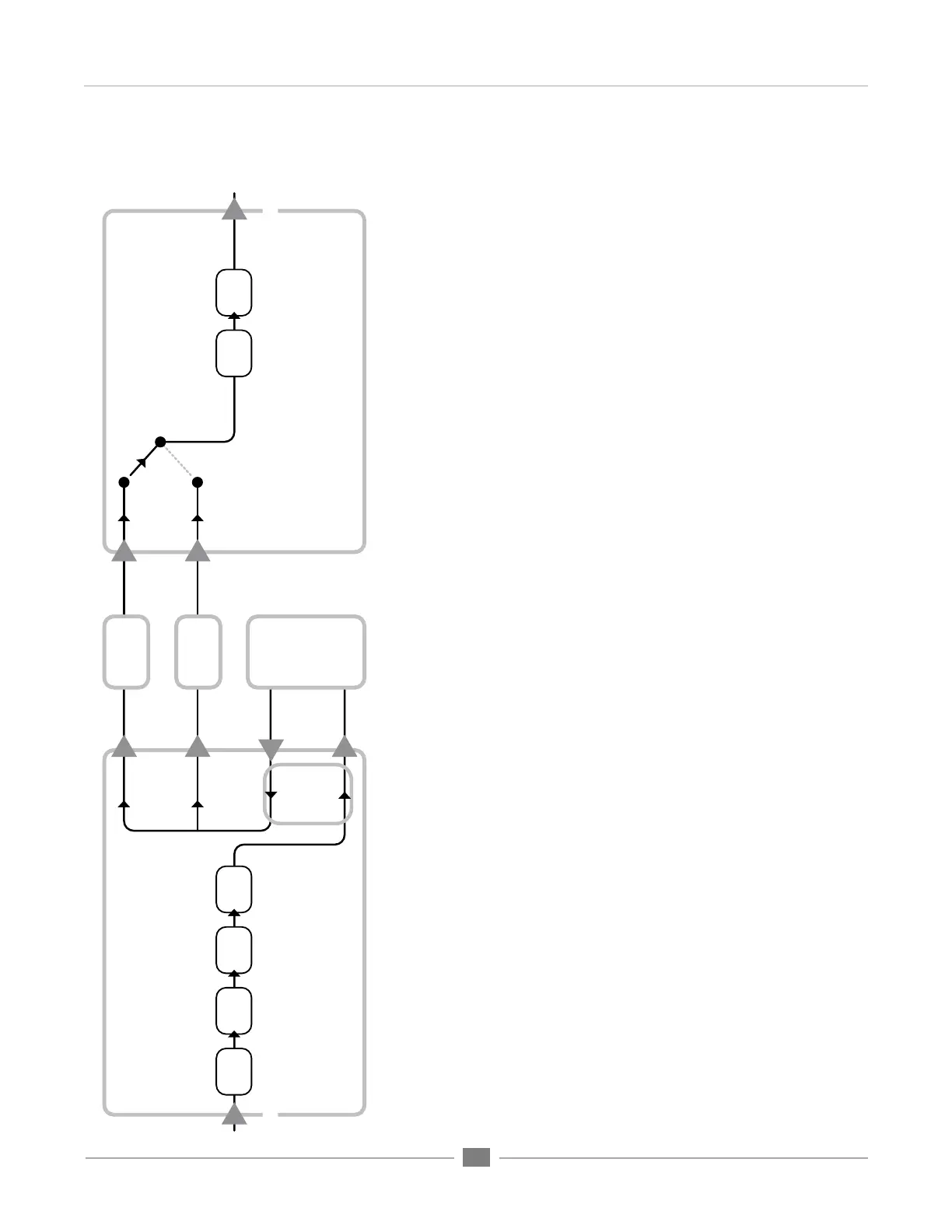
AD-16X’s digital I/O. As depicted in the routing diagram at right, the
AD-16X’s analog inputs are routed to the Firewire audio device while
the AD-16X’s digital outputs are routed from the Firewire device. These
digital outputs may be connected to a DA-16X or a MiniDAC to provide
analog output. In short, only one X-Option card is needed to connect an
AD-16X and a D-to-A.
AES
Optical
DA-16X
DA-16X: Standard Routing
D to A
& Meters
Cal
Level
(input select)
Analog Out
AD-16X: Advanced Option Routing
Cal
Level
Soft
Limit
AES
Optical
Option In
Option Out
A to D
& Meters
UV22
AD-16X
AES
Device
Optical
Device
Analog In
X-FireWire
option card
Computer
with
FireWire
400/800


 To Next Page