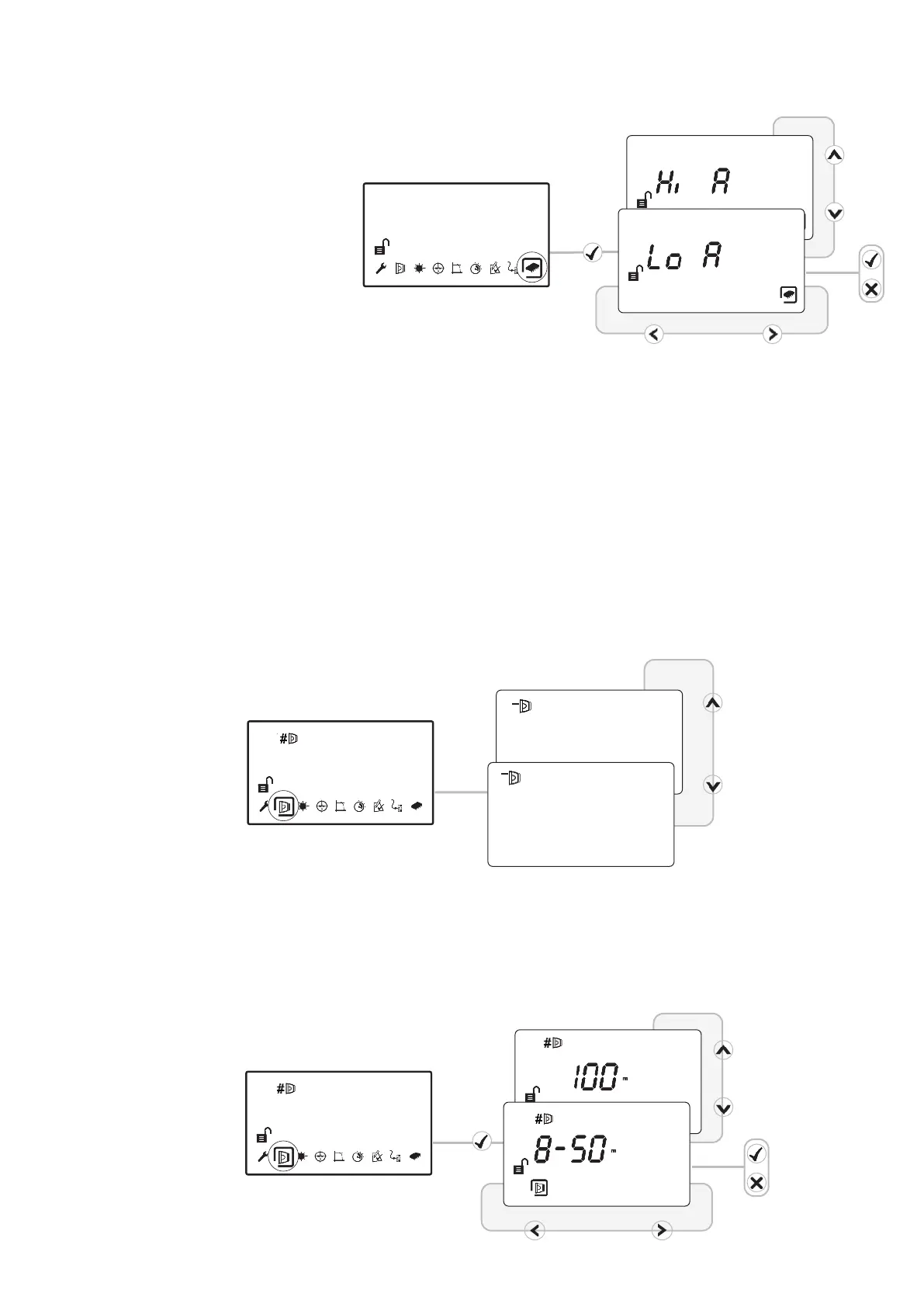
• In ‘Hi A’ mode (default), during
normal operation the system
will take 5.5mA if one Detector
is connected or 8mA if two
Detectors are connected.
During Laser targeting, Auto,
Hand and Home functions, the
system will take 36mA.
• In ‘Lo A’ mode (selected via the
System Controller settings
menu), the system will take
5.5mA or 8mA in ALL modes of
operation. The Detector will
move more slowly during Align,
Laser targeting and Home, so it
is recommended to leave the
system set to ‘Hi A’ if the
current is available.
8. Select Power Mode
9. Select Detector
• Select Detector to be accessed
• All Detectors need to be aligned separately
• Steps 9 to12 explain how to align individual Detectors
1
2
10. Select Distance between Detector and Reflector
• Select 8-50m (default) or 100m
(Set for each Detector)
9
Note: When multiple systems are connected to a
loop, it is recommended that only one system at a
time is used in an alignment mode (HAND, AUTO,
LASER, HOME) to ensure that excessive current is
not consumed


 To Next Page