EasyManua.ls Logo

Aprilaire 62 - User Manual

Aprilaire 62
9 pages
Print Icon
To Next Page IconTo Next Page
Loading...
Automatic Digital
and Manual
Humidifier Control
Models 60, 62 & 4655
Operating
Instructions
INSTALLER:
Please leave this Operation Manual with the homeowner.

Other manuals for Aprilaire 62

Question and Answer IconNeed help?

Do you have a question about the Aprilaire 62 and is the answer not in the manual?

Summary

Your Humidifier

Digital Humidifier Control Indicator Lights

Explains red, yellow, and green indicator lights for service, maintenance, and operation status.

Operating Instructions

Blower Activation

Details how to set the Blower Activation switch to control humidifier operation with the HVAC fan.

Automatic Digital Humidifier Control

Automatic Mode

Guides setting the Automatic Digital Humidifier Control for optimal home humidity.

Manual Mode

Table 1 - Outdoor Temperature;Indoor Relative Humidity

Lists recommended indoor RH levels based on outdoor temperatures for comfort and protection.

Water Panel Change Indicator (Model 60 Only)

Test;Reset

Explains using Test/Reset to check operation and reset the Water Panel change timer.

Additional Information

Table 2 - % Relative Humidity Guide

Provides a guide for % Relative Humidity based on dial settings and outdoor temperatures.

Manual Humidifier Control

Table 3 - Operation Guide

Provides solutions for common operational issues and troubleshooting for humidifiers.

Check the Humidifier Operation

Digital Humidifier Control

Steps to check the operation of the Digital Humidifier Control, including test mode.

Annual Summer Shutdown

Manual Humidifier Control

Instructions for properly shutting down the Manual Humidifier Control for the summer.

Summary

Your Humidifier

Digital Humidifier Control Indicator Lights

Explains red, yellow, and green indicator lights for service, maintenance, and operation status.

Operating Instructions

Blower Activation

Details how to set the Blower Activation switch to control humidifier operation with the HVAC fan.

Automatic Digital Humidifier Control

Automatic Mode

Guides setting the Automatic Digital Humidifier Control for optimal home humidity.

Manual Mode

Table 1 - Outdoor Temperature;Indoor Relative Humidity

Lists recommended indoor RH levels based on outdoor temperatures for comfort and protection.

Water Panel Change Indicator (Model 60 Only)

Test;Reset

Explains using Test/Reset to check operation and reset the Water Panel change timer.

Additional Information

Table 2 - % Relative Humidity Guide

Provides a guide for % Relative Humidity based on dial settings and outdoor temperatures.

Manual Humidifier Control

Table 3 - Operation Guide

Provides solutions for common operational issues and troubleshooting for humidifiers.

Check the Humidifier Operation

Digital Humidifier Control

Steps to check the operation of the Digital Humidifier Control, including test mode.

Annual Summer Shutdown

Manual Humidifier Control

Instructions for properly shutting down the Manual Humidifier Control for the summer.

Overview

The Aprilaire Automatic Digital and Manual Humidifier Control (Models 60, 62 & 4655) is designed to regulate the humidity levels in your home, working in conjunction with your heating, ventilating, and air conditioning (HVAC) equipment. This control system offers both automatic and manual modes of operation, providing flexibility and precision in maintaining optimal indoor humidity.

Function Description:

The primary function of the Aprilaire Humidifier Control is to manage the operation of your humidifier to achieve desired indoor relative humidity (RH) levels.

In Automatic Mode, the Digital Humidifier Control senses both indoor humidity and outdoor temperature. It then automatically adjusts the humidifier's operation to provide the optimum humidity level, protecting your home and furnishings from the damaging effects of excessive condensation or low humidity during the heating season. This mode eliminates the need for manual adjustments when outdoor temperatures change and removes the necessity to turn the dial setting to "OFF" during the summer. The digital readout on the automatic control displays the humidity level inside the cold air return duct, which accurately reflects the humidity in the living space when the HVAC blower is operating. For every 2°F change in outdoor temperature, the Digital Humidifier Control automatically adjusts the indoor RH by 1%. The control is designed to maintain a maximum indoor humidity of 45%.

In Manual Mode, the control allows you to set the desired humidity level manually. This mode requires you to anticipate drops in outdoor temperature and reduce the setting accordingly to avoid excessive condensation. The manual control is installed either in the cold air return duct or on an interior wall.

Blower Activation:

The "Blower Activation Switch" allows the humidifier control to activate the HVAC fan for maximum humidification. When set to "ON," if the HVAC system has been idle for one hour, the humidifier control will activate the HVAC system fan to sample the air for 3 minutes. If the RH is lower than the set point, the humidifier control will activate the humidifier and keep the fan running. The humidifier will continue to operate for 2 hours or until the humidification set point is reached. If the RH set point has not been reached by the end of a call for heat, the control will continue to operate the humidifier and the HVAC fan until the humidification set point is reached or 2 hours have elapsed. For Models 500, 600, and 700, this setting requires connection to hot water. When the "Blower Activation Switch" is in the "OFF" position, the humidifier control will only operate the humidifier if humidity is required and the HVAC system fan is operating or the HVAC system is producing heat. Note that if used with an Aprilaire 8570 Communicating Thermostat and blower activation is desired, the A B communication terminals should not be wired.

Important Technical Specifications:

  • Humidity Range (Automatic Mode): Automatically adjusts indoor RH based on outdoor temperature, with a maximum controlled humidity of 45%.
  • Humidity Range (Manual Mode): Settings are provided for various outdoor temperatures, with recommended RH levels ranging from 15% at -20°F to 45% at +40°F.
  • Control Type: Automatic Digital Humidifier Control (Models 60, 62 & 4655) or Manual Humidifier Control.
  • Installation: Typically installed in the cold air return duct or on an interior wall.

Usage Features:

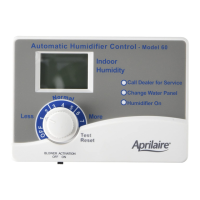
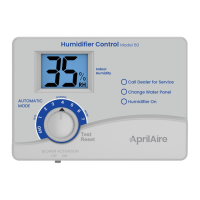
  • Digital Humidifier Control Indicator Lights:
    • Call Dealer for Service (Red Light): Indicates abnormal humidifier operation requiring service.
    • Change Water Panel (Yellow Light): (Model 60 only) Indicates it's time to replace the humidifier's Water Panel.
    • Humidifier On (Green Light): Indicates normal humidifier operation.
  • First Heating Season Setup (Automatic Mode): Initially, turn the dial setting knob to "5." Over the next 24-48 hours, minor adjustments may be needed for personal comfort. During the coldest part of the season, further minor adjustments might be necessary depending on home construction. Once set, it typically won't require further adjustment in future heating seasons.
  • Test/Reset Feature: Allows checking humidifier operation even without a call for humidity. Turning the control knob to "Test/Reset" will operate the humidifier for one minute (in test mode) and reset the "Change Water Panel" timer. In Digital Humidifier Control, if the knob is left in "Test/Reset" for more than 1 minute, the display will flash the software revision level.
  • Annual Summer Shutdown:
    • For Digital Humidifier Control in Automatic Mode with Blower Activation switch "OFF," no adjustment is necessary.
    • For Digital Humidifier Control in Automatic Mode with Blower Activation switch "ON," set the knob to "OFF."
    • For Digital Humidifier Control in Manual Mode, set the knob to "OFF."
    • For Manual Humidifier Control, set the knob to "OFF."
  • Condensation Management: The control helps prevent condensation on windows by automatically adjusting humidity levels. If condensation occurs, the setting should be reduced by one increment.
  • Lack of Humidity: If humidity is insufficient, increase the setting by one increment. If already at maximum ("7"), set the Blower Activation Switch to "ON" (requires hot water connection for Models 500, 600, 700).

Maintenance Features:

  • Water Panel Change Indicator (Model 60 Only): The control tracks humidifier operation time, and the yellow "Change Water Panel" light flashes when a preset amount of running time has elapsed. This interval is determined by the installer based on the humidifier model and water hardness.
  • Resetting Water Panel Timer: After replacing the Water Panel, turn the Control knob to the "Test/Reset" position until the green "Humidifier ON" light flashes to reset the timer.
  • Troubleshooting (Table 3 - Operation Guide): Provides solutions for common issues such as condensation on windows, lack of humidity, humidifier not operating, humidifier not shutting off, and error codes (E1, E2, E3, E4). For error codes, it recommends calling your heating and air conditioning dealer.

Aprilaire 62 Specifications

General IconGeneral
BrandAprilaire
Model62
CategoryController
LanguageEnglish

Related product manuals