- 9 -
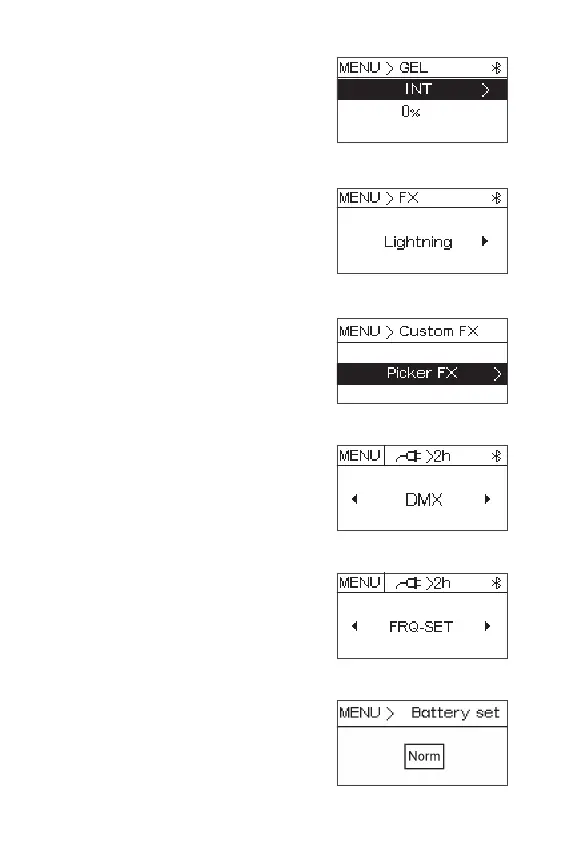
2.3 GEL mode: press the knob to enter GEL
mode,then rotate the knob to select
brightness, color temperature and Gel, press
the knob to enter the submenu to adjust the
brightness(0%~100%), color temperature
(3200K/5600K) and Gel.
2.4 FX mode: press the knob to enter FX mode,
then rotate the knob to select Club Lights,
Paparazzi , Lightning , TV , Candle, Fire, Strobe,
Explosion, Faulty Bulb, Pulsing , Welding , Cop
Car, Color Chase , Party Lights, Fireworks.
2.5 Custom FX mode: press the knob to enter
Custom FX mode, then rotate the knob to
select Picker FX, Music FX, and TouchBar FX.
2.6 DMX mode: press the knob to enter DMX
mode. then rotate the knob to adjust the DMX
channel (001~512).
2.7 Frequency set: press the knob to enter
frequency selection menu, then rotate the
knob to select the frequency (+0~2000Hz).
2.8 Battery setting: press the knob to enter
battery setting, then rotate the knob to
select Norm, 2H, 4H, 6H, 8H.












 To Next Page