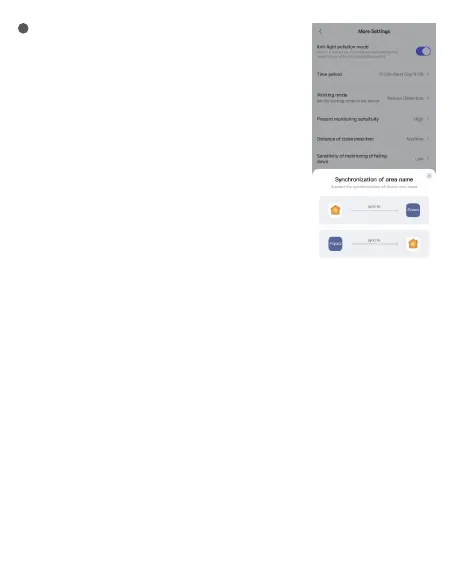
More Settings
FP2 supports the following More Settings:
(1) Anti-light pollution mode
When activated, all indicator lights, including protection and offline
reminders, are turned off during specified periods.
Note: Reset and network access indicators still function normally
during network access.
(2) Detection modes
FP2 supports presence detection, zone dectection (Personnel
positioning), falling detection. Default mode is always on by default,
regardless of selecting any two other modes.
Note: Future FP2 OTA will support more modes.
Zone detection includes detection direction and coordinate
direction reversal configuration options.
Coordinate direction reversal supports enabling, disabling, and auto
modes. In auto mode, FP2 system automatically recognizes the
installation method of the device and decides whether to enable
coordinate direction reversal.
When the detection direction function is set to le-right monitoring,
12
the entry and exit directions will have distinct attributes, and will be divided into le-entry,
right-entry, le-exit, and right-exit.
(3) Presence Detection Sensitivity
Sensitivity levels impact FP2's response speed and accuracy. Higher sensitivity offers quicker
responses but may cause false alarms. Use high sensitivity in static areas like bedrooms, and low
sensitivity in dynamic areas like hallways.
(4) Proximity Sensing Distance
This setting influences proximity sensing for both radar and surrounding area.
With low, medium, and high settings, the distance thresholds are 1m, 2m, and 3m. For example, at
medium, events are reported when a person is within 2m (approaching) or more than 2m (departing)
from the radar or area.
(5) Fall Detection Sensitivity
Different fall detection sensitivities affect the recognition range and false alarm rate. Higher sensitivity
detects more fall types but may cause some false alarms, such as a slow sitting action being
misinterpreted as a fall.
(6) Reset to Absence Status
If the device has false alarms, you can click "Reset to Absence Status" to clear all targets in the entire space.
(7) Name Synchronization
With this feature, you can synchronize the set zone names with Apple Home.




 To Next Page