MANUAL BASIC
SIMPLY POWERFUL · 40·
14 | REPLACEMENT OF FILTER ELEMENTS
• There are three colors for the lter element indicators: blue, orange, and red.
If the service life of the lter element is normal, the blue indicator lights up,
if the service life remains at 20%, it lights up orange and if the service life
expires, it lights up red.
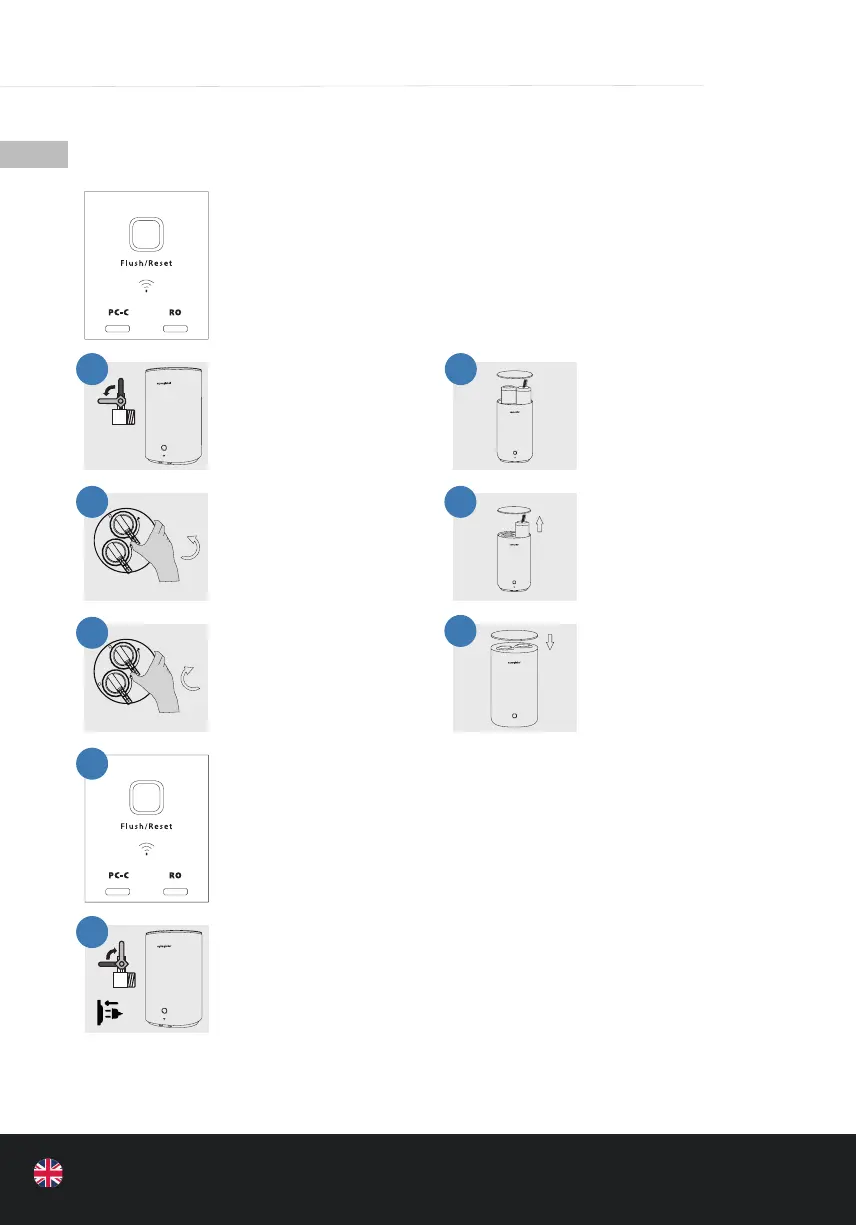
• Remove the top cover
and pull out the handle
of the lter element.
• Press and hold the
end of the lter
handle to pull it in the
unlocking direction.
• Remove the old lter
and insert the new l-
ter into the respective
lter cartridge.
• Hold the end of the
lter handle rmly and
pull it in the locking di-
rection until it reaches
the end position.
• Reinstall the top cover.
• Press and hold the “Flush / Reset” button for 4-5 seconds to enter the
reset status. Then press the “Flush / Reset” button to select the lter ele-
ment to be reset (the lter indicator ashes) and press the “ Flush / Reset”
button again for 4-5 seconds. The lter reset can be completed (the lter
service life is restarted).
• After the lter element has been replaced, switch the water supply back
on, manually press the “Flush / Reset” button, the orange light will ash.
Clean the lter element and press again, it will then switch to normal
operating mode.
• Close the water
supply.
1 2
3 4
5
6
7
8


 To Next Page