MANUAL - MINI TOUCH & FLEXIBLE TOUCH
YOUR WATERBAR · 28·
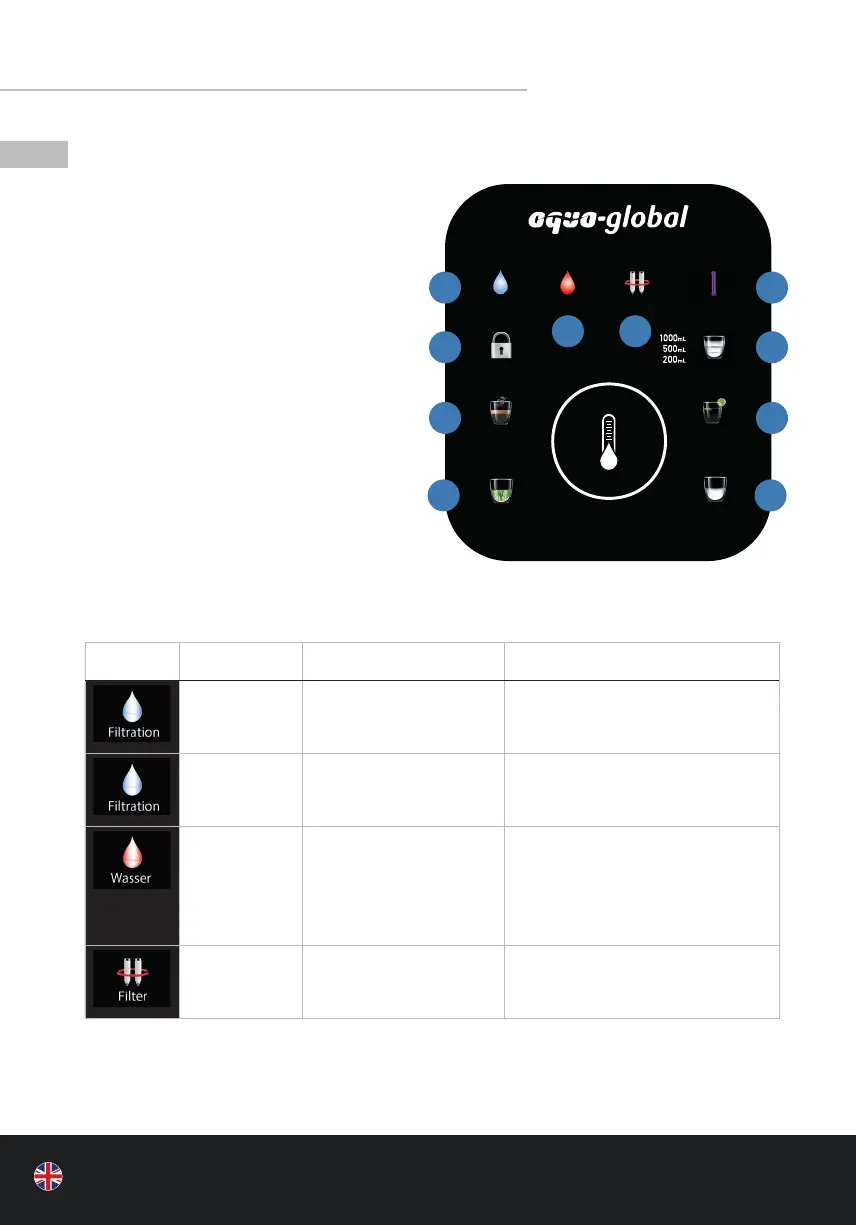
8 | DISPLAY AND USER INTERFACE
A Replace water / water shortage
B Water ltration
C Replace lter
D Key lock
(locks “Baby”, “Tea”, and “Hot”)
E Boiling water
F Room temperature
G ideal for green tea
H for milk for babies
and drinks for children
I Water quantity selection
J Ultraviolet lamp
• STATUS DESCRIPTION
SYMBOL STATUS DESCRIPTION ACTION
Lights up
permanently
Produces water /
automatic rinsing
Normal operation
ashes Not enough water in the
clean water tank / No hot
water available
Wait a moment until the symbol
lights up permanently
ashes No water ow to the
appliance
Flexible: Drain the process water
and the residual water tank (see
g. p. 24) and ll the tank with
fresh water
Mini: Check water supply
ashes The service life of the
lters is less than 5%
Water production and water intake
of the appliance is not restricted;
provide for new lters in stock
Filtration
Wasser
Filter
UV
HOT
TEA
ROOM
BABY
A C
B
D
E
G
J
I
F
H



 To Next Page