Overlay buttonsModel
Cleaning level – Change the cleaning performance
Quick: Choose if your pool has small amount of dirt
Regular: Choose for daily maintenance
Thorough: Choose if your pool has large amount of dirt
Delay
When this option is On, the robot will start to work after 2 hours of delay.
This feature is used to let debris and dust sink on the floor before starting the robot's cleaning.
500
500
Pool shape:
Allows the robot to calculate the most efficient cleaning pattern for the pool shape chosen. Press the button to select the drawing most suitable to the
shape of the pool. A red light will indicate your selection.
400/500
External Timer
Auto-Detect - OFF. Choose this option if your pool has obstacles on the floor such as high drain. This will prevent the unit from changing direction
upon hitting the obstacle.
Auto-Detect - ON. Choose this option if the pool floor is free of obstacles.
Auto detect: this feature prevents the robot from getting stuck on obstacles in the pool such as main drains, steps, ladders etc. Press this button to
choose one of the following options:
400/500
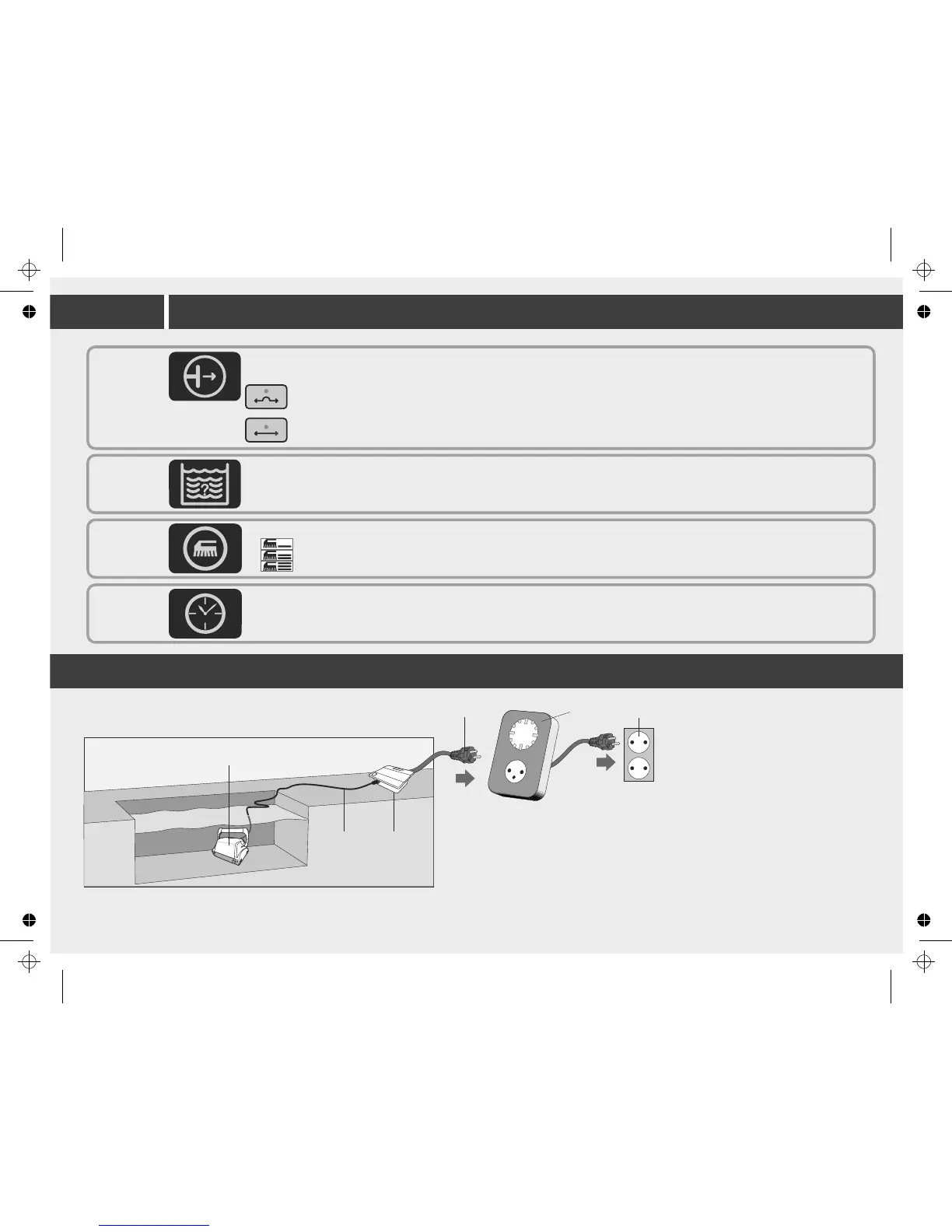
Using External Timer
(Optional, should be purchased
separately)
An external timer can be used to
automatically activate the Cleaner
on pre-set time.
The external timer should be
connected between the wall socket
and the Power and Control unit
1. Unit
2. Cable
3. Power supply
4. Power supply plug
5. External timer (purchased separately)
6. Outlet
1
2 3
4
5
6
11


 To Next Page