AquaMaster
®
Owner’s Manual 1/21/2021 30
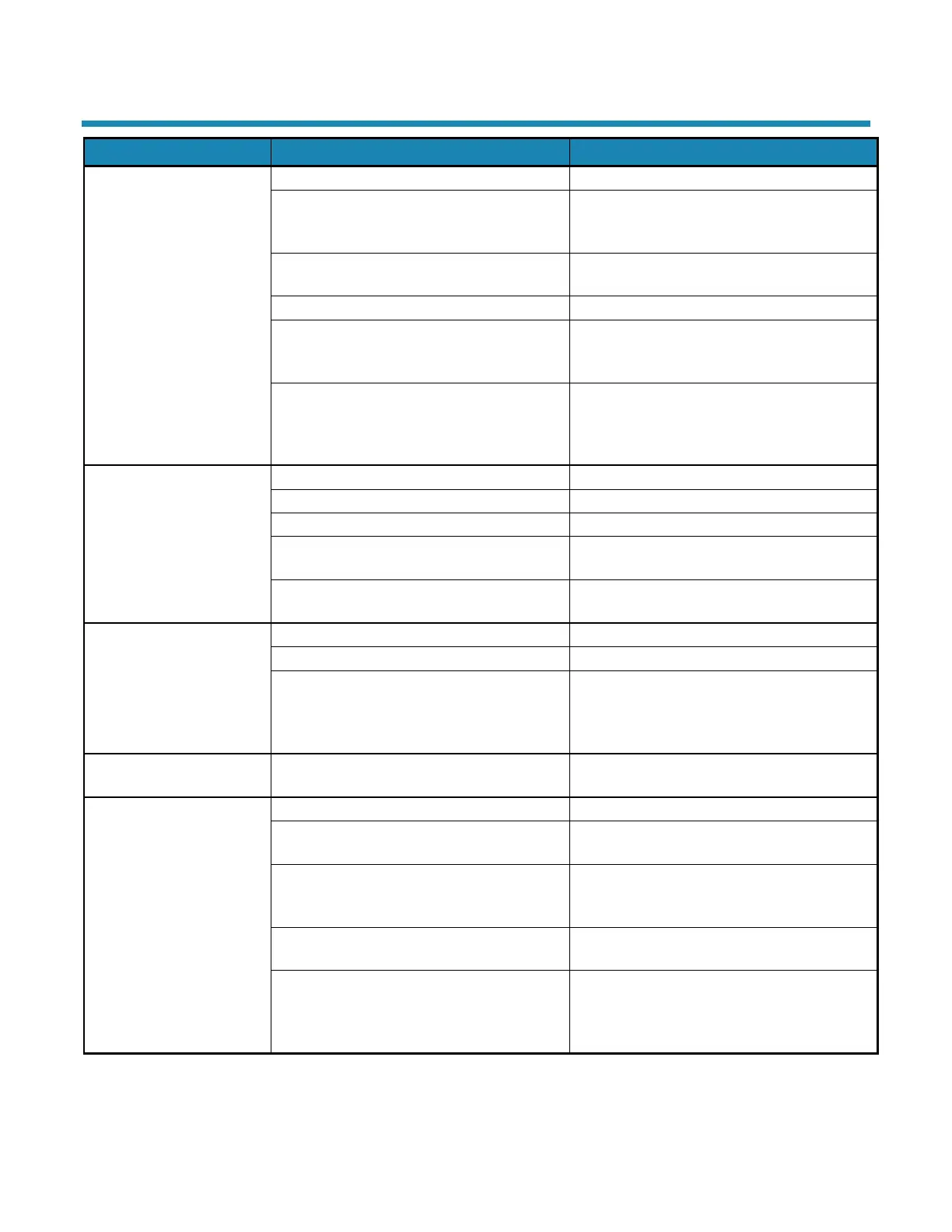
Troubleshooting
regeneration
Sediment in brine cabinet has plugged the
brine line and air check/draw tube
Remove air check/draw tube and flush with
clean water. Clean injector assembly. Clean
any sediment from brine cabinet
Remove brine piston housing and clear debris
from the flow control
Drain line is pinched, frozen, or restricted
Straighten, thaw, or unclog the drain line
Clogged injector assembly
Remove injector cap and clean nozzle and
throat with a wooden toothpick. Replace throat
Salt bridge has formed due to high humidity
or the wrong kind of salt
Test with a blunt object like a broom handle.
Push the handle into the salt to dislodge the
salt bridge, or use hot water around the inside
The bypass valve is in the Bypass position
Place the bypass valve in the Service position
Appliance is plumbed backward
Check that appliance is plumbed correctly
Water hardness has increased
Re-test the water and re-enter a new setting
number
Flow should be indicated with water usage. If
no flow, see below
when water is flowing
The bypass valve is in the Bypass position
Place the bypass valve in the Service position
Appliance is plumbed backward
Check that appliance is plumbed correctly
Sensor not receiving signal from magnet on
turbine
Remove sensor from Bypass housing. Test
with magnet on either flat side of sensor. If
flow is indicated, check turbine. If no flow,
Flow indicated when
water is not being used
The household plumbing system has a leak
Electric cord is unplugged
No electric power at outlet
Check power source. Make sure outlet is not
controlled by a switch
Test with volt meter for 12 VAC at control. If
less than 10 VAC or greater than 14 VAC,
With 12 VAC present at controller, replace the
controller
High ambient room temperature. If the
temperature exceeds 120°F, the display will
blank out. This does not affect the operation


 To Next Page