16
5 USE
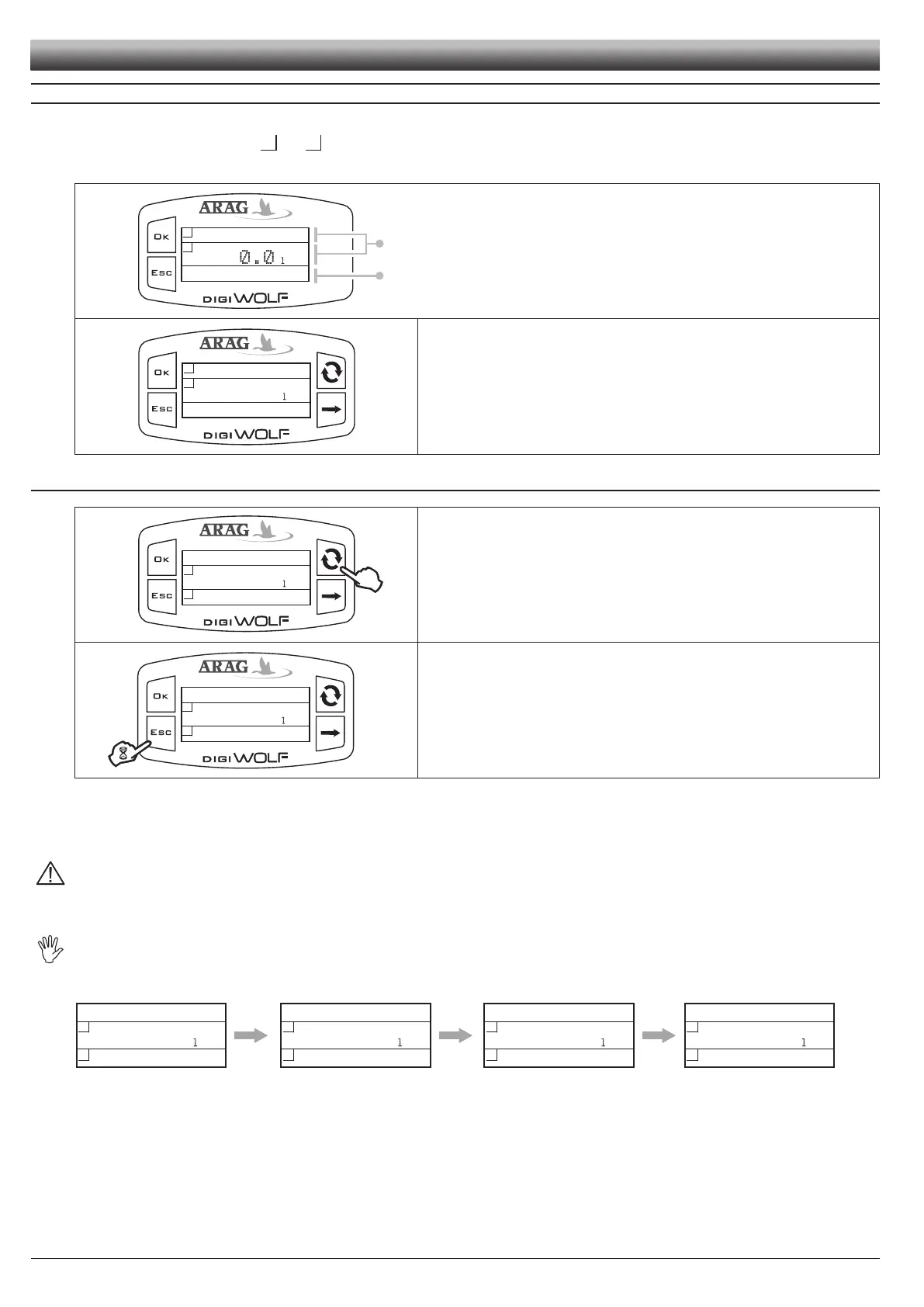
Once the setup is nished, Digiwolf is ready for use. The main screen shows the display divided into three horizontal sectors.
The sectors showing the symbols
and
represent the partial totalizers, individually resettable.
The third data represents instant rate value.
Feed some liquid to the system. The display will start to show the increasing value
of the measured quantity of liquid, and the instant rate value.
5.1 Partial totalizer reset
To reset a totalizer, it is necessary to visualize it in full.
To do this, press the button several times until the value to zero is in the central
area of the display.
Press ESC for two seconds. The totalizer will zero.
- Do not place DigiWolf under pressurized water.
- Use the owmeter only within recommended rate range (Tab. 2 - Par. 2.3.1). Beyond these limits, the ow-meter may give out incorrect data.
- To avoid damaging the owmeter, do not exceed the maximum rate except for short periods.
ARAG can not be held responsible for damage caused to persons, animals or things from the incorrect or unintended use of Digiwolf or
its parts.
- Do not exceed the max. operation pressure (Tab. 2 - Par. 2.3.1).
Display of the symbol ------ shows that the rate or the totalizer are over the max. displayable value.
Totalizers have oating points and display a max. of 5 gures. Up to 999.99 two decimals are shown, it then drops to 1 and 0 with the tran-
sition to thousands and tens of thousands (Fig. 43).
50.00 l
2
1
21.84 l/min
999.99
1050.0 l
2
1
21.84 l/min
1000.0
10049 l
2
1
21.84 l/min
9999.9
10050 l
2
1
21.84 l/min
10000
...
Partial totalizers
Instantaneous rate
Fig. 39
Fig. 40
Fig. 41
Fig. 42
Fig. 43
SETUP



 To Next Page