18
6.2 Paddle cleaning and replacement
lock
unlock
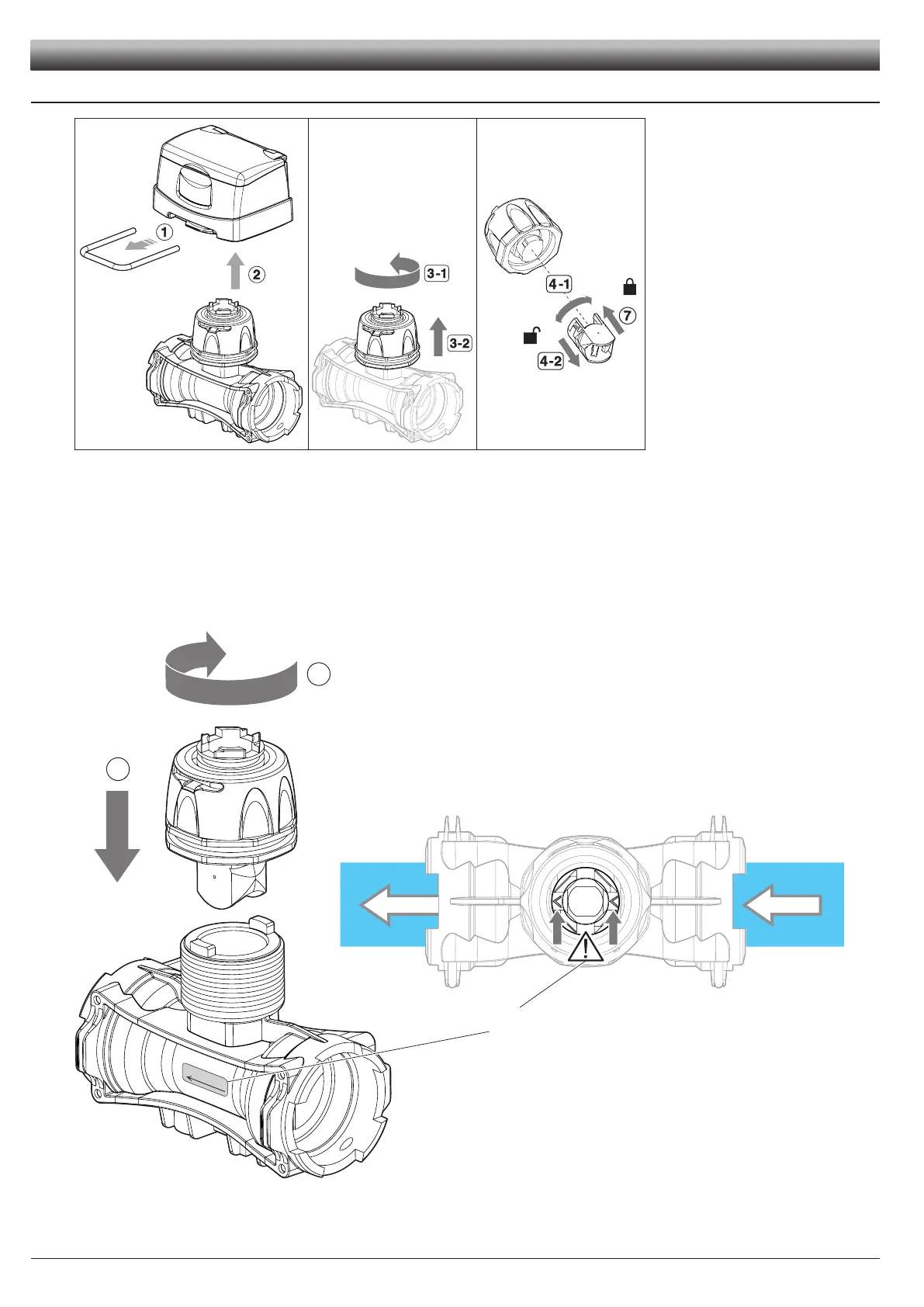
1) Remove the fork from the monitor using a screwdriver.
2) Remove the monitor from the owmeter body.
3) Unscrew the ring nut in a counter clockwise direction and remove the sensor housing block from the owmeter body.
4) With half a rotation, remove the paddle group from the sensor housing block in a counter clockwise direction.
5) Immerse the paddle group in detergent liquid for several hours.
6) Wash the paddle group thoroughly with running water and check its correct operation. If necessary, replace the complete paddle group with its
suitable spare part (code 4626000.500).
7) Ret the paddle group on the electronic sensor with a clockwise rotation until it clicks in place.
1
2
8) Ret the sensor housing block on the owmeter body tightening the ring nut in a clockwise direction until it stops paying attention to keep the
arrow on the coupling facing the ow direction.
Fig. 43 Fig. 44 Fig. 45
Fig. 46
Arrows direction on the body must
correspond to the one on the label
MAINTENANCE



 To Next Page