Hardware Included
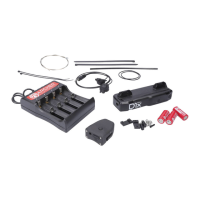
4 x Battery door screws (1 extra)
2 x Jagwire ferrule
1 x Jagwire LEX-SL bowden housing
1 x 60cm Jagwire slick shift cable
3 x Jagwire cable end caps
2 x P-strap clamps
2 x P-straps
5 x P-strap clamp screws (1 extra)
1 x SRAM MatchMaker clamp and included hardware
2 x 14500 lithium-ion rechargeable shifter batteries
1 x 10440 lithium-ion rechargeable remote battery
1 x USB li-ion battery charger
4 x Griptape stars (optional extra grip for remote buttons)
2 x 12oz aluminum can coozies (optional but highly recommended)
Required Tools
1.5mm hex driver
2.5mm hex driver
5mm hex driver
cable/housing cutters
Step 1: Install App
Download and install the Archer Components app
from the Google Play Store or Apple App Store.
Step 2: Charge Batteries
Charge the shifter and remote batteries completely before
installation using the provided charger.


 To Next Page