5
USER MANUAL - version 3
2
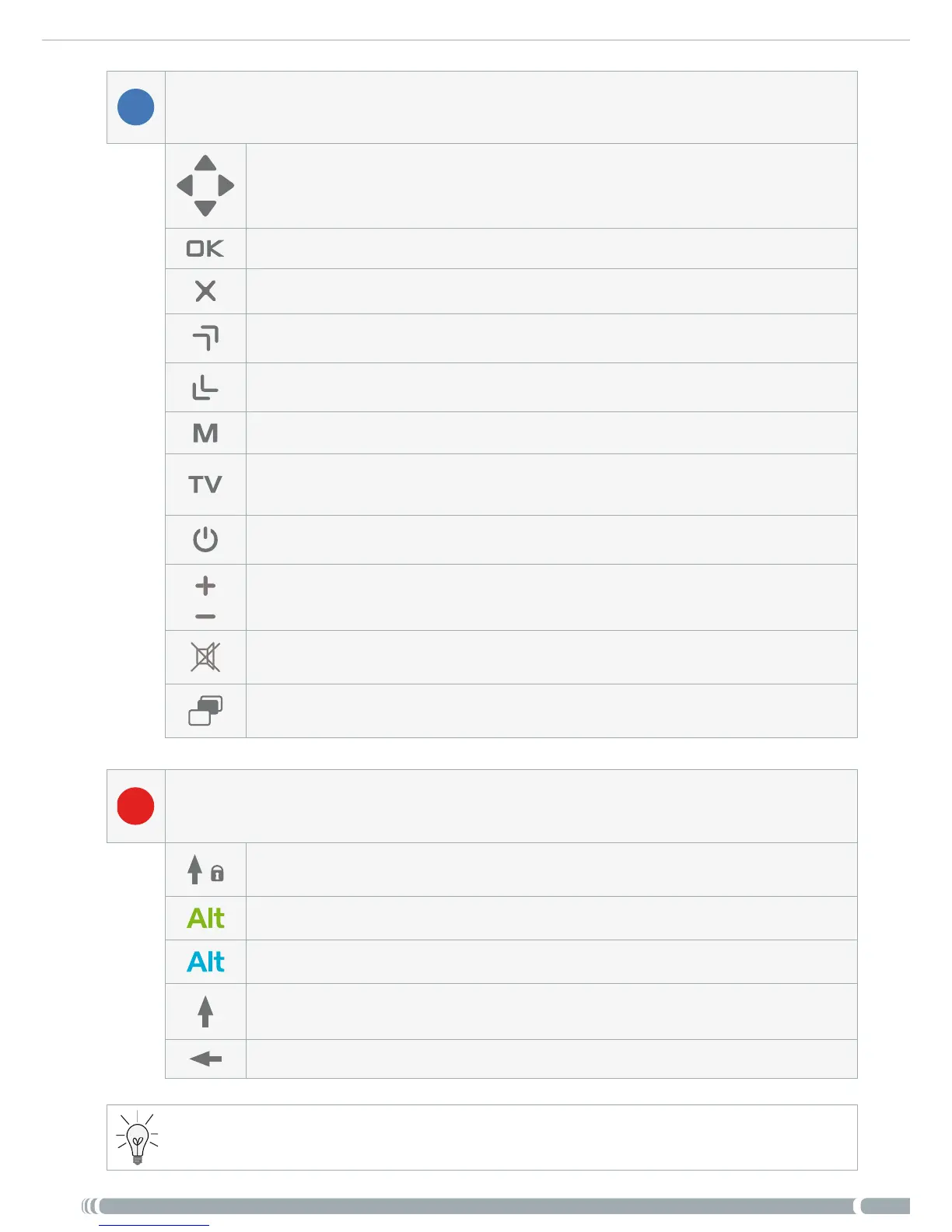
These are the main buttons:
Navigation buttons: move from one item to another
Enter/Accept or Play/Pause/Resume
Escape/Back/Stop
High-speed fast forward, list scrolling or zoom in
High-speed fast rewind, list scrolling or zoom out
Display a text description of the available menu icons
Switch the display of the image between the built-in LCD screen and a
TV
Turn on the ARCHOS / put it into standby mode
Increase/decrease volume
Mute sound
Tab between available screens
3
The keyboard can be used, for example, to enter a Web address, write an e-mail
(only with Gen 5 WiFi devices), name/rename a folder, etc:
Caps Lock key
Green Alt key: enable the keys’ green secondary functions
Blue Alt key: enable the keys’ blue secondary functions
Shift key
delete character before cursor
In order to type one of the green/blue secondary characters in capital letters (é, è, ç, etc.), press Caps
Lock, then Alt green/blue, and press the corresponding key.



 To Next Page