53
DIVISION II - OPERATION/
MAINTENANCE
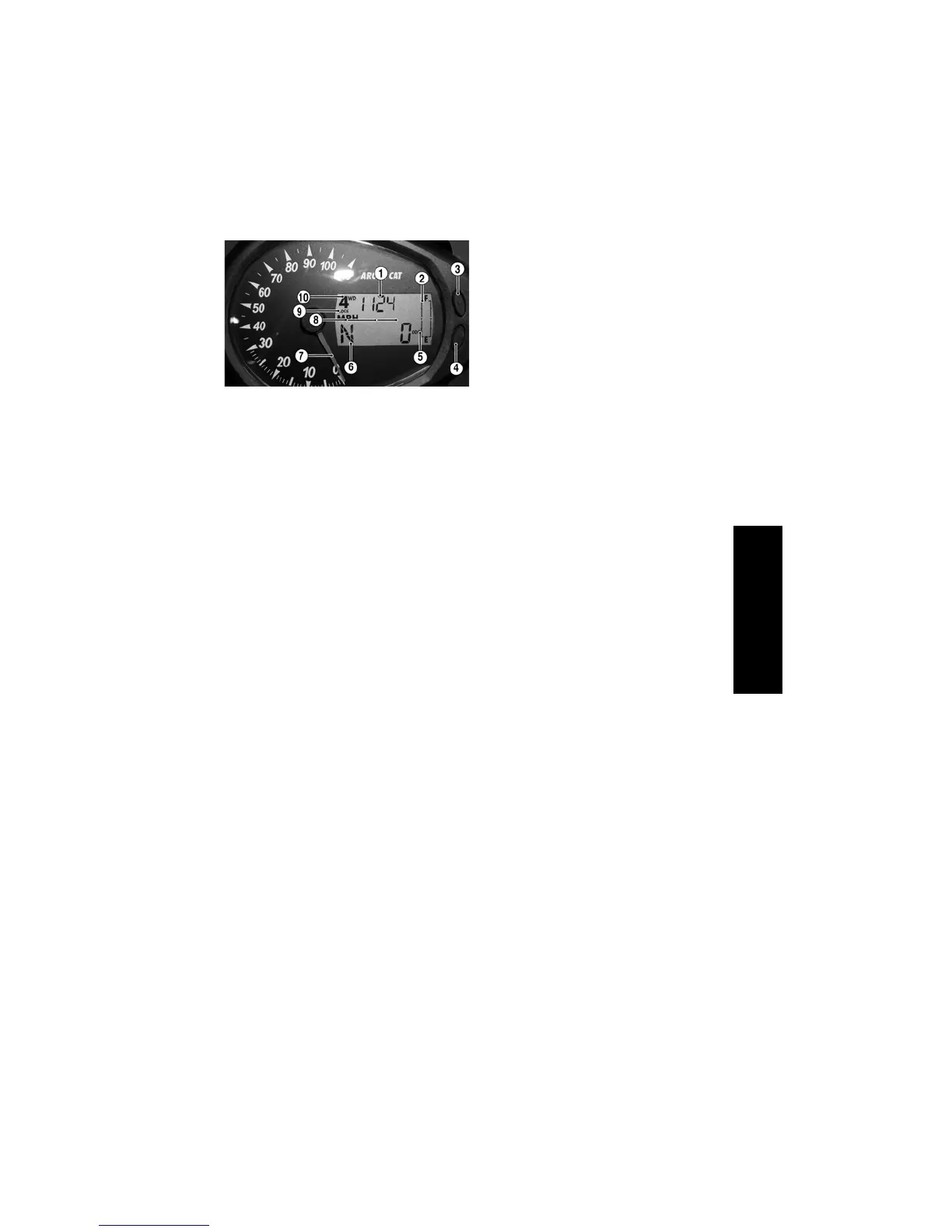
Speedometer/LCD
(Analog/Digital) (550
Limited/1000 Limited)
CF094A
1. Clock/Engine Hour Meter - The clock
function indicates time in the 12 hour
mode; the hour meter indicates the
total time the ATV has run and cannot
be reset to zero. To set the clock, use
the following procedure.
A. With the ignition switch ON,
press and release the Mode But-
ton (3) until the Clock/Engine
Hour Meter (1) is displayed; then
(if necessary) press and release
the Set/Reset Button (4) to the
clock display.
B. Press and hold the Set/Reset Button
(4) until the minutes stop scrolling
and the hour display starts to scroll.
Momentarily release when the cor-
rect hour is displayed; then repeat-
edly press and release the Set/Reset
Button (4) until the correct minutes
are displayed.
NOTE: Approximately two seconds
after releasing either Button, the
LCD will return to normal operation.
NOTE: Clock memory power is
supplied through the 15-amp acces-
sory fuse and verified during gauge
“power-up” and reset. In the event of
clock memory power failure (blown
fuse, etc.), the gauge will “power-
up,” reset, and shut down repeatedly
until clock memory power is
restored. Always check the 15-amp
accessory fuse if this gauge condi-
tion is noted.
NOTE: The engine hour meter will
not activate until engine speed
exceeds 500 RPM.
2. Fuel Level Indicator - Indicates
approximate amount of gasoline in
the gas tank.
NOTE: When the bottom segment
flashes, approximately 3.5 L (0.92 U.S.
gal.) of gasoline remains in the tank.
3. Mode Button - Shifts the gauge
through three set-up modes: speedome-
ter/tachometer, distance, and time.
NOTE: The Mode Button must be
pressed and released to shift modes.
Approximately two seconds after the
Mode Button is released, the digital
gauge will return to full display.
4. Set/Reset Button - In conjunction
with the Mode Button, sets and resets
various displays on the digital gauge.
Also used to shift from speedometer
function to tachometer function on
the speedometer/tachometer gauge.
5. Odometer/Trip Meter (T1 and T2) -
Odometer registers the total distance
the vehicle has traveled. Trip meters
can register two distances (for instance,
T1 could register trip distance and T2
could register distance between stops).
The trip meters can be reset while the
odometer only registers accumulated
miles/kilometers and the odometer can-
not be reset to zero.
All distances correspond to speedometer
function selected (MPH or km/h).
NOTE: To select the odometer
(ODO), trip #1 (T1), or trip #2 (T2),
press the Mode Button (3) to select
the distance mode; then press the
Set/Reset Button (4) to select the
desired display. Hold the Set/Reset
button down to reset trip meters.
6. Gear Position Indicator - Indicates
which gear is selected - R (reverse)/N
(neutral)/H (high range)/L (low
range).
NOTE: An E will be displayed if
there is an error caused by a no-shift
position signal.
7. Speedometer/Tachometer - A needle
indicates approximate vehicle speed
in mph or km/h when speedometer
function is selected or rpm when
tachometer function is selected.








 To Next Page