Page 22
Note: DSR and DCD are only required to be active at the start of message
reception, while CTS is only required to be active at the start of message
transmission.
Section 6. KITZ LED INDICATIONS
The KITZ unit has five led indications.
The green led indicates that the KITZ unit is in the powered-up state. The four
yellow leds indicate the status of the K-Bus and IEC-870 communications.
The Receive K-Bus message led (K-Bus Rx) indicates that a message is being
received on the K-Bus communications port.
The Transmit K-Bus message led (K-Bus Tx) indicates that a message is being
transmitted on the K-Bus communications port.
The Receive IEC message led (IEC Rx) indicates that a message is being received
on the IEC-870 communications port.
The Transmit IEC message led (IEC Tx) indicates that a message is being
transmitted on the IEC-870 communications port.
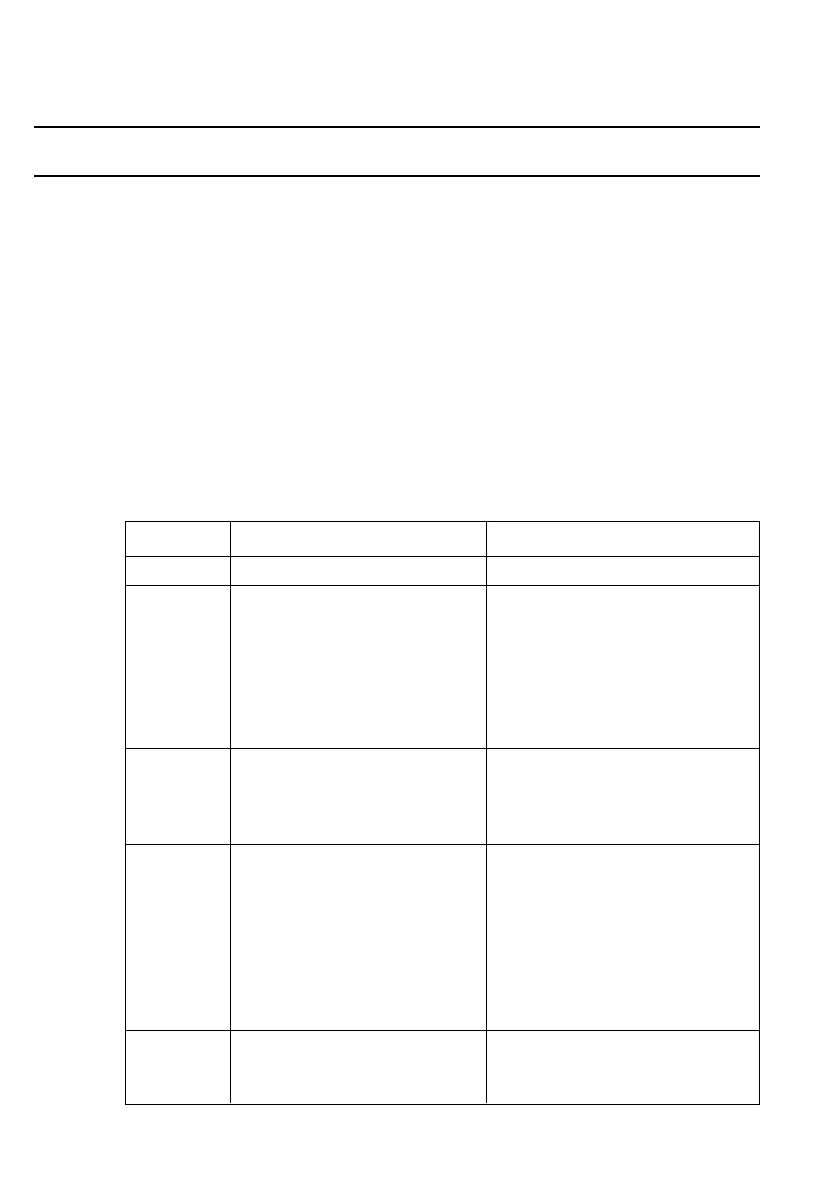
A detailed description of the led indication operation is shown below.
Indication “On” State “Off” State
Green led Supply present No supply
K-Bus Rx When the first address (1) When the end of message is
character of the K-Bus received (Closing Flag 7Eh).
message is received. (2) When a time-out error occurs.
(3) When disabled (ie. when a
valid IEC-870 message has
been received on the other
channel).
K-Bus Tx When a K-Bus message is (1) When all message characters
ready for transmission have been transmitted
(loaded in transmit buffer). including the Closing Flag.
(2) When a time-out error occurs.
IEC 870 Rx When the first IEC-870 Start (1) When the end of message is
character (68h) of the received (IEC-870 Stop
IEC-870 message is received. character (16h) ).
(2) When a time-out error occurs.
(3) When disabled (ie. when
a valid K-Bus message has
been received on the
other channel)
IEC 870 Tx When an IEC-870 message is (1) When all message characters
ready for transmission (loaded have been transmitted.
in transmit buffer). (2) When a time-out error occurs.
Table 6. KITZ led indications.



 To Next Page