V 01/22
31
FOR OPTIMUM OPERATION OF THE REMOTE CONTROL, ADDRESS THE
TRANSMITTER HEAD TOWARDS THE RECEIVER LOCATED ON THE AIR
CONDITIONER.
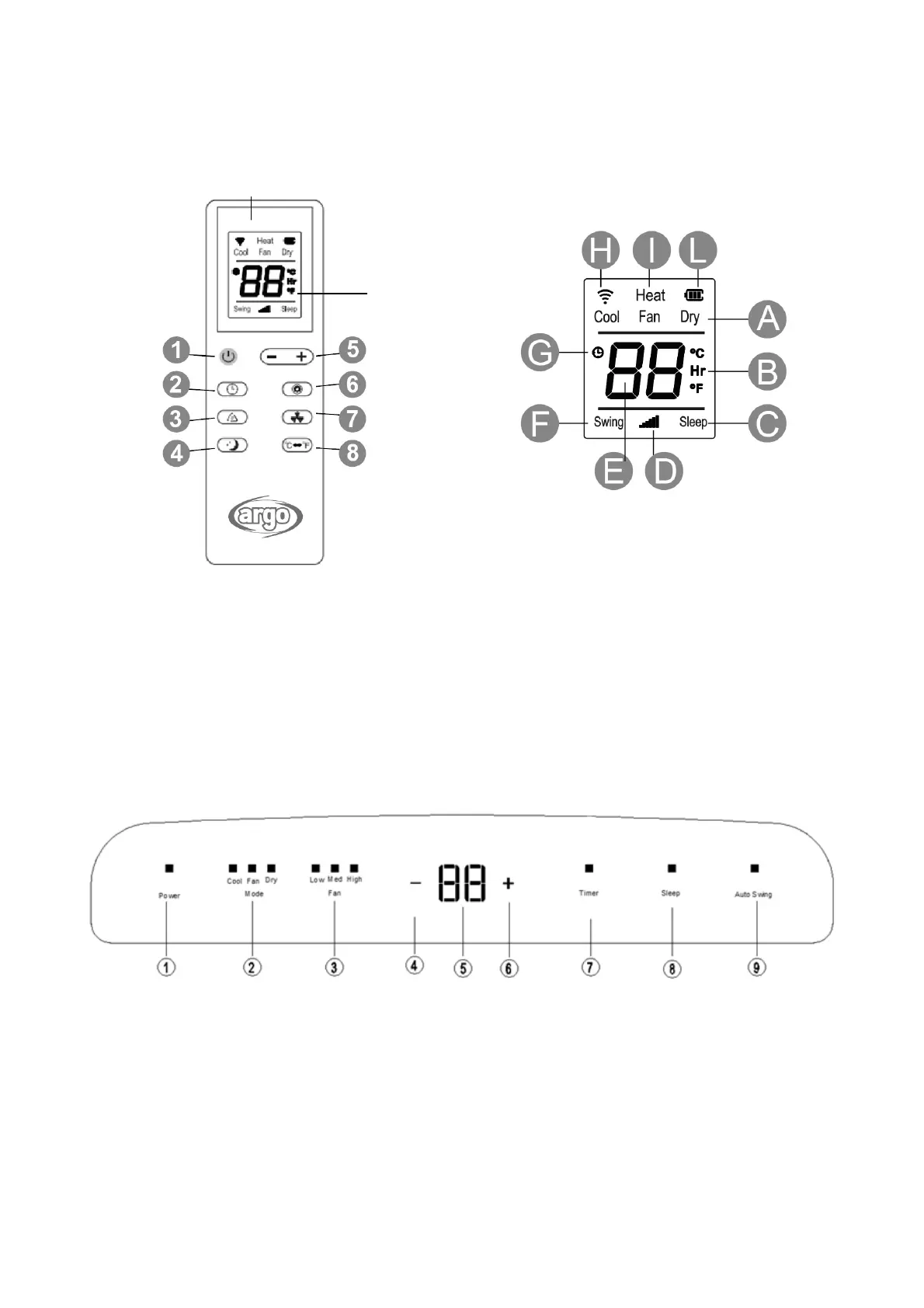
1. ON/OFF BUTTON
2. TIMER BUTTON
3. SWING BUTTON
4. SLEEP BUTTON
5. TEMPERATURE AND TIMER ADJUSTMENT
BUTTONS
6. MODE BUTTON
7. FAN BUTTON – VENTILATION SPEED
8. TASTO °C °F
A. Mode indicator: COOL, FAN, DRY
B. Temperature and time
C. Sleep on/off
D. Speed setting
E. Display timer and temperature
F. Swing on/off
G. Timer set
H. Signal transmission
I. Heating mode (not available)
L. Battery level
(1) ON/OFF BUTTON
When turned on, the unit emits an audible signal and enters stand-by mode.
Press this button to switch the unit on or off.
When switched on, the appliance will start functioning based on its last settings (memory function).
(2) MODE SELECTION BUTTON (MODE)
Press this button to select the various operating modes, according to the following sequence: COOL -> FAN -> DRY
SIGNAL
TRANSMITTER
DISPLAY



 To Next Page