V 10/19
54
5. ▲/ ▼ button
Press "▲" or "▼" once to increase or decrease the set temperature by 1°C. Press and hold "▲" or
"▼" for 2 seconds to rapidly adjust the set temperature on the remote control. When set-up is
complete, release the button and the indoor unit's temperature indicator will change accordingly.
(The temperature cannot be adjusted in automatic mode).
When setting the TIMER ON, TIMER OFF or CLOCK, press "▲" or "▼" to adjust the time. (Please
refer to the relevant sections for the CLOCK, TIMER ON and TIMER OFF buttons).
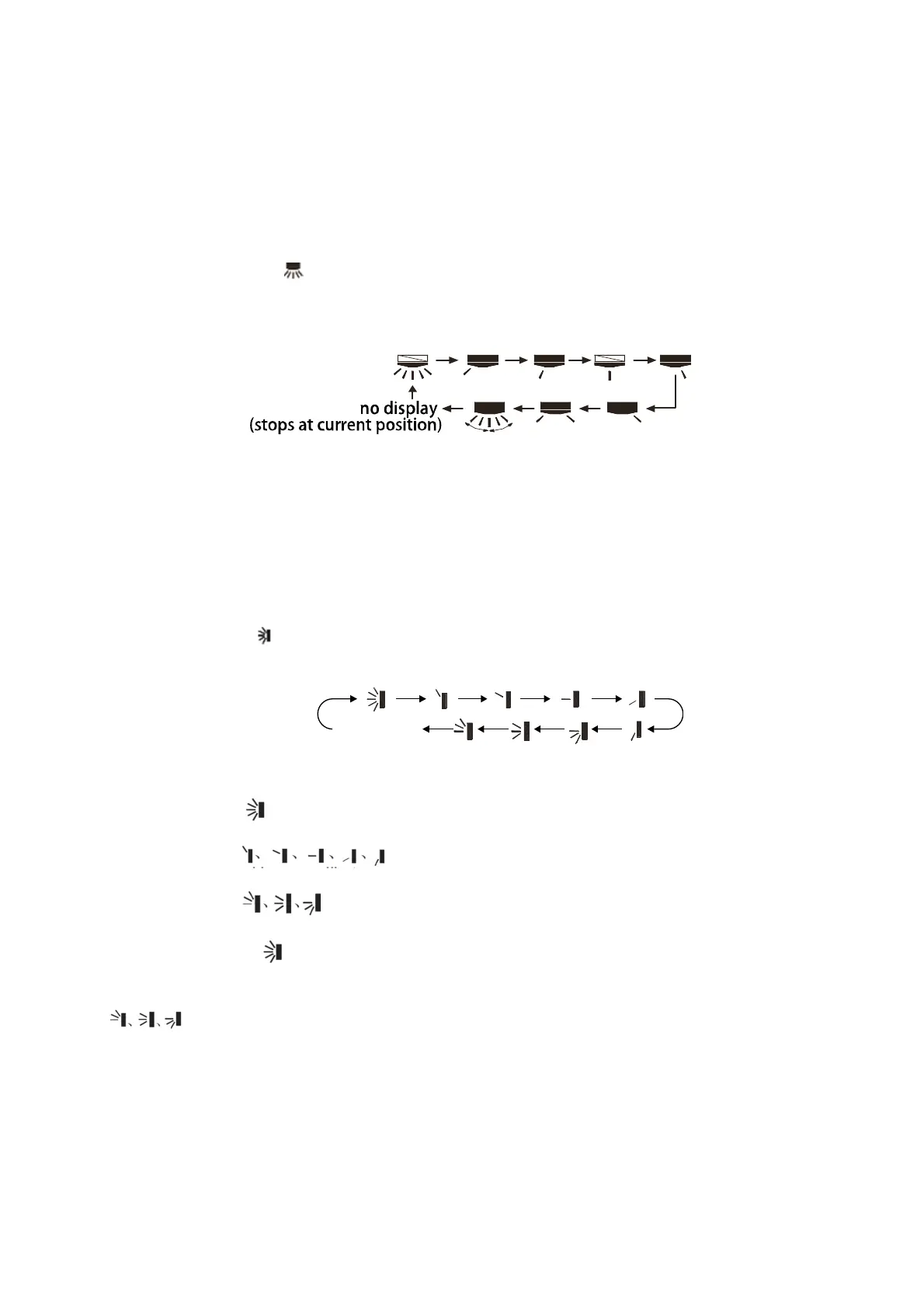
6. SWING (Horizontal)
button
Press this button to set the angle of inclination of the flap to the left and right. The flow outlet
angle can be set circularly, according to the sequence shown below:
Note:
• Keeping this button pressed for more than 2 seconds the flap will swing to the left and right;
leaving the key the flap will stop and the current position of the flap will be maintained.
• In the SWING mode, when switching from off to this mode, if you press the button again after
2 sec. has elapsed, the unit will go directly off; if instead the key is pressed a second time
before 2 sec. has passed, the change in the position of the flap will follow the sequence
illustrated above.
7. SWING (vertical)
button
Press this button to set the swing angle (up/down). You can cycle through and set the fan's angle
of airflow as shown below:
When you select , the air conditioner will operate the fan automatically. The horizontal flap will
automatically tilt up and down to the maximum angle.
When you select , the air conditioner will operate the fan in a fixed position. The
horizontal flap will stop in a fixed position.
When you select , the air conditioner will operate the fan at a fixed angle. The horizontal
flap will deliver air at a fixed angle.
Hold and press the button for 2 seconds to set the desired tilt angle. Release the button once
you have reached the desired angle.
N.B.:
may not be available. When the air conditioner receives this signal, the fan will start
operating in automatic mode.
8. SLEEP button
By pressing this button you can select Sleep 1, Sleep 2, Sleep 3 and cancel the Sleep function.
- SLEEP 1 works in cooling and dehumidification mode: after one hour of unit operation, the
temperature will increase by 1°C, after 2 hours it will increase by 2°C; in heating mode, after one
no display
(horizontal louvers stops
at current position)





 To Next Page