V 10/19
57
13. Wi-Fi button
Press this button to start the Wi-Fi function. When the Wi-Fi function is active, the "Wi-Fi" icon will
appear on the remote control display. When the remote control is off, press and hold the "Mode"
button and the "Wi-Fi" button simultaneously for 1 sec to return to the factory settings.
14. LIGHT button
Press this button to turn off the indoor unit's display light. The icon will disappear from the remote
control display. Press this button again to turn on the display light. The icon will appear on the
display.
15. HEALTH/SCAVENGING button
The HEALTHY function means that cold plasma kills bacteria, removes odors and releases
negative oxygen ions.
The SCAVENGING or purification function means active external / internal ventilation to exhaust
the air drawn in by the environment and to introduce fresh air.
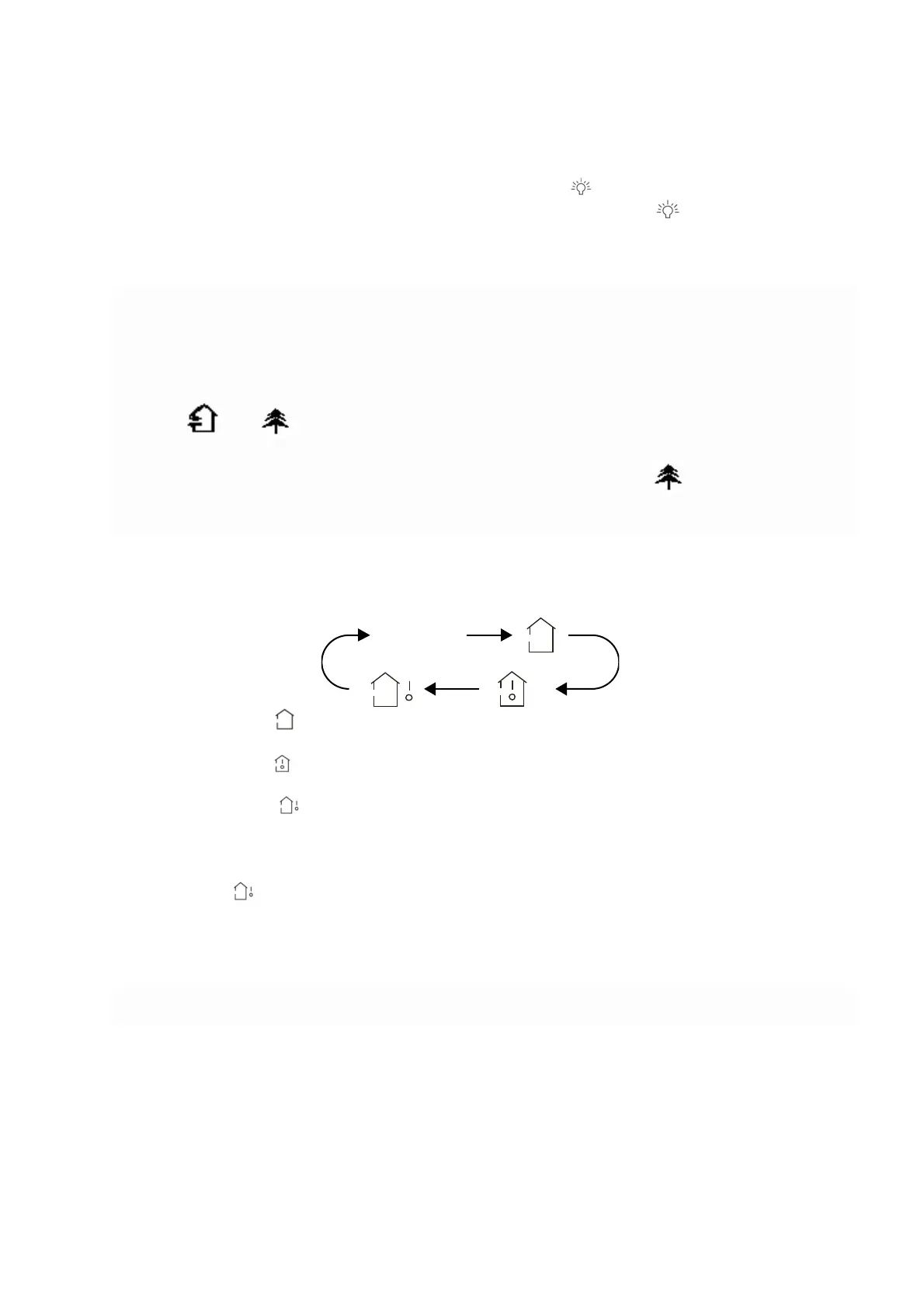
Press this button once to start the air purification function: the symbol appears on the display..
Press the button a second time to start the purification and sanitizing function at the same time,
symbols and appear.
Press the button for the third time to turn off both functions.
Press the button the fourth time to start the sanitizing function, appears .
Press this button again to repeat the operations listed above.
16. TEMP button
Pressing this button will allow you to display the set temperature, the indoor ambient temperature,
or the outdoor ambient temperature on the indoor unit's display. You can cycle through the settings
on the remote control display as shown below:
• When you select or “no display” with the remote control, the set temperature will appear on
the indoor unit's display.
• When you select with the remote control, the indoor ambient temperature will appear on the
indoor unit's display.
• When you select with the remote control, the outdoor ambient temperature will appear on
the indoor unit's display.
N.B.:
•
It is not possible to display the outdoor ambient temperature on all models. The indoor unit will
receive the signal but will display the set temperature.
•
The set temperature will appear on the unit's display on start-up, if enabled to do so.
• When you select to display the indoor or outdoor ambient temperature, the indoor unit will
display the corresponding temperature for three to five seconds, after which it will automatically
revert to displaying the set temperature.
Getting to know the button combination functions
Energy saving function
In cool mode, press the TEMP and CLOCK buttons simultaneously to start or stop the energy saving
function. When you start the energy saving function, "SE" will appear on the remote control display
and the air conditioner will automatically adjust the set temperature according to the factory settings
to achieve the best energy-saving effect. Press TEMP and CLOCK again simultaneously to exit the
energy saving function.
no display





 To Next Page