8
AC 220 240V 50/60HzAC 220 240V 50/60Hz
STEREO INPUTSTEREO INPUT
AUDIO INAUDIO IN
OUT TO
RIGHT
OUT TO
RIGHT
5VDC CHARGE FOR iPOD5VDC CHARGE FOR iPOD
POWER ON/OFFPOWER ON/OFF
RR
LL
SUB OUTSUB OUT
BACK VIEW
AUDIO
VIDEO
R
L
S-VIDEO
DVD
TV
CD/MP3 player
B2
AUDIO
VIDEO
R
L
S-VIDEO
B1
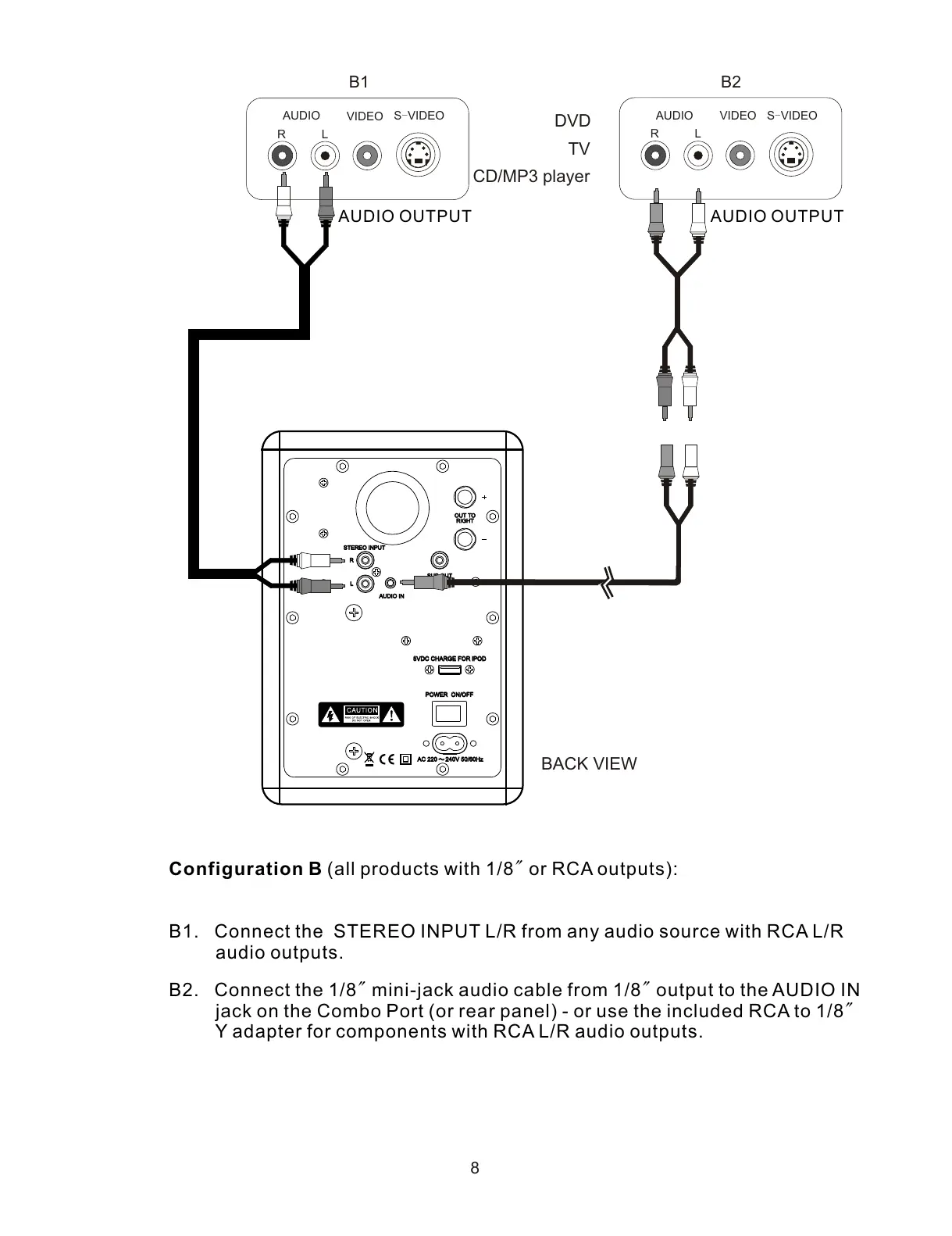
Configuration B (all products with 1/8" or RCA outputs):
B1. Connect the STEREO INPUT L/R from any audio source with RCA L/R
audio outputs.
B2. Connect the 1/8" mini-jack audio cable from 1/8" output to the AUDIO IN
jack on the Combo Port (or rear panel) - or use the included RCA to 1/8"
Y adapter for components with RCA L/R audio outputs.
AUDIO OUTPUTAUDIO OUTPUT



 To Next Page