EN - 25
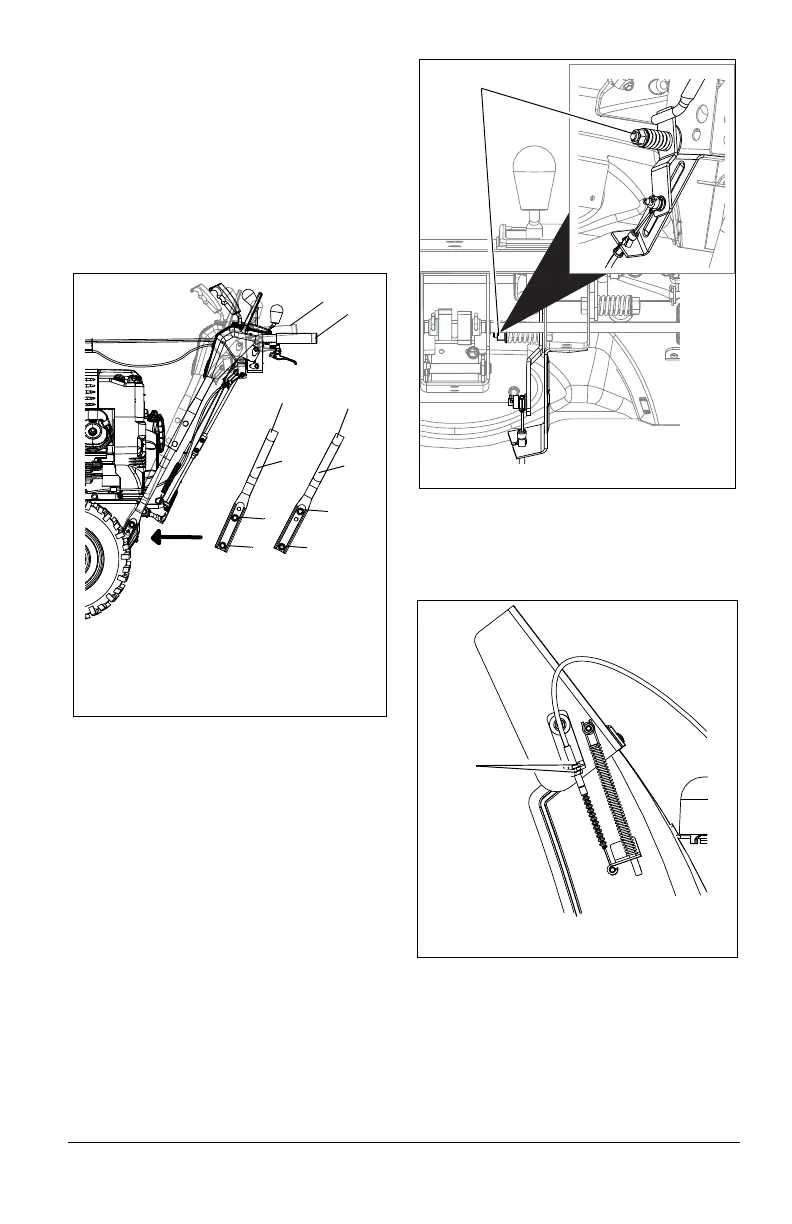
To raise or lower the handlebar:
1. Place unit in service position (see
Service Position on page 21).
2. Remove bottom cover.
3. Remove top mounting bolts from the
handlebars and adjust the handlebar up
or down as needed until the handlebar
mounting holes align with holes in unit
frame.
4. Secure handlebar to frame with
hardware removed in step 3 using the
different hardware locations shown in
Figure 21.
5. Check and adjust speed selector. See
Speed Selector Adjustment on page 26.
6. Check tension on auger and traction
clutch cables. See Attachment
Clutch/Brake Adjustment on page 26
and Traction Drive Clutch Adjustment on
page 28.
7. Re-install bottom cover.
REMOTE DEFLECTOR CONTROL
(Figures 22 and 23)
Deflector must stay in selected position while
throwing snow.
If deflector does not stay in set position:
1. Tighten nut beneath control panel to
increase pressure on deflector control
(Figure 22).
If deflector does not follow full range of travel:
1. Push deflector remote forward.
2. Loosen adjusting nuts on cable support
bracket on side of chute deflector
(Figure 23).
3. a. To adjust the deflector lower:
Slide cable up and tighten top nut.
b. To adjust deflector higher:
Slide cable down and tighten bottom
nut.
4. Check travel and repeat adjustment as
necessary.
Figure 21
1. Upper Position
2. Lower Position
3. Lower Handlebar
4. Upper Mounting Bolt
5. Lower Mounting Bolt
1
2
4
3
5
3
5
4
2
1
Figure 22
Control Lever Nut




 To Next Page