OPERATING FROM THE REMOTE CONTROL (cont.)
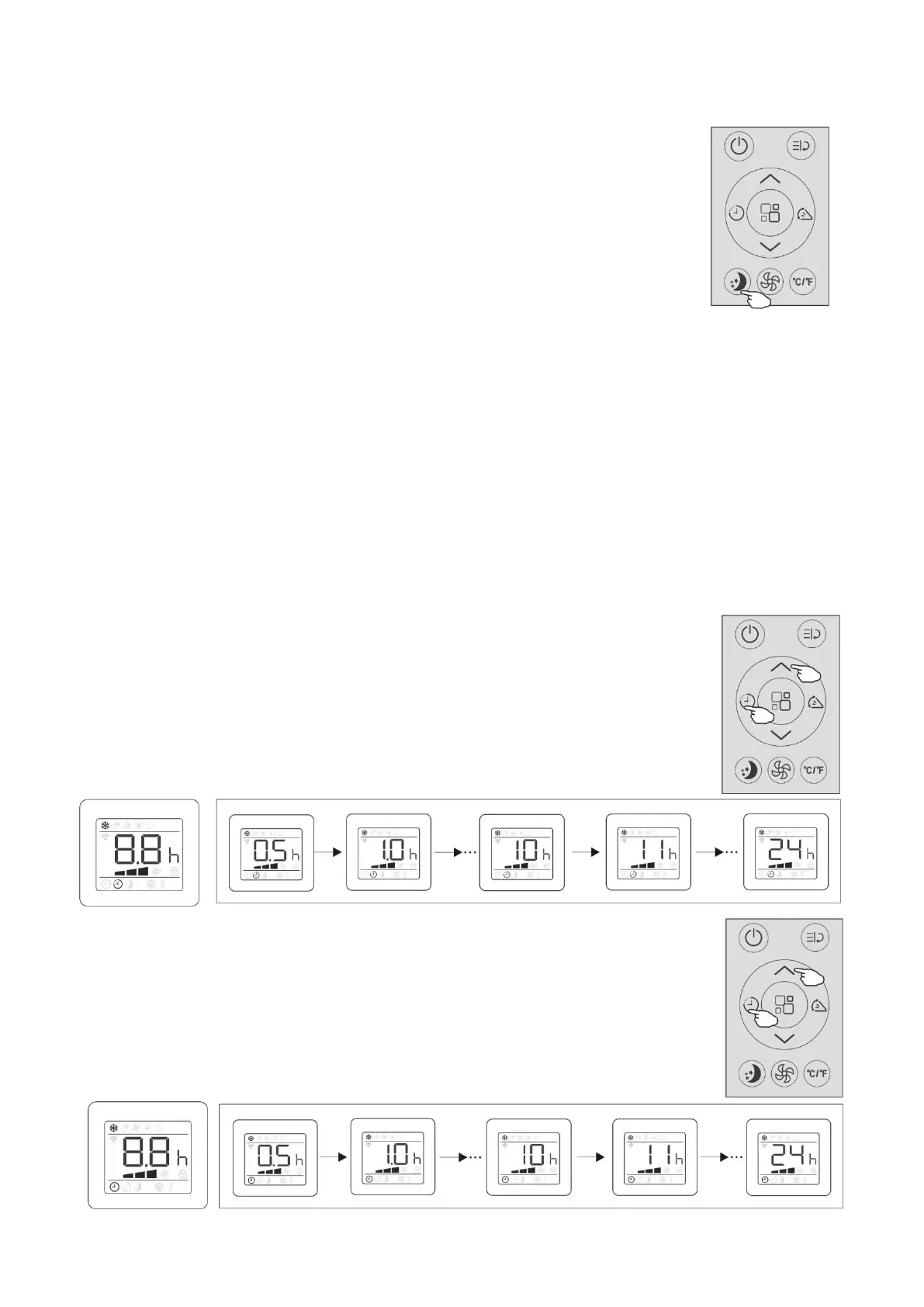
Sleep mode button
Pre-setting automatic operating program.
This function is useful for the night as it gradually reduces operation of the appliance.
To set this function correctly:
●Select the cool,dry or heat mode as described above.
●Press the “Sleep button” to activate the sleep mode, and the symbol “sleep”
Appears on the display.
NOTE:
●The SLEEP function can be canceled at any time during operation
by pressing the "Sleep", "Mode" or "Fan" button.
●In FAN mode, SLEEP function cannot be set.
●When you choose the sleep function, the screen will reduce the brightness
,
and the fan speed is low, while room temperature and humidity vary gradually
to ensure the most comfortable.
●When in COOL mode, the selected temperature will increase by 1
℃
(1
℉
) per hour
in a 2 hour period. This new temperature will be maintained for the next 6 hours.
Then the appliance turn it off.
●When in HEAT mode, the selected temperature will decrease by 1
℃
(1
℉
) per hour
in a 3 hour period. This new temperature will be maintained for the next 5 hours.
Then the appliance turn it off.
Timer button—Set Tmier Off
To set the air conditioner switching-off auto matically.
●With the AC on, press the “Timer button” and then use the “Increase button”
or “Decrease button” to set the length of time before the AC will turn off.
Press the timer button again to start the countdown.
NOTE: To cancel the setted function, press the “Timer button” again.
In case of power off,it is necessary to set TIMER OFF again
Timer button—Set Tmier On
To set the air conditioner switching-on auto matically.
●With the AC off, press the “Timer button” and then use the “Increase button”
or “Decrease button” to set the length of time before the AC will turn on.
Press the timer button again to start the countdown.
NOTE: To cancel the setted function, press the TIMER button again.
In case of power off,it is necessary to set TIMER OFF again


 To Next Page