Need help?
Do you have a question about the Ariston CUBE S NET and is the answer not in the manual?
Explains the meaning of various icons displayed on the thermostat's interface.
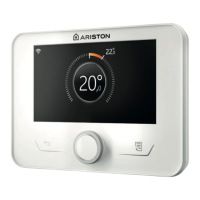
Details the components and information shown on the thermostat's display screen.
Describes the functions of the navigation and selection buttons on the thermostat.
Guides on securing the base plate, connecting wires, fitting the battery, and attaching the device.
Explains how to configure the Wi-Fi network via the thermostat's menu.
Provides a legend for icons indicating connection status and update progress.
The Ariston Cube S Net Wi-Fi Thermostat is a sophisticated device designed to enhance the user experience of domestic heating and water systems. It offers a comprehensive solution for managing home climate, providing convenience, energy efficiency, and remote control capabilities.
The Cube S Net is a Wi-Fi-enabled thermostat that allows users to control their heating and hot water systems from anywhere, at any time, using a smartphone or PC. It connects to the Ariston Net platform, which is the central hub for all its smart functionalities. The device monitors room temperature and allows users to set desired temperature points, enabling precise climate control. It also continuously tracks energy consumption, helping users to reduce their gas bills by optimizing heating schedules and usage patterns.
A key feature of the Cube S Net is its ability to notify users in real-time about boiler malfunctions. This proactive alert system ensures that any issues with the heating system are promptly identified, allowing for quicker resolution and minimizing potential discomfort or damage. Furthermore, when the teleassistance service is activated, the Ariston service center can remotely diagnose and often resolve most problems, reducing the need for on-site visits and providing a more efficient support experience.
The thermostat's display provides clear and concise information, including the detected room temperature, the setpoint temperature, and various status indicators. These indicators include Wi-Fi connectivity, current operating mode (Winter, Summer, Heating only, Cooling, OFF system off, Programmed, Manual, Override), and special functions like Holiday mode, flame presence, outdoor temperature, and internet weather reports. It also indicates when the AUTO function is enabled, if there's an error, if the screen is locked, or if resistance is active.
The Cube S Net is designed for intuitive operation, both directly on the device and through the Ariston Net app or web portal.
Installation involves securing the base plate to the wall, connecting the wires to the boiler via the BUS, inserting the battery, and then restoring the thermostat onto its base plate. It is recommended to install the device approximately 1.5 meters above floor level, away from heat sources and drafts, to ensure accurate temperature readings. Installation should be performed by a qualified technician, with electrical power to the boiler shut off before making any connections.
To unlock the full potential of the Cube S Net, users need to register an account on the Ariston Net platform. This involves downloading the Ariston Net app, creating an account by entering personal information, and activating the account via a welcome email. The device supports common Wi-Fi security protocols (WEP, WPA/WPA2 Personal) for secure connectivity.
After physical installation, the device guides users through a basic configuration procedure, including language selection and Wi-Fi network setup. If Wi-Fi is not configured during the initial startup, it can be done later through the "Connectivity" menu. The device needs to be connected to the internet to function optimally, allowing for remote control and access to advanced features.
Once connected to the internet and registered, the Cube S Net can be controlled remotely via the Ariston Net smartphone app or the web portal. Users can start, stop, and adjust the temperature of their heating and hot water systems from anywhere. The app and web portal provide a user-friendly interface for managing settings, viewing energy consumption, and receiving alerts.
When paired with a boiler that lacks an internal clock, the Cube S Net relies on an internet connection to display the current time and enable time scheduling through the Ariston Net app. This allows users to program heating schedules to match their daily routines, further enhancing comfort and energy efficiency. Without an internet connection, time and time scheduling features will not be available.
The device supports two main services: "Telecontrol" (TC) for end-user monitoring and configuration via the app or web portal, and "Teleassistance" (TD) for remote support from the Technical Assistance Centre. These services allow for comprehensive management and troubleshooting of the heating system.
The physical device features a clear display and navigation buttons. The right arrow increments values or scrolls down, while the left arrow decrements values or scrolls up. The central blue button confirms prompts or selections. This allows for direct interaction with the thermostat for basic adjustments and settings.
The Cube S Net is designed for reliable operation with minimal user maintenance. However, certain guidelines are important for its longevity and safe use.
The appliance should not be cleaned with insecticides, solvents, or aggressive detergents, as these can damage plastic or painted parts. For cleaning, it is necessary to isolate the appliance from the mains supply by removing the plug to prevent electrocution.
The device uses a lithium-ion battery. If the batteries need to be replaced, it is crucial to use new ones of the correct type to avoid a risk of explosion. Used batteries must be disposed of separately from normal waste, requiring special treatment.
All maintenance on the product must be carried out exclusively by qualified staff using solely original spare parts. The manufacturer is not liable for damage resulting from failure to observe this instruction, which may compromise the safety of the installation.
Users are warned against performing operations that involve removing the appliance from its installation location, climbing on unstable supports to clean it, or allowing children or inexperienced people to operate it unsupervised. The product should only be used for its specified purpose of normal domestic use.
The Ariston Cube S Net Wi-Fi Thermostat offers a modern and efficient way to manage home heating and hot water, combining remote control, energy monitoring, and intelligent support services for a comfortable and convenient living environment.
 General
| Display | LCD |
|---|---|
| Connectivity | Wi-Fi |
| Type | Smart Thermostat |
| Smart Home Compatibility | Amazon Alexa, Google Assistant |
| Weight | 150 g |
| Control | Remote via app |
| Compatibility | Ariston NET compatible devices |
| Power Supply | 2 AA Batteries |
| Operating Temperature | 0°C to 40°C |

 To Next Page