11
8 OPERATION & SENSOR ADJUSTMENT
Operation
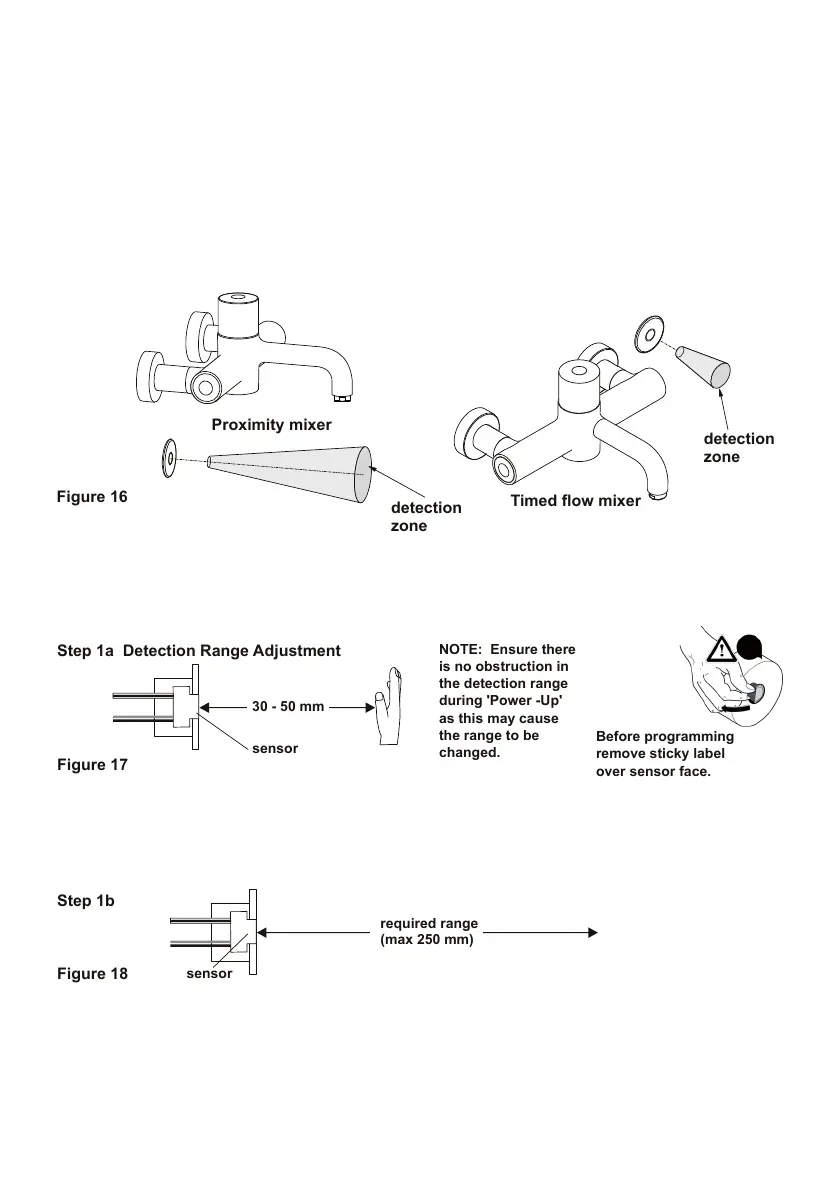
Step 1a Detection Range Adjustment
Both mixers are operated when the user places a hand in the detection zone.
With the proximity version, ow starts when a hand is placed in the detection zone and
will continue until it is removed.
The other version gives a timed ow which is started by placing a hand in the detection zone. Flow will
then continue for a preset time of 60 seconds and then stop automatically. The preset time can be ad-
justed by following the procedure outlined in the section on programming the sensor below.
After the initial 5 secs, the LED will stop ashing and will stay fully on for about 5 more secs.
During this time, move hand to required range (up to a maximum of 250mm),
Leave hand at this position for 5 seconds, the LED will start to ash again.
If it is necessary to change the run time, go to Step 2 below, otherwise move hand away from detection
range. The sensor now works normally and is no longer in programming mode.
If an error is made in programming the detection range, it is necessary to start again from Step 1a.
PROGRAMMING THE SENSOR
Follow this procedure to change the Detection Range and the Run Time for timed ow product
PLEASE NOTE: Only the detection range can be changed on proximity product. The run time is deter-
mined by the presence of a hand in the detection zone, or the anti-vandal max run time.
The sensor can only be programmed just after power-up.
Disconnect power supply from the mains, wait 30 seconds.
Reconnect sensor to power supply - note LED in sensor ashes slowly for about 5 seconds.
During this time, place hand 30 to 50 mm from sensor while LED ashes slowly.


 To Next Page