INSTRUCTIONS MANUAL
FEATURES
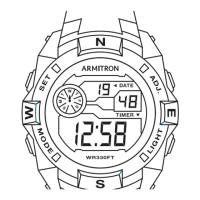
SELECTING FEATURES
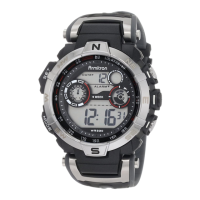
SETTING THE TIME AND CALENDAR
• TimeTellingMode(HoursandMinutes)
• CalendarMode
• LEDDisplay
1. Press ‘A’ todisplaytheHourandMinutes.Thetimeisdisplayedfor4-5
seconds.
2. WhiletheHourandMinutesaredisplayed,press‘A’againtoenterthe
CalendarMode.TheMonthandDatearedisplayedfor4-5seconds.
3. WhiletheMonthandDatearedisplayed,press‘A’againtodisplaythe
Seconds.TheSecondsaredisplayedfor4-5seconds.
1. Press‘A’.WhiletheHourandMinutesaredisplayed,pressandhold‘B’
toentertheTimeSettingMode.The12HourFormatashes.Press‘A’to
selecteither12Houror24Hour(Military)Time(0,00-23’59).When12Hour
Formatisselected,‘I’indicates‘p.m:times;thereisnoindicatorfor‘a.m:
times.
2. Press‘B’.Hoursash.Press‘A’toadvancetheHour.NOTE:Pressing
andholding‘A’willadvancedigitsrapidly.
NOTE: Pressing and holding‘D’ will advance digits rapidly.
3. Press‘B’.Minutesash.Press‘A’toadvancetheMinutes.
4. Press‘B’.Secondsash.Press‘A’tozeroouttheSeconds.
5. Press‘B’.TheYearashes.Press‘A’toadvancetheYear(2000-2059).
6.Press‘B’.TheMonthashes.Press‘A’toadvancetheMonth.
7.Press‘B’.TheDateashes.Press‘A’toadvancetheDate.
8.Press‘B’toendthesetsequence.
BJ3407
WATER RESISTANCE
ThisisaWATER RESISTANTwatch.Donotoperatepushbuttonsbelow
thesurfaceofthewater.Shouldwaterorcondensationappearinthe
watch,immediatelyhavethewatchchecked.Watercancorrodeelectron-
icpartsinsidethecase.
CHANGING THE BATTERY
Changethebatterywhenthewatchbecomesslow,thereadoutdarkensor
doesnotappear,orthebacklightfails.Beforeremovingtheoldbattery,be
suretodenoteitspolaritysothatthenewbatteryisinstalledinexactlythe
sameway.Replacewiththesamekindorequivalentonly.Thiswatch
containspreciseelectroniccomponentsandshouldonlybeopenedby
aqualiedwatchtechnician.However,itisnotnecessarytoreturnyour
watchtothemanufacturerforbatteryreplacement.Itisrecommendedthat
youbringyourtimepiecetoalocaljeweler.
RETURN YOUR WATCH FOR SERVICING
USE OUR NATIONWIDE SERVICE CENTERS. YOU
CANNOT RETURN WATCH FOR SERVICE WHERE IT
WAS PURCHASED.
Pleasecall(718) 482-4195foralistingofallapprovedandauthorized
servicecentersandlocations,orvisitourwebsiteat:
WWW.ARMITRON.COM
YOURWATCHSHOULDNOTBERETURNEDTOTHEPLACEOF
PURCHASE.Carefullypackyourwatchinasturdybox(donotsendina
giftboxforsamewillnotbereturned)andmailtothenearestapproved
authorizedservicestation.Becauseofpossibleloss,werecommendthat
youinsurethewatch,returnreceiptrequested,whenusingthemail.Ifyou
donotreceiveareceiptwithinareasonabletime,startatracerthrough
theoriginatingpostoce.Neverincludeaspecialwatchbandorany
otherarticleofpersonalvalueinyourshipment.
Ifyourwatchrequirescleaning,lubrication,batterychanging,orneeds
acrystalreplaced,ArmitronAdventureapprovedServiceCentersare
availableinyourarea.TheserepairfacilitiesuseArmitronAdventureparts
andcomponentstoassurequalityandfutureperformance.Freeestimates
areavailableinadvance,shouldyouneedservicingorrepairsnotcovered
underthewarranty.Repairscoveredunderthewarrantymayrequireproof
ofpurchase,soretainthepurchasereceipt.


 Need help?






 General