www.armstrongfluidtechnology.com
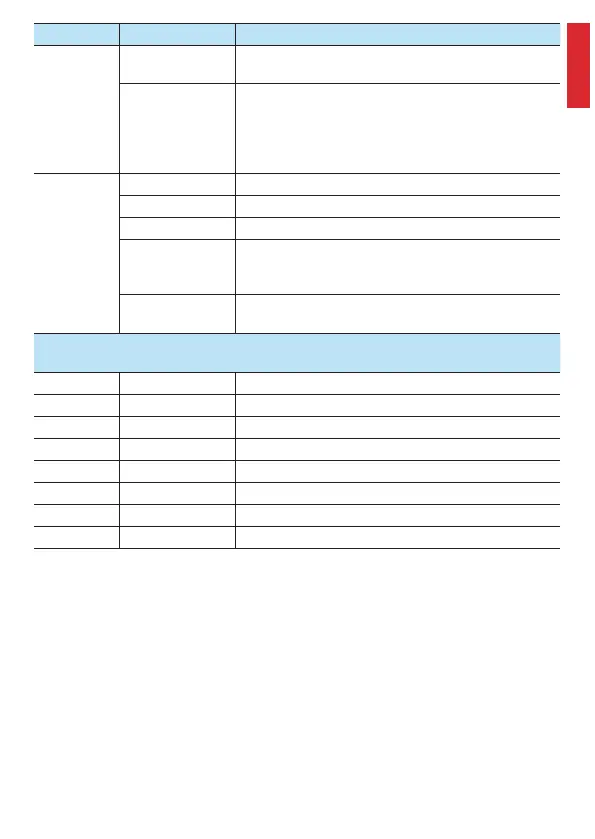
Fault Cause Action
Pump not
running
No operating
voltage
• Check the electrical system.
Rotor/shaft
blocked, digital: fast
LED flashes
• Isolate the pump from the power supply
• Remove the vent screw (see p. 43/44)
• Turn the shaft clockwise using a screwdriver (4mm)
• Screw in the vent screw
• Switch on the pump
Loud noises
(> 43 dB(A))
Air in the system • Bleed the system
Air in the pump • Bleed the pump (see p. 43/44)
Pump flow too high • Reduce the pump speed using the knob or button
Cavitation due to
insufficient supply
pressure
• Check the operating pressure of the system
• Increase the system threshold values
Foreign matter in
pump housing
• Clean the housing
HEP Optimo/HEP Optimo (N)/
HEP Optimo Geo
E1 Overvoltage Ensure admissible voltage supply, then error will be eliminated
E2 Undervoltage Ensure admissible voltage supply, then error will be eliminated
E3 Blocked rotor Vent screw to unblock shaft manually, restart pump
E4 Dry running Open valve, fill medium, vent pump
E5 Overload Replace pump with pump with higher power motor
E6 Winding fault Remove supply voltage and replace pump
E7 Short circuit Remove supply voltage and replace pump
E8 Pump motor error Replace the pump
EN
47





 To Next Page