7
Fixture MenuFixture Menu
7
Fixture Menu
This section describes the fixture menu of the SkyPanel and the SkyPanel remote control. Some options,
especially options for saving and loading data, are not available in the remote control fixture menu.
Overview
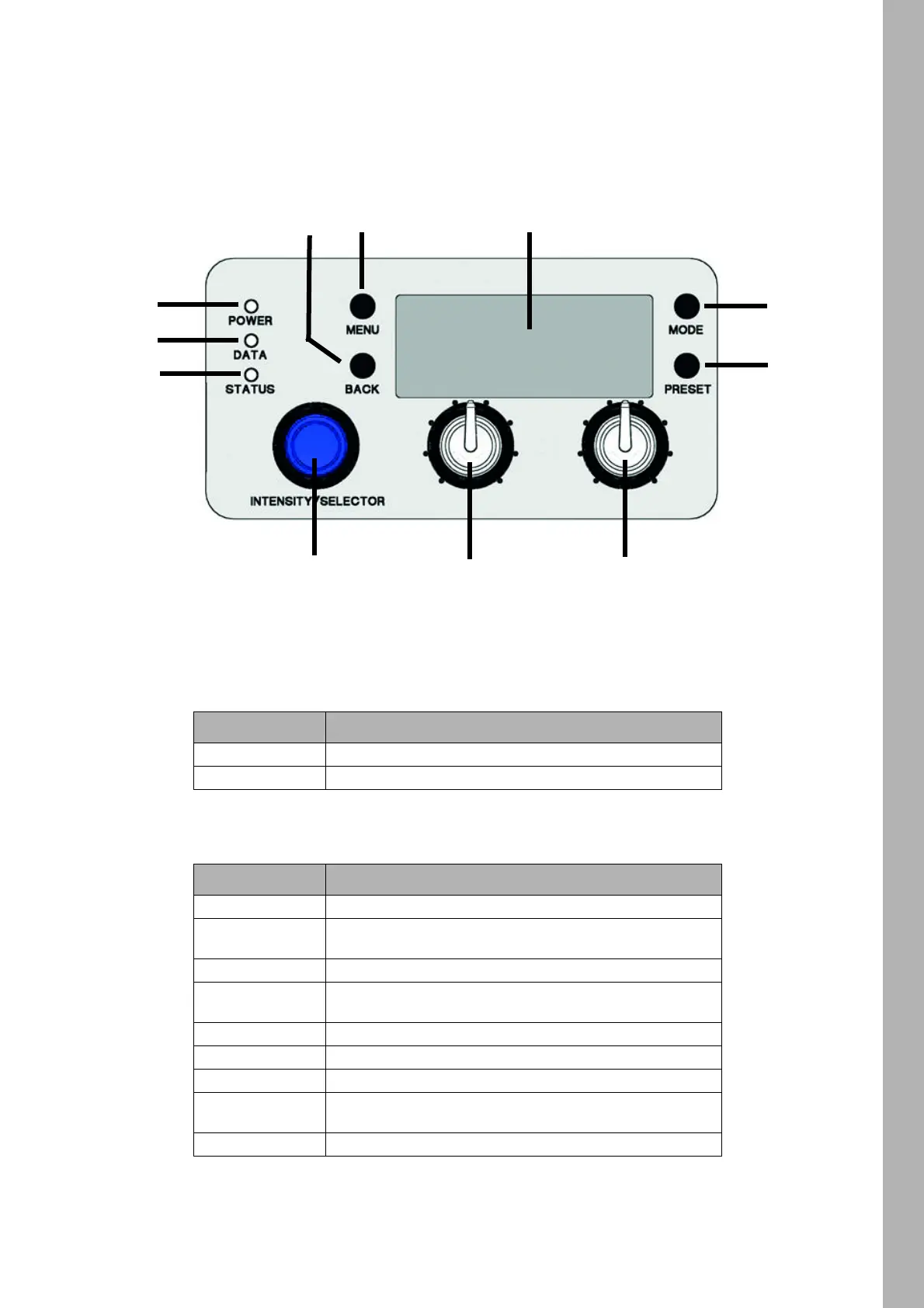
Features of the Fixture Menu
POWER-LED (1)
DATA-LED (2)
Color Indication
Green Fixture switched on. No error.
Off / No color Fixture switched off.
Color Indication
Blue The fixture receives a valid DMX signal.
Blue / green
The fixture receives a valid CRMX (wireless DMX) signal
(only S360-C).
Purple Host mode active
White
Receiving valid Art-Net signal or communicating via RDM,
Gateway active
Green Receiving valid Art-Net signal, Gateway not active
Orange Receiving valid sACN signal, Gateway active
Cyan Receiving valid sACN signal, Gateway not active
Red
No communication between fixture menu and controller
board.
No light The fixture receives no valid control signal.



 To Next Page