44
3.5.2 UPDATE
At subsequent times it may be desirable to learn a new operating point of the motor. This can be
done using the UPDATE function.
When eMCM first starts in the MONITOR, IMPROVE or UPDATE modes, it has insufficient data to
indicate the motor status accurately. Under such conditions a blank string may be displayed instead
of the motor status. This is a temporary condition and should last only for the first data cycle. As a
result of internal error handling, the blank string may occasionally be seen. Again, this is temporary
and will pass by the start of the next data cycle.
Although eMCM should have met the majority of working conditions in the learning mode, it is still
possible for it to fail to recognize a particular working point. In such a case, the user can elect to
add the current operating point to the internal database using the UPDATE feature. Running
UPDATE will cause the internal database to be updated with the new information over a preset
number of cycles. Once the count of iterations exceeds the preset number, eMCM will automatically
return to MONITOR without user intervention.
3.6 Advanced Use
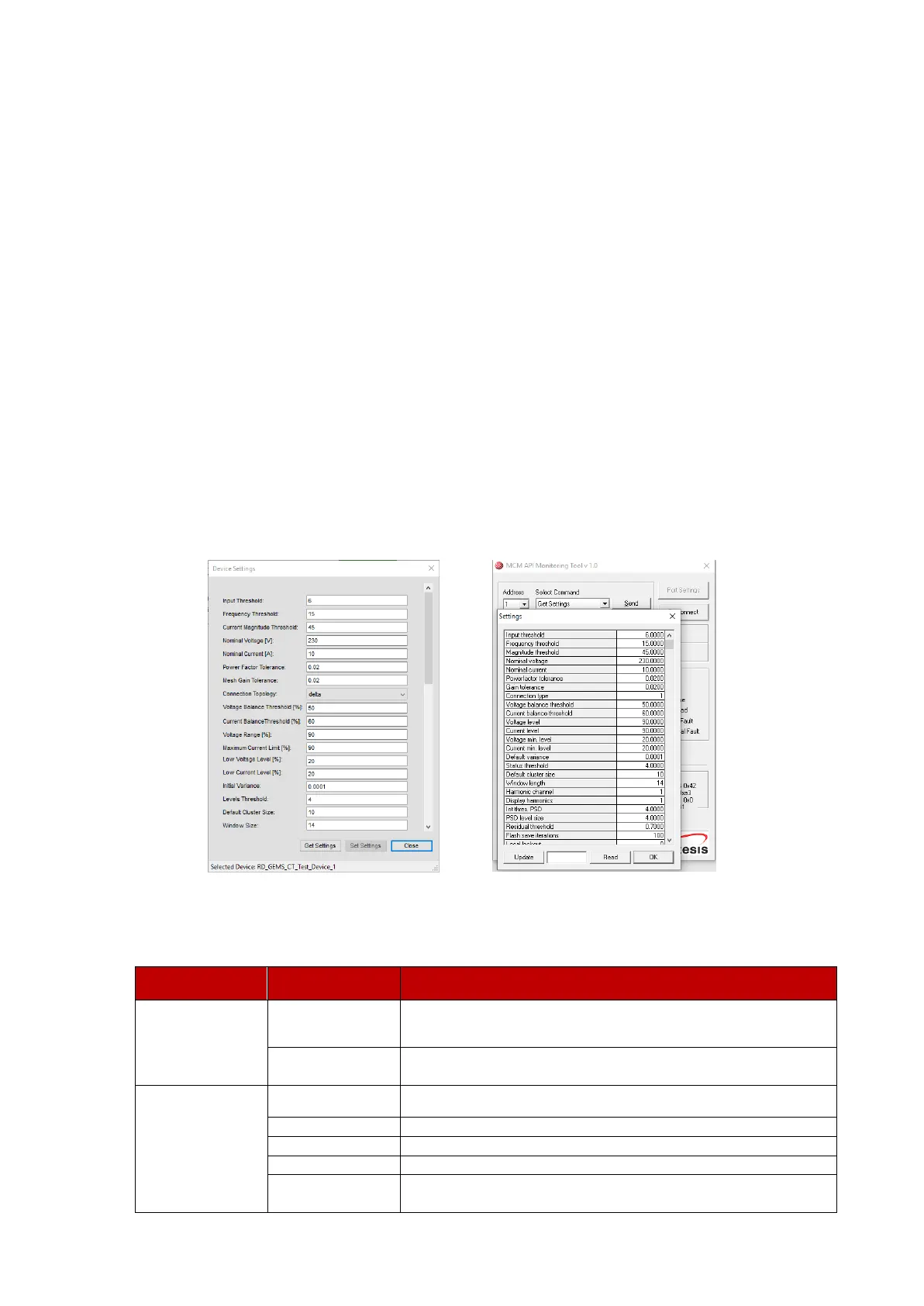
It is possible to customize the behavior of eMCM by adjusting various settings. These settings can
be changed with both the AES Configuration software and the MCM API Tool.
The following table summarizes the settings that can be changed together with their significance.
It is recommended that the original values of each setting be recorded prior to changing them. After
changing certain settings, it may be necessary to relearn the motor.


 To Next Page