10 | 9004 Gateway Aruba 9004 Gateway | Installation Guide
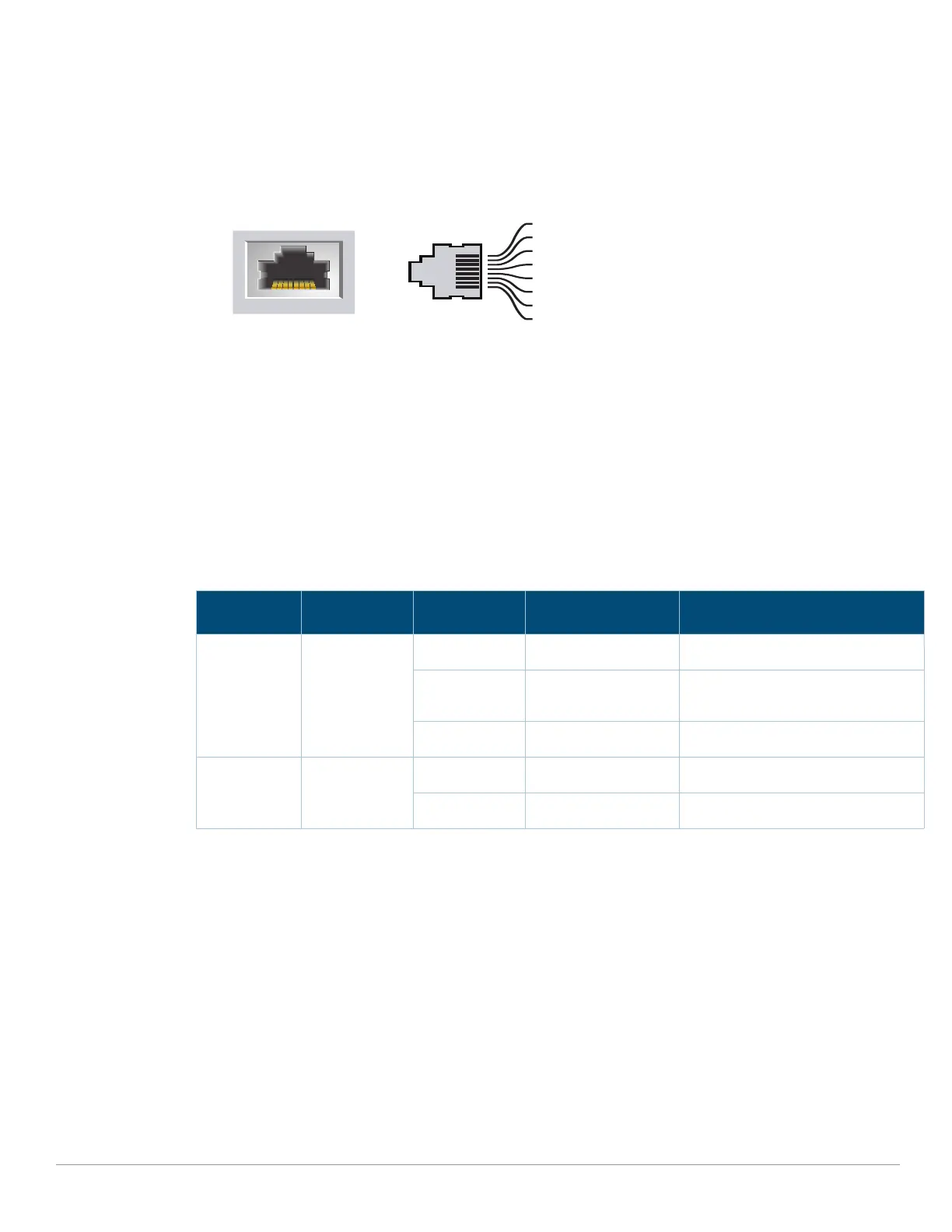
out for an RJ-45 connector. The pins paired on a 100/1000Base-T Gigabit Ethernet port are: 1/2, 3/
6, 4/5, and 7/8.
Figure 3 Figure 3 Gigabit Ethernet Port Pin-Out
Ethernet Port LEDs
Each 100/1000BASE-T Ethernet port is equipped with two LEDs that allow basic monitoring of
link/port status and activity.
LINK/ACT: Placed on the left side of the port, and displays the link status and activity of the
port.
STATUS: Placed on the right side of the port, and displays the status of the port based on the
CLI.
The following table describes the LED behavior for each mode:
Micro-USB Console Port
The Aruba 9004 gateway is equipped with a Micro-USB (type B) connector that provides console
access for direct local access. If both Micro-USB and RJ-45 console ports are connected, the Micro-
USB connection takes precedence over the RJ-45 console connection.
Micro-USB Driver
To use the Micro-USB console port, you must install the Aruba Micro-USB driver on the computer
that will manage your gateway. To download the driver, perform the following steps:
1. Go to https://support.arubanetworks.com.
2. Click on the Tools & Resources tab.
3. Open the USB Console Driver folder.
4. Open the Mobility Gateway and Mobility Access Switch folder.
Table 5 100/1000BASE-T Ethernet Port LEDs
LED Function Mode Indicator Status
LINK/ACT Link status NA Green (Solid) Link established
Green (Blinking) Port is transmitting or receiving
data
Off No link
STATUS Port status Speed Green (Solid) Link at 1000 Mbps
Off Link at 100 Mbps
1000Base-T Gigabit
Ethernet Port
RJ-45 Female
Pin-Out
Signal Name
1
2
3
4
5
6
7
8
BI_DC+
BI_DC-
BI_DD+
BI_DD-
BI_DA+
BI_DA-
BI_DB+
BI_DB-
Function
Bi-directional pair +C
Bi-directional pair -C
Bi-directional pair +D
Bi-directional pair -D
Bi-directional pair +A
Bi-directional pair -A
Bi-directional pair +B
Bi-directional pair -B


 To Next Page