Aruba 9004 Gateway | Installation Guide 9004 Gateway | 9
DC Power Connector
The AC-DC adapter kit with the following specification is used to power the Aruba 9004 gateway:
12V/2.5A power interface
Center-positive 2.1/5.5 mm circular plug, 9.5 mm length
Reset Switch
The Aruba 9004 gateway includes a recessed button for resetting the gateway configurations.
Insert a pin into the Reset Switch hole until you feel the pin touches a surface. Push and hold the
pin for two seconds to reset the gateway configuration.
Ethernet Ports
The Aruba 9004 gateway is equipped with four 100/1000BASE-T Gigabit Ethernet ports (0 to 3).
Gigabit Ethernet uses all eight wires and each pair is bidirectional, which means, the same pair is
used for both data transmission and reception. Figure 3 illustrates the Gigabit Ethernet port pin-
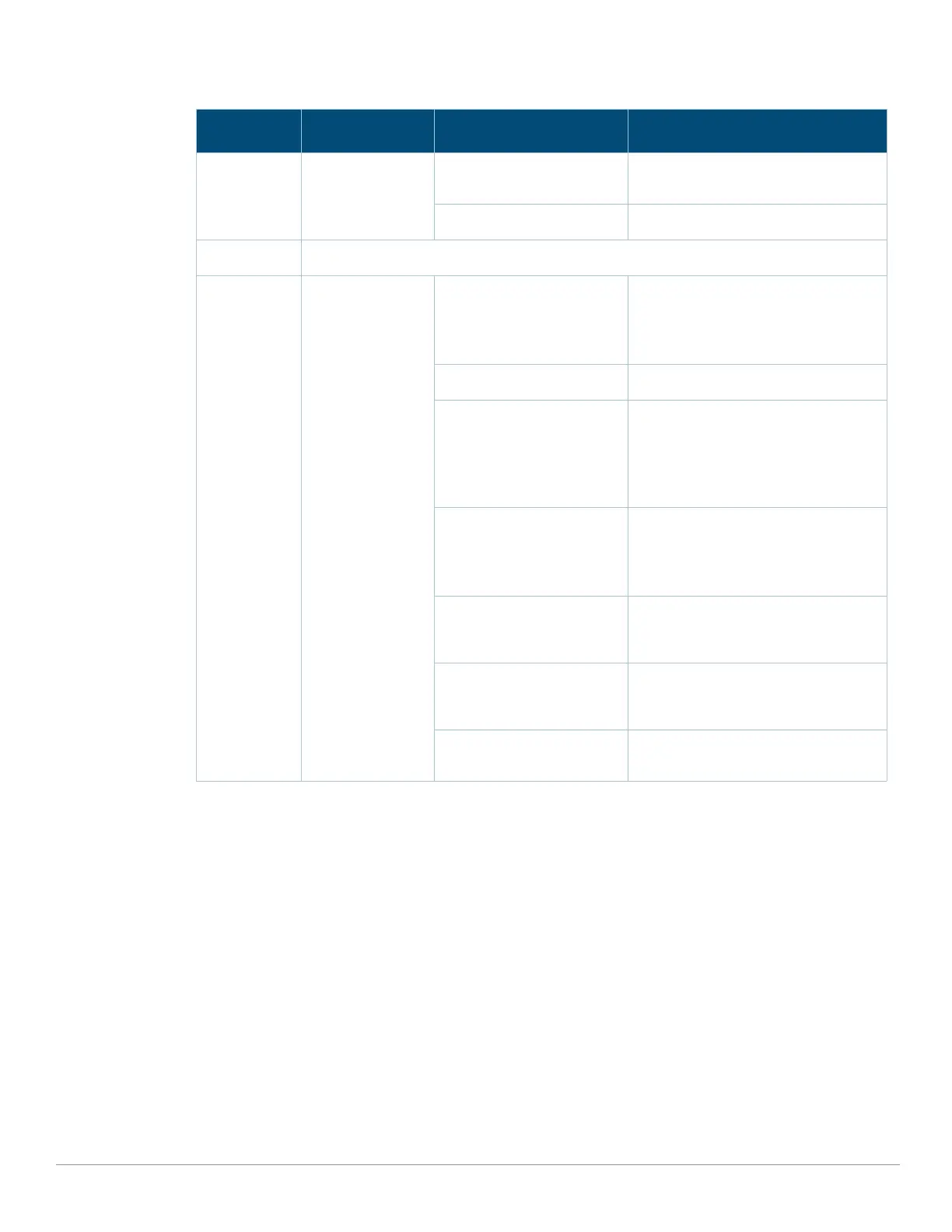
Wireless Wireless LAN
Gateway Status
Green (Solid) The WLAN Gateway is Up and
Functioning.
Green (Blinking) WLAN Gateway Booting
Central/Cloud Central Connectivity Status
Cellular Link Status Green (Solid) Modem Initialized and Connected to
the Network. Good Signal Strength.
Signal Strength Threshold:
> -65 dBm
Green (Blinking) Modem Initializing
Green + Amber (Greenish
Yellow) (Solid)
Modem Initialized and Connected to
the Network. Average Signal Strength.
Signal Strength Threshold:
< -65 dBm
> -80 dBm
Amber (Solid) Modem Initialized and Connected to
the Network. Poor Signal Strength.
Signal Strength Threshold:
< -80 dBm
Amber (Blinking) Network Connection Failure. SIM
Removal. Modem not Responding to
Web Commands.
Red (Solid) Modem Lost IP Address or
Disconnected from the Network.
Acting as a Backup Uplink.
Red (Blinking) Hardware Failure. USB Failure.
Unsupported USB Device Attached.
Table 4 LED Status
LED Function Indicator Status


 To Next Page