Aruba 9004 Gateway | Installation Guide 9004 Gateway | 11
Select the appropriate file for your application. The corresponding operating system is in the file
name.
Console Port
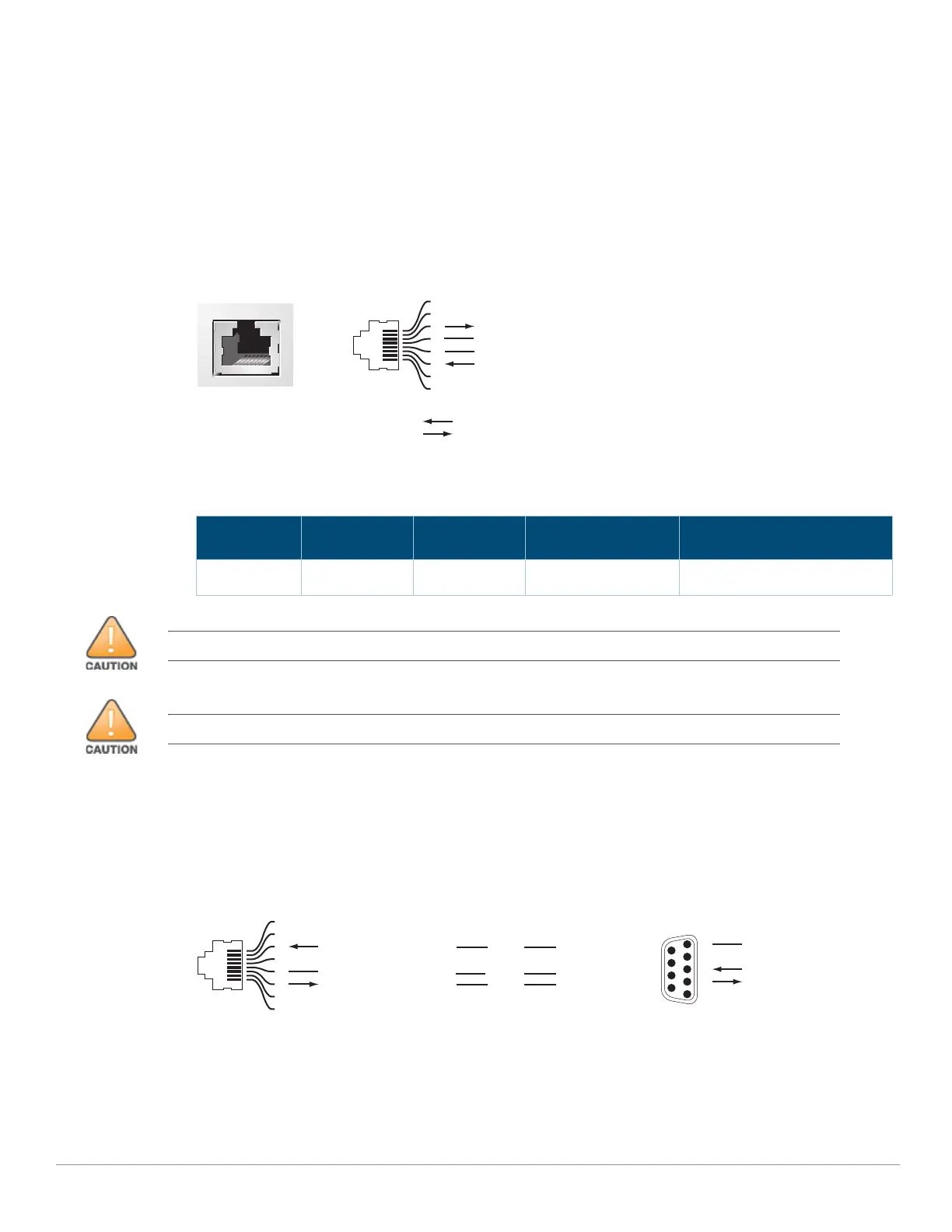
The serial console port allows connecting a gateway to a serial terminal or a laptop for direct local
management. This port is a RJ-45 female connector with the pin-outs descried in Figure 4 on page
11. Connect it directly to a terminal or terminal server using an Ethernet cable.
Figure 4 Serial Console Port Pin-Out
The communication settings for the Console port is shown in the following table:
Serial Console Port Adapter
A modular adapter can be used to convert the female RJ-45 connector to a male DB9 connector.
See Figure 5 for complete details.
Figure 5 RJ-45 (Female) to DB9 (Male) Modular Adapter Conversion
USB Port
The Aruba 9004 gateway is equipped with a USB 3.0 interface. A USB storage device can be used
to save and upload configurations to the gateway.
Table 6 Console Terminal Settings
Baud Rate Data Bits Parity Stop Bits Flow Control
9600 8 None 1 None
Serial
Console Port
1
2
3
4
5
6
7
8
TxD
GND
RxD
RJ-45 Female
Pin-Out
Direction
Input
Output
GND
The CONSOLE port is compatible only with RS-232 devices. Non-RS-232 devices, such as APs, are not supported.
Do not connect the Console port to an Ethernet switch or a PoE power source. This may damage the gateway.
3
4
5
2
5
63
RJ-45 DB-9
Internal
Connections
TxD
GND
RxD
1
2
3
4
5
6
7
8
TxD
GND
RxD
RJ-45 Female
Pin-Out
DB-9 Male
Pin-Out
TxD
RxD
Ground
5
4
3
2
1
9
8
7
6


 To Next Page