AP-270 Series Outdoor Access Point | Installation Guide 5
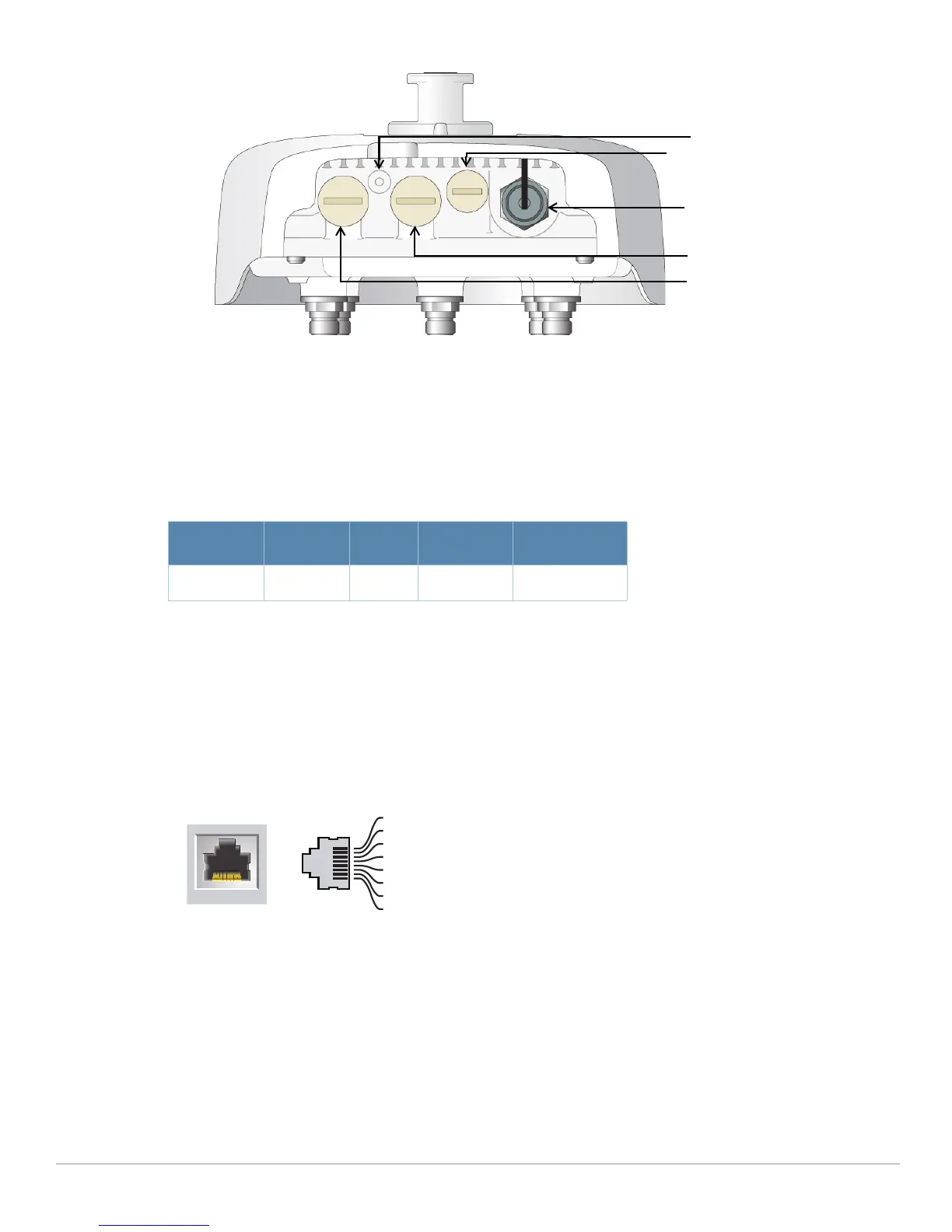
Figure 4 AP-274 Rear View
USB Console Port
The USB Micro-B console port allows you to connect the AP to a terminal or a laptop for direct local
management. Use the included USB console cable to connect the AP. You can download the necessary
driver for USB-UART adapter from
support.arubanetworks.com under the Tools & Resources tab.
Use the following setting to access the terminal:
Ethernet Ports
AP-270 Series is equipped with two10/100/1000Base-T (RJ-45) Gigabit Ethernet ports (WAN and LAN port)
for wired network connectivity. The WAN port supports 802.3at Power over Ethernet (PoE), accepting 48
VDC (nominal) as a standard defined Powered Device (PD) from a Power Sourcing Equipment (PSE) such
as a PoE midspan injector.
These ports have RJ-45 female connectors with the pin-outs shown in Figure 5.
Figure 5 Gigabit Ethernet Port Pin-Out
Reset Button
The reset button can be used to return the AP to factory default settings. To reset the AP:
1. Power off the AP.
2. Press and hold the reset button using a small, narrow object, such as a paperclip.
3. Power-on the AP without releasing the reset button. The system LED will flash within 5 seconds.
4. Release the reset button.
The system LED will flash again within 15 seconds indicating that the reset is completed. The AP will now
continue to boot with the factory default settings.
Table 3 Console Settings
Baud Rate Data Bits Parity Stop Bits Flow Control
9600 8 None 1 None
AC Power Interface
LAN Port
WAN Port
Grounding Point
USB Console Port and Reset button
1000Base-T Gigabit
Ethernet Port
RJ-45 Female
Pin-Out
Signal Name
1
2
3
4
5
6
7
8
BI_DC+
BI_DC-
BI_DD+
BI_DD-
BI_DA+
BI_DA-
BI_DB+
BI_DB-
Function
Bi-directional pair +C, POE Positive
Bi-directional pair -C, POE Positive
Bi-directional pair +D, POE Negative
Bi-directional pair -D, POE Negative
Bi-directional pair +A, POE Negative
Bi-directional pair -A, POE Negative
Bi-directional pair +B, POE Positive
Bi-directional pair -B, POE Positive


 To Next Page