4 Aruba 330 Series Access Points | Installation Guide
Console Port
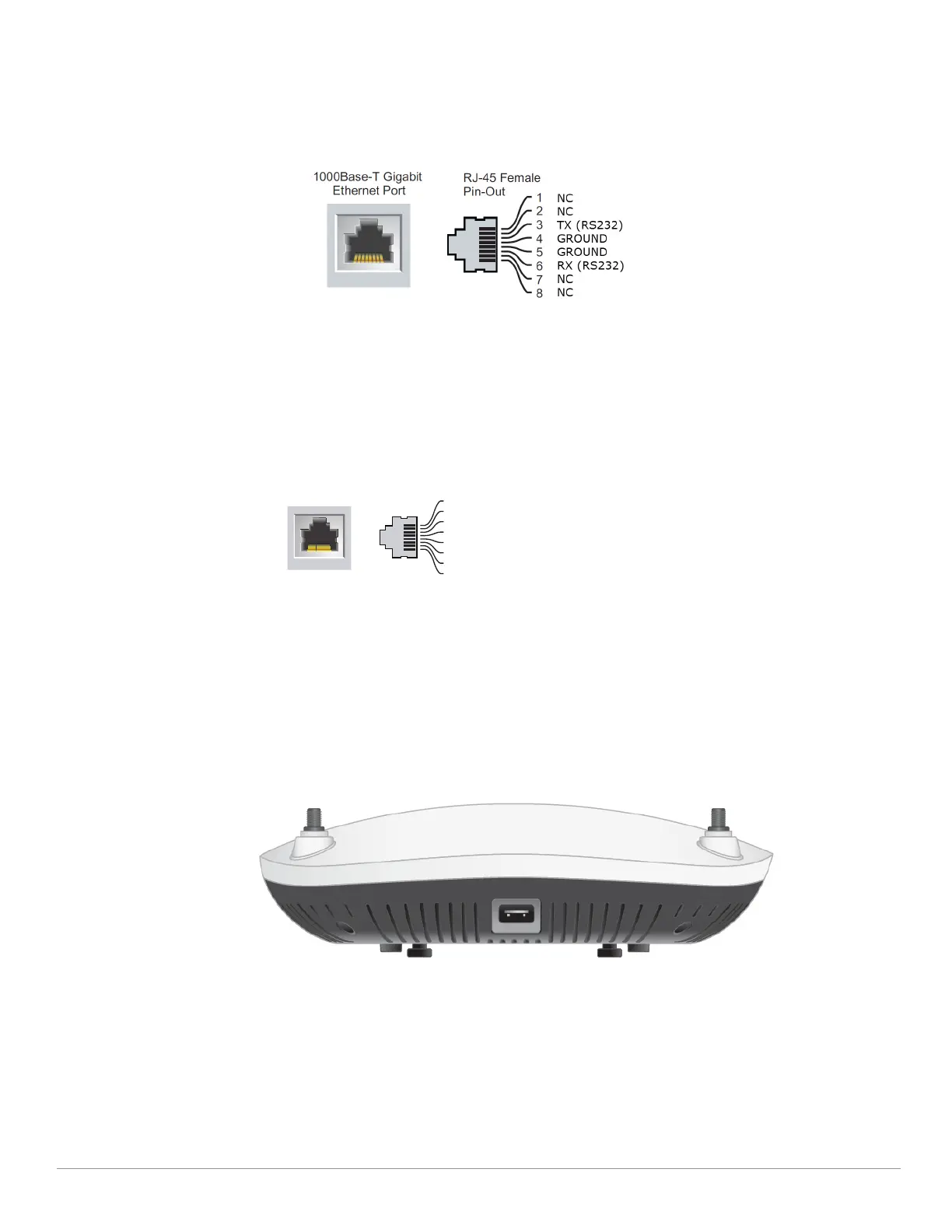
The console port allows the user to connect the access point directly to a serial terminal or laptop for local
management. Connect the device to a terminal or terminal server using an Ethernet cable. The port is a RJ45
connector with pin-out details in Figure 4.
Figure 4 Console Port Pin-out
Ethernet Ports
The back panel of the 330 Series access point is equipped with two Ethernet ports (ENET0 and ENET1) to support
wired-network connectivity. These ports support IEEE 802.3at Power over Ethernet (PoE) compliant sources,
accepting 56V DC (nominal) as a standard powered device (PD) from power sourcing equipment, such as PoE
midspan injector or network infrastructure that supports PoE.
ENET0: 100/1000/2500Base-T auto-sensing MDI/MDX RJ45 port.
ENET1: 100/1000Base-T auto-sensing MDI/MDX RJ45 port.
Figure 5 Ethernet Port Pin-Out
Kensington Lock Slot
The 330 Series is equipped with a Kensington lock slot for additional security.
USB Interface
The 330 Series is equipped with a USB port for connectivity with cellular modems and other USB client devices.
The USB port can provide up to 5W/1A of power if the access point is powered by a DC source. This USB
interface is disabled when the access point is powered by PoE 802.3at or 802.3af source.
Figure 6 USB Port
Reset Button
The reset button can be used to reset the access point to factory default settings. To reset the access point, refer
to the following steps:
1. Power off the access point.
2. Press and hold the push button using a small, narrow object, such as a paper clip.
3. Power-on the access point without releasing the push button. The System Status LED will flash within 5
seconds.
4. Release the push button.
1000Base-T Gigabit
Ethernet Port
RJ-45 Female
Pin-Out
Signal Name
BI_DC+
BI_DC-
BI_DD+
BI_DD-
BI_DA+
BI_DA-
BI_DB+
1
2
3
4
5
6
7
8
BI_DB-
Function
Bi-directional pair +A, POE Negative
Bi-directional pair -A, POE Negative
Bi-directional pair +B, POE Positive
Bi-directional pair +C, POE Positive
Bi-directional pair -C, POE Positive
Bi-directional pair -B, POE Positive
Bi-directional pair +D, POE Negative
Bi-directional pair -D, POE Negative


 To Next Page