INSTALLATION (continued)
1--5
pressthisbutton
observe these lights
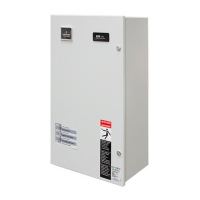
Figure 1–8. Standard controls and indicators.
3 – Electrical Operation
This procedure will check the electrical operation of the
Automatic Transfer Switching Equipment.
Close the automatic transfer switching
equipment enclosure door and tighten the
screws before you test electrical operation.
Transfer Test
Both normal and emergency sources must be available
and the emergency source generator (if used) must be
capable of being started in this procedure.
Perform steps 1 through 8 at the right. Observe the status
lights. See Figure 1–8.
O Black circle means light is on.
P White circle means light is off.
NOTE: If Motor Load Transfer
feature is activated, then transfer may
not occur immediately after the
respective time delays. Transfer will
only occur when the phase relationship
betweensourcesiscorrect.
NOTE: The operating transfer time of the transfer
switching device is 0,17 second maximum, which is
measured from the time that power is applied to the
operating coil of the transfer switching device until the
main contacts close on the alternative source.
This com p l etes the Function al Test of the A SCO
Series 20 0 Automatic Transfer Switching Equipm ent.
Leave the engine–generator start ing control in the
automatic position.
1
The normal source must be
available and the generator
must be ready t o start.
Check t hat the Normal Source
Accepted light is on.
Source Accepted
Normal
Emergency
2
Press and hold the Transfer Test
button until the engine starts
and runs. This should happen
within 15 sec.
Transfer
Tes t
3
The Emergency Source
Accepted light should come on.
Source Accepted
Normal
Emergency
4
The transfer sw itching device
should transfer to the
Emergency position. The
Emergency Transfer Switch
Position light should come on
and the Normal light should go
off.
Transfer Switch
Position
Normal
Emergency
5
If the transfer to emergency
delay is used the transfer
should occurs after a time delay
(up to 5 minutes).
Forimmediatetransferpress
the Bypass Time Delay button.
Bypass
Time Delay
6
The transfer sw itching device
should transfer back to the
Normal position. The Normal
Transfer Switch Position light
should come on and the
Emergency light should go off.
Transfer Switch
Position
Normal
Emergency
7
If the retransfer to normal delay
is used the retransfer should
occur after a time delay
(up to 30 minutes).
Forimmediateretransferpress
the Bypass Time Delay button.
Bypass
Time Delay
8
The unloaded running delay
keeps the generator running for
5 minutes (cool–down period).
Then the generator should stop
and the Emergency Source
Accepted light should go off.
Source Accepted
Normal
Emergency
Get other manuals https://www.bkmanuals.com


 To Next Page
 Loading...