TD 92579EN
15 February 2012 / Ver. H
Installation and Operation Manual
IP-DECT Base Station & IP-DECT Gateway (software version 5.0.x)
73
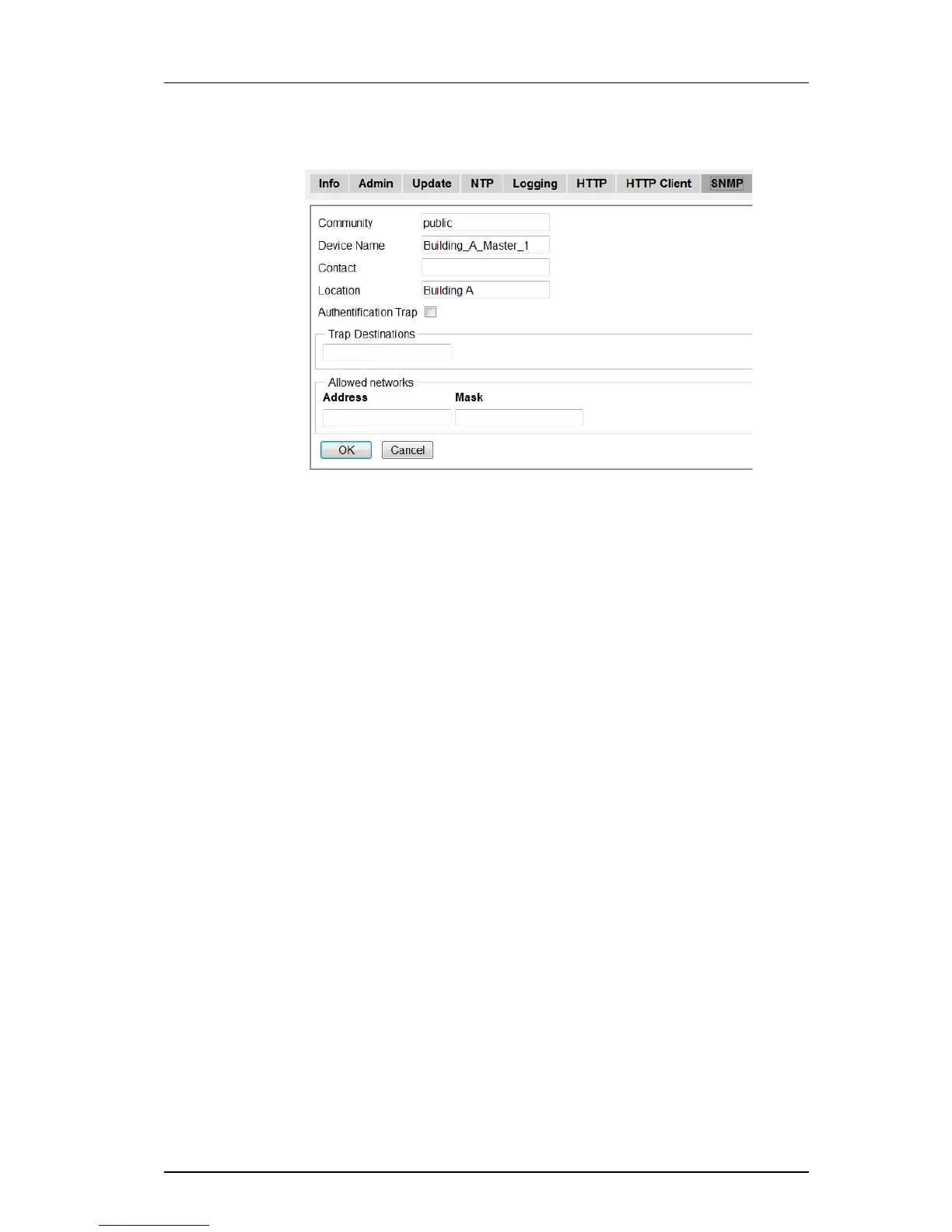
Figure 27. Configure SNMP Settings
1 Select General > SNMP
2 Enter a name in the Community field if you are not using the standard community
name (public). The community text string acts like a password to regulate access to
the agent on the Base Station.
3 Enter a device name in the Device Name field. This field is optional and serves only
informational purposes.
4 Enter the name and phone number of the contact person in the Contact field. This
field is optional and serves only informational purposes.
5 Enter a location in the Location field. This field is optional and serves only
informational purposes.
6 Select the Authentification Trap check box to enable the sending of authentification
traps. Access via SNMP is only possible if the correct Community Name is entered. If
enabled a trap will be generated in the event of access with an incorrect
Community Name.
7 Enter the IP address of the desired trap destinations in the Trap Destinations field.
SNMP traps will be sent to all destinations.
8 Enter the IP address and mask of the networks that are allowed to send SNMP
requests. All networks are allowed if the field is empty.
9 Click "OK".
8.1.10 Certificates
The Certificates tab is part of IP Security in IP-DECT. For more information on IP Security,
see chapter 4 IP Security on page 22.
Select General > Certificates.



 To Next Page