Ascon Tecnologic - K Series - ENGINEERING MANUAL - Vr. 9.0 PAG. 24
7.4.2 Direct set point modification
This function allows to modify rapidly the set point value
selected by [79] SPAt (selection of the active Set point) or
to the set point of the segment group (of the programmer)
currently in progress.
The instrument is showing the “Standard display”.
1. Push
button.
The upper display shows the acronym of the selected set
point (e.g. SP2) while the lower shows its value.
Note: When the programmer is running, the instrument
shows the set point of the group currently in use
(e.g. if the instrument is performing soak 3 the
instrument shows [104] Pr.S3).
2. By
and buttons, assign to this parameter the
desired value;
3. Do not push any button for more than 5 second or push
the
button. In both cases the instrument stores the
new value and returns to the “Standard display”.
Note: If the selected set point has not been promoted to the
Operator level, the instrument allows you to see the
value but not to modify it.
7.4.3 Additional information
This instrument is able to show you some additional
information that can help you in managing your system.
The additional information are related to how the instrument
is programmed, hence in many cases, only part of these
information are available.
1. When the instrument is showing the “Standard display”
push
button.
The lower display shows H or c followed by a number. This
value is the current power output applied to the process.
H indicates that the action is a Heating action while
c says that the action in progress is a Cooling action.
2. Push
button again. When the programmer is running
the lower display shows the segment currently performed
and the Event status:
r1.00 where the first character can be r for a ramp
or S for a soak, the next digit shows the number of the
segment (e.g.: S3 means Soak number 3) and the two
Less Significant Digits (LSD) indicate the status of the two
events (the LSD is the Event 2);
3. Push button again. When the programmer is running
the lower display shows the theoretical remaining time to
the end of the program preceded by a P letter: P84.3
4. Push button again. When the wattmeter function
is running the lower display shows U followed by the
measured energy.
Note: The energy calculation will be in accordance with
the [123] Co.tY parameter setting.
5. Push
button again. When the “Worked time count” is
running the lower display shows d for days or h for hours
followed by the measured time.
6. Push
button again. The instrument returns to the
“Standard display”.
Note: The additional information visualization is subject to a
time out. If no buttons are pressed for more than 10
seconds the instrument automatically returns to the
Standard display.
7.4.4 The programmer function
In “Chapter 5” we have described all parameters related with
the programmer and their action during program execution.
In this paragraph we give you some additional information
and some application examples.
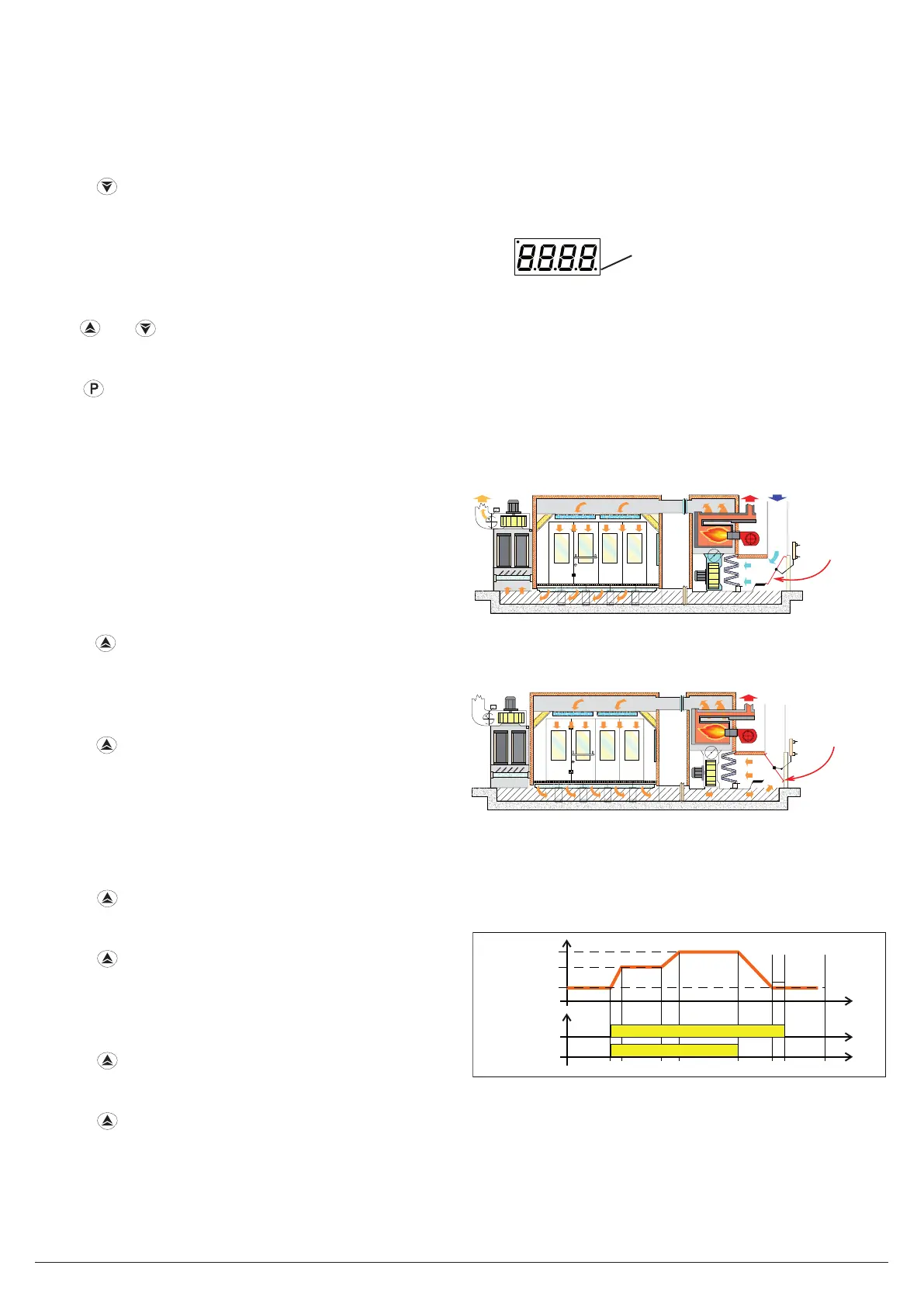
Note: The decimal point of the LSD of the lower display is
used to show the programmer status independently
from the displayed value selected by [114] diSP
(Display management).
Decimal point
of the LSD
.
The relation between the programmer status and the
LED are the following:
• Program in RUN - The LED is ON;
• Program in Hold - The LED flashes fast;
• Program in Wait - The LED flashes slow;
• Program in end or reset - The LED is OFF.
Application example 1: Spray Paint Drying Booth.
When the operator is in the booth painting the car, the
internal temperature must be 20°C and the air used for booth
ventilation comes from outside.
Shutter
During the passivation and drying phases, the operator is out
of the booth and the system closes the air shutter to recycle
the internal air in order to reduce the power consumption.
Shutter
When the drying time is finished, before the operator is
allowed to enter the boot, you must be sure that:
1. The air in the booth has been refreshed;
2. The temperature is lower than a limit. So that you need a
profile like the one below:
Status
Run
Event 1
Event 1 = ON shutter closed
Program
OFFOFF
Time
Pr.S3 = 20°C
P.End
Temp.
Passivation
Drying
Pr.S2
Wait
Pr.S1
20°C
Time
Program Run
Out 1 = H.rEG (heating output);
Out 2 = P.Et1 (program event 1);
Out 3 = P.run (program running);
Pr.E1and Pr.E2 = 10.10 (event 1 goes ON during ramp 1,
soak 1, ramp 2 and soak 2).
When the program is running the door is locked.



 To Next Page