PAGE 12
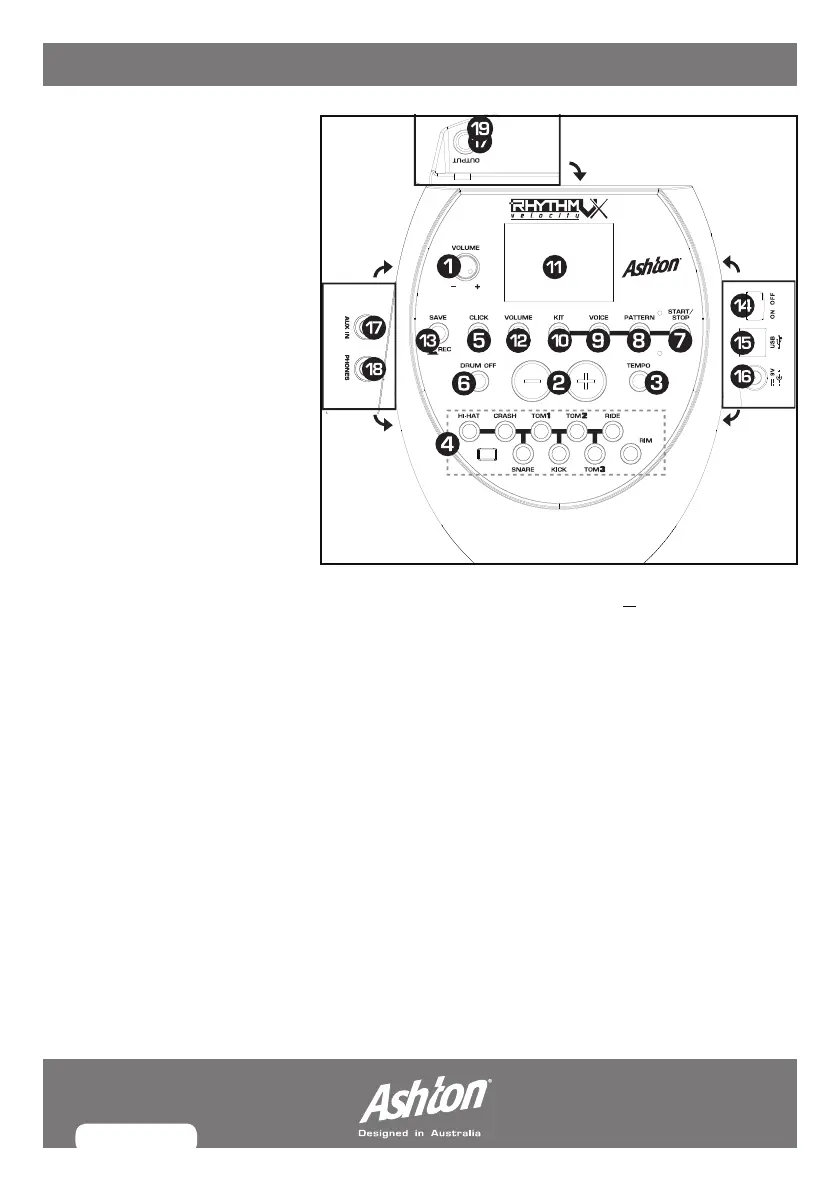
MODULE PANEL DESC.
1. VOLUME: Controls master
volume. Turn to adjust.
2. (+) & (-) BUTTONS: Adjusts
menu parameter (kit, voice,
pattern, click value, tempo
etc...)
3. TEMPO: Enters
tempo
adjustment mode
.
4. PAD INDICATORS: Shows
triggered pad (LED).
5. CLICK: Turns metronome
on/off.
6. DRUM OFF Button: Mutes
pattern drum kit.
7. START/STOP: PLAY/STOP
for patterns/songs.
8. PATTERN Button: Enters the
pattern
select mode
. Also provides MIDI output
format choice- see MIDI section for more
details.
9. VOICE BUTTON: Enters the
voice select
mode
.
10. KIT BUTTON: Enters the
kit select mode
.
11. 3 DIGIT LED: Displays current
parameters.
12. VOLUME : Enters volume mode.
13. SAVE/REC: Hold for
recording mode
,
press once to save kit setting to user kit.
14. POWER SWITCH
15. USB PORT: For USB connection (USBA).
16. POWER INPUT (--- 9V): 9V AV
17. AUX IN: Allows external device input
such as MP3 and CD.
18. HEADPHONES: ¼” jack for
headphones output.
19. OUTPUT: Supports line stereo out for
amplifier or mixing desk.


 To Next Page