PAGE 16
SELECTING A PAD VOICE
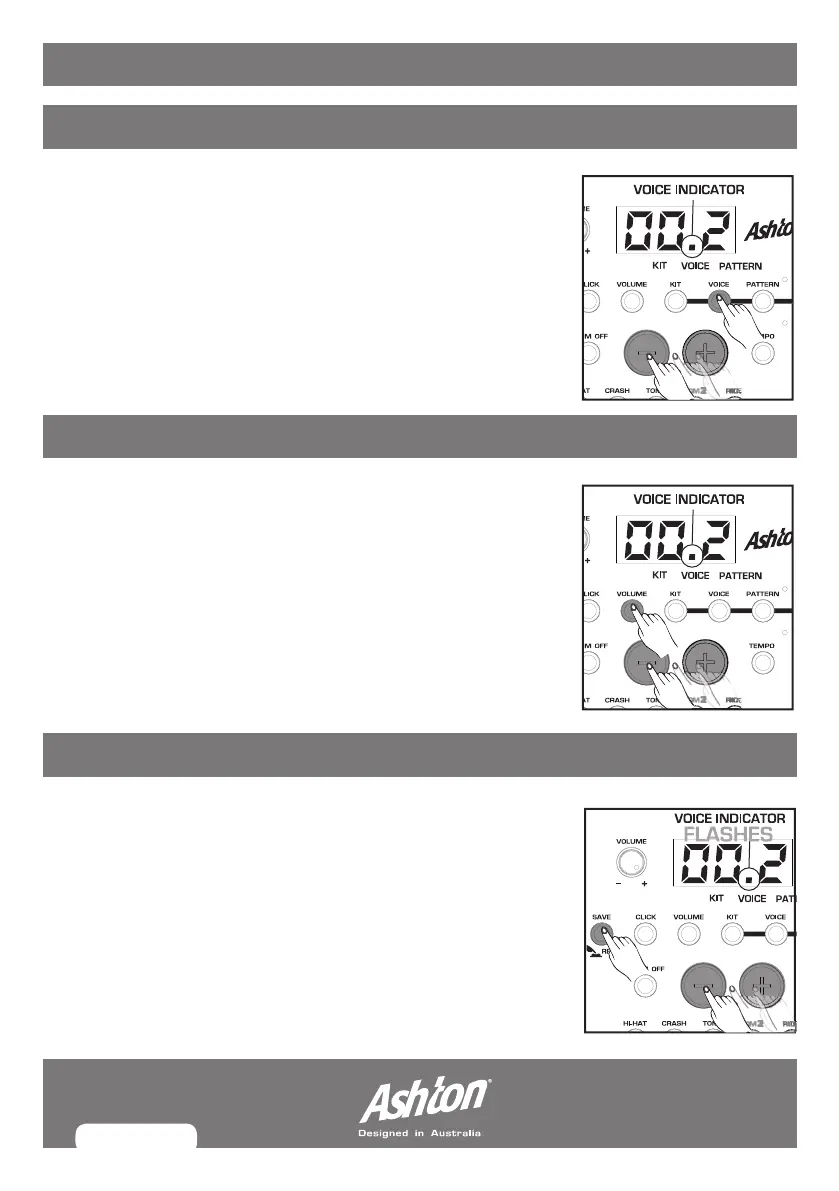
Press the VOICE button to enter
voice selecting mode
, the
current pad voice will light on the LED screen.
Trigger the pad you want to adjust the voice on by hitting it,
then use the (+) and (-) buttons to adjust the pad voice.
There are 108 voices in total, for voice breakdown please turn
to the voice appendix.
SELECTING A PAD VOLUME
While in
voice selecting mode
, press the VOLUME button to
enter the
voice volume mode
(the volume indicator will light).
Use the [+] and [-] buttons to adjust the volume up or down. The
volume value will be displayed on the screen from 000 to 016.
Press the KIT button again to exit the
voice volume mode and
re-enter the voice sele
cting mode.
SAVING A USER KIT
Once you have assigned all your desired pad voices. Press the
SAVE button to enter the
kit saving mode
, the LED will display
the user kit you are set to (and wish to save to), use the (+) and
(-) buttons to choose your desired location (010 - 015) that you
want to save the kit to.
The user kit number on the LED screen will flash, while flashing,
press the SAVE button again and the current kit settings
(voices/volumes) will be stored in that user kit location.
MODULE: VOICE SETTINGS


 To Next Page