PAGE 21
MIDI/USB CONNECTION
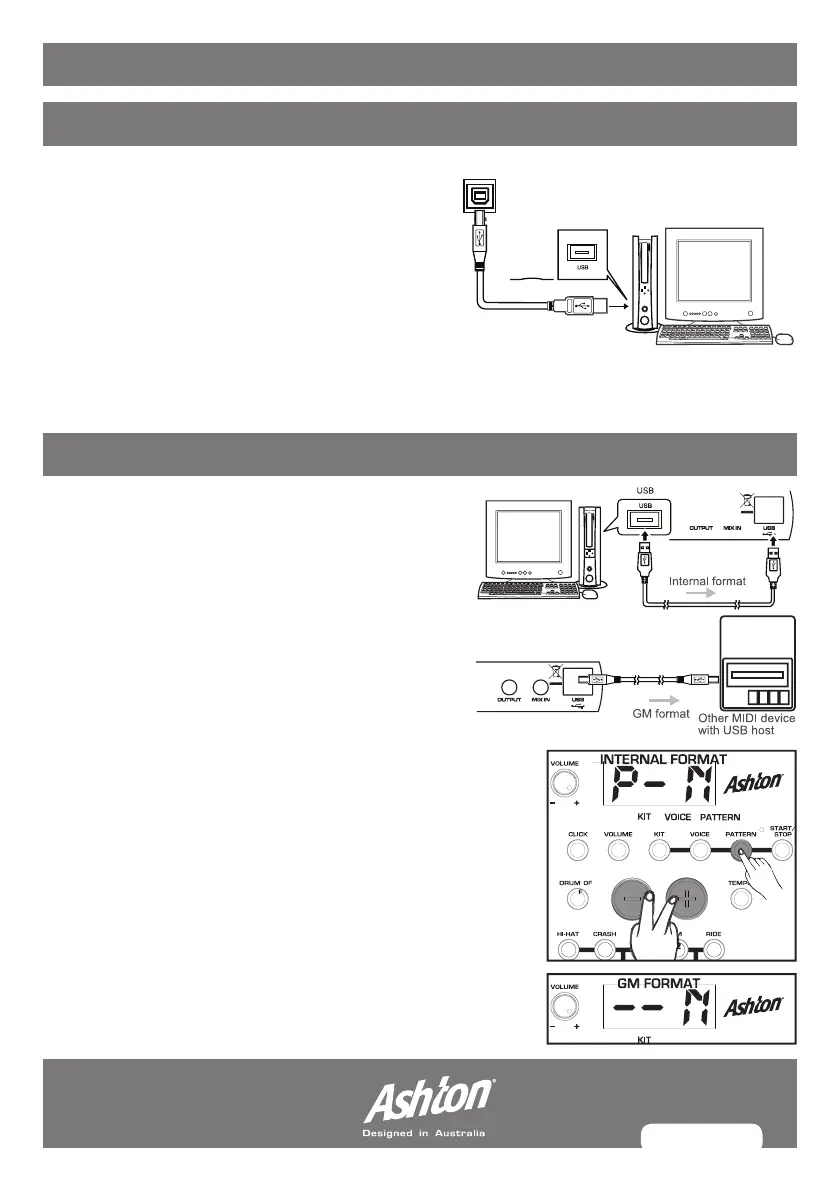
CONNECTING A MIDI/USB DEVICE
1. Connect a PC/MAC or other USB host
device that support USB audio.
2. For devices with a USB cable you can elect
to transfer the recorded pattern and MIDI
notes from the drum module into a software
program that can read MIDI data.
3. The drum module sends the MIDI data by the
triggering of pads or pedal steps through the
USB port. The data of the click and song are
not included when sending MIDI info.
MIDI OUT FORMAT
One of two different MIDI output formats can be
selected for the drum module; the internal format
(default) and the GM format.
INTERNAL FORMAT:
The internal format is used when the drum
module works as a sound source.
GM FORMAT:
The GM format is used when another sound
source is applied, such as a computer, If you record your
drumming to computer software with internal format,
then only the drum module can recognise and play back
your recorded MIDI file correctly. If you want the recorded
MIDI file to play on a GM supported device, choose this
format.
SELECTING FORMAT:
Press PATTERN when in
pattern selecting mode
to
enter the
MIDI output format choice
, “P-N” is the internal
formatting mode (default), press (+)/(-) to toggle between
the two.


 To Next Page