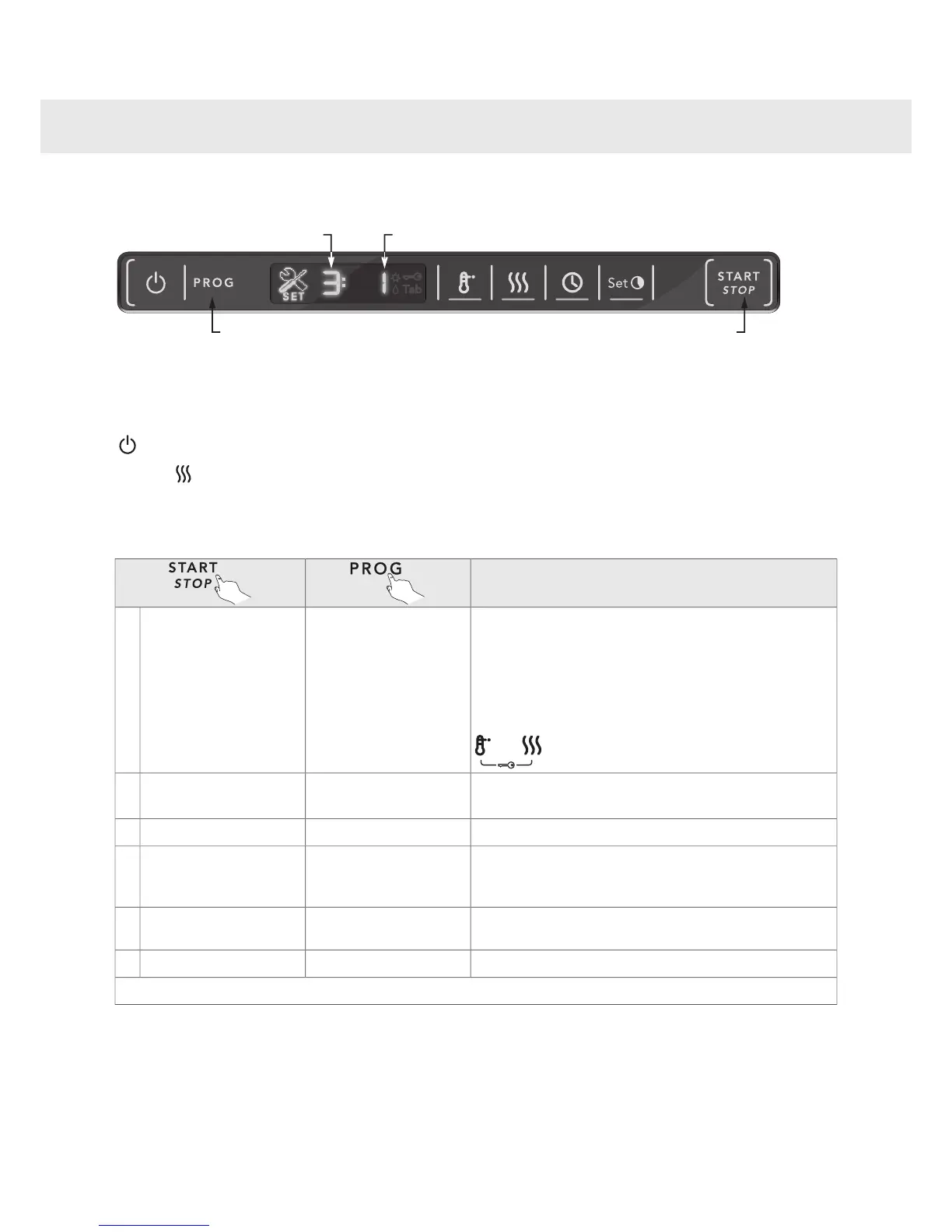
Do as follows to open the settings menu:
Turn off the dishwasher using the main power switch. Then press the main power switch again.1.
Press the Program selector and Drying buttons simultaneously.2.
+
You can now adjust the following settings:
Description
You can activate the child lock (button lock) option to pre-
vent children from starting the dishwasher.
Press the Temperature and Drying buttons simultaneously
to temporarily deactivate the button lock when you want to
start the dishwasher. The button lock is automatically reac-
tivated after 2 minutes.
0 (Off) or 1 (On)Child lock
(button lock)
1:
The dishwasher uses a buzzer to indicate when a program
is finished or when a fault has occurred.
0 (Off), 1–4Buzzer volume2:
This sound is used to confirm each button press.0 (Off), 1–4Operation volume3:
For adjusting the contrast of the display on the front door.-1, 0, +1, +2, +3LCD contrast
(Display on the front of the
door)
4:
For adjusting the contrast of the display on the panel.-1, 0, +1, +2, +3LCD contrast
(Display on the panel)
5:
Rinse aid dosage setting.0 (Off), 1–6Rinse aid6:
Finally, press Start/Stop to save and exit the menu.
20
Settings


 To Next Page