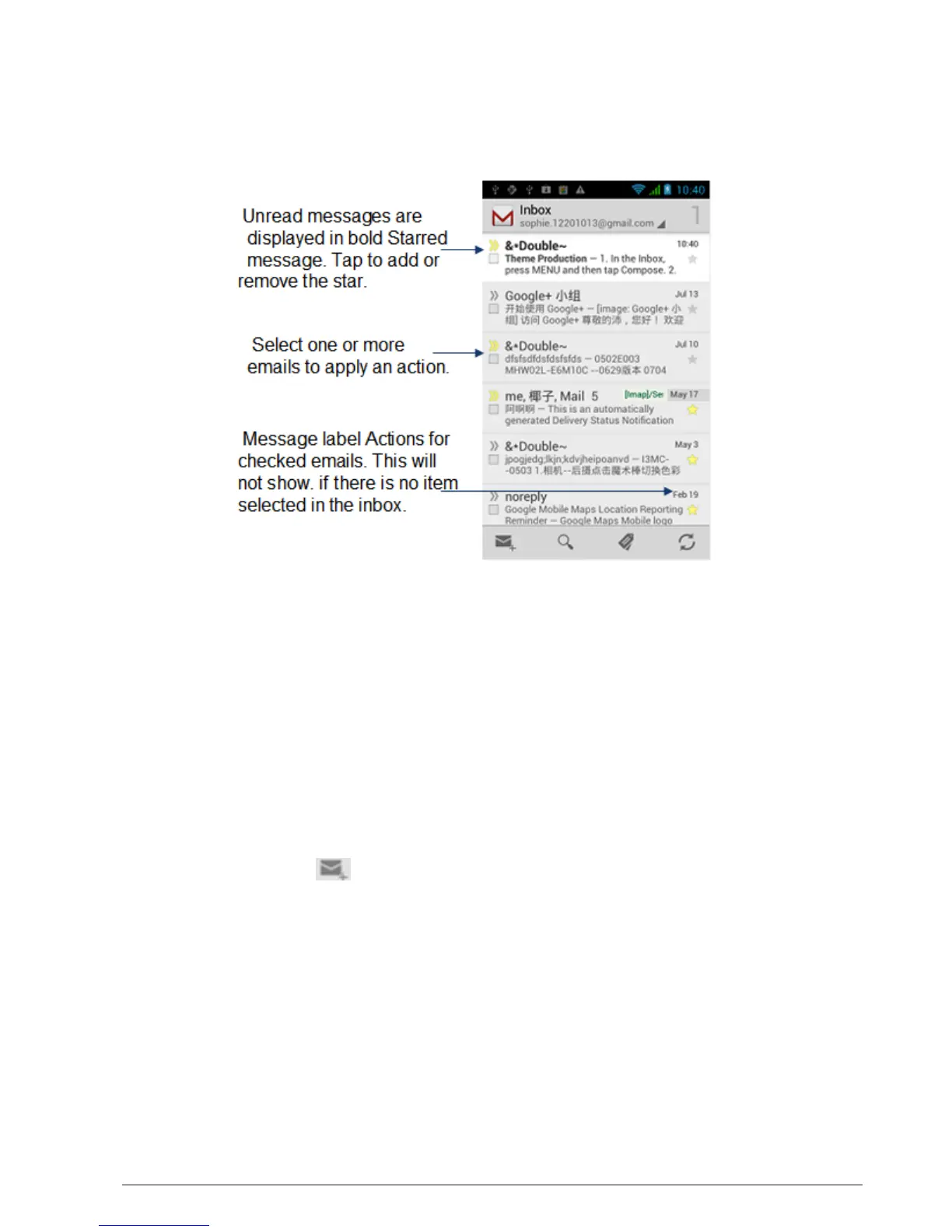
5.2.1 To open Gmail/Google Mail
The Inbox conversations list (here in after referred to as Inbox) is your default
Gmail/Google Mail view. All your received emails are delivered to your Inbox.
5.2.2 To refresh Gmail/Google Mail
Press Refresh to send or receive new emails and to synchronize your emails with
your Gmail/Google Mail account on the web.
5.2.3 Creating and sending emails
5.2.3.1 To create and send an email
1. In the Inbox, press and then tap Compose.
2. Enter the message recipient’s email address in the To field. If you are
sending the email to several recipients, separate the email addresses with a
comma. You can add as many message recipients as you want. Note: If you
want to send a carbon copy (Cc) or a blind carbon copy (Bcc) of the email
to other recipients, press MENU and then tap Add Cc/Bcc.
3. Enter the email subject, and then compose your email. Tips: If you want
to add a picture attachment, press Attach. Select the picture you want to
attach, and then tap OK.
4. After composing your email, tap Send.
Note: While composing the message, tap Save as draft or press the BACK
CHAPTER 5: GOOGLE APPS



 To Next Page