EN - 23
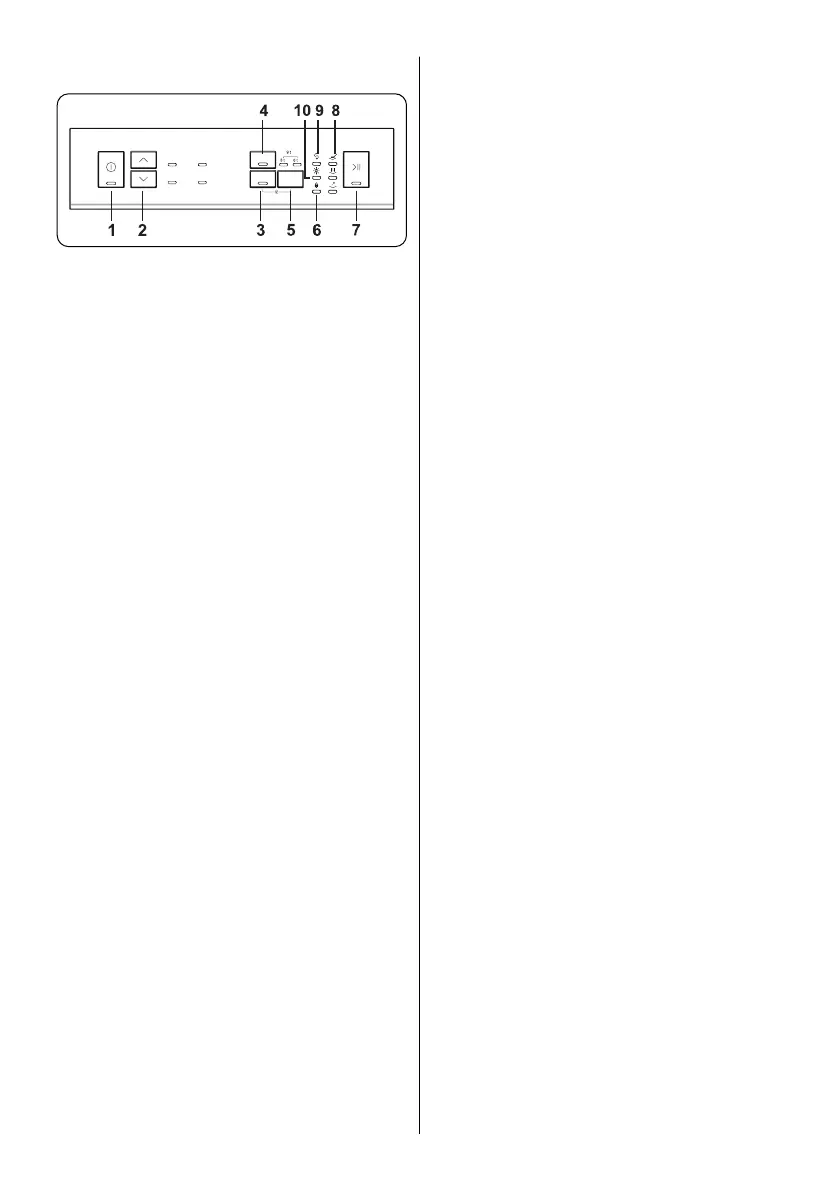
Program Selection Buttons
Tablet Option Button
Half Load Button
Delay Button
Child Lock Feature Led
Programme Monitoring Lights
Salt Missing Warning Indicator
Rinse Aid Missing Warning Indicator
as the machine is on.
down buttons.
It is used for selection for tablat option. If
tablet option is activated, tablet lamp turns
on. Select the Tablet Detergent option when
using a combined detergent that contains
salt, rinse aid or other extras. The Tablet
Detergent Indicator will remain on for as
long as it is selected.
Thanks to the half load function in your
machine, you can shorten the durations of
the programmes that you have selected
and reduce the energy and water
consumption by using half load electricity
and water.
It is used for activation of delay timer. When
it is pushed once, 3h timer is activated.
6h and 9h delay timer is activated during
consecutive pushes, respectively. If both
delay leds are active, it means that 9h
delay timer is active.
This feature is activated by pressing both
tablet and delay timer buttons at the same
time during 3 seconds. If any button is
pushed when the child lock feature is
active, child lock led blinks.
the programme you have selected with
the programme selection button will start
operating and the washing light will be on.
the programme lights on the control panel.
• Wash
• Dry
• End
Check the salt missing warning indicator
light on the display to have an idea whether
the softening salt in your machine is
enough. When the salt missing warning
Check the rinse aid missing warning
indicator light on the display to have an
idea whether the amount of the rinse aid in
your machine is enough. When the rinse
rinse aid compartment.



 To Next Page