14
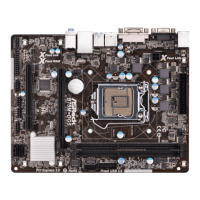
ASRock B75M-DGS R2.0 Motherboard
English
Chassis and Power Fan Connectors Please connect the fan cables
(4-pin CHA_FAN1)
to the fan connectors and match
(see p.2, No. 27)
the black wire to the ground pin.
CHA_FAN1 supports Fan
(3-pin PWR_FAN1)
Control.
(see p.2, No. 2)
CPU Fan Connector Please connect the CPU fan
(4-pin CPU_FAN1)
cable to the connector and
(see p.2, No. 5)
match the black wire to the
ground pin.
CPU fan still can work successfully even without the fan speed control function.
If you plan to connect the 3-Pin CPU fan to the CPU fan connector on this
motherboard, please connect it to Pin 1-3.
3-Pin Fan Installation
Pin 1-3 Connected
ATX Power Connector Please connect an ATX power
(24-pin ATXPWR1)
supply to this connector.
(see p.2, No. 3)
ATX 12V Power Connector Please connect an ATX 12V
(4-pin ATX12V1)
power supply to this connector.
(see p.2, No. 1)
FAN_SPEED_CONTROL
GND
+12V
CHA_FAN_SPEED
GND
+12V
CPU_FAN_SPEED
FAN_SPEED_CONTROL
4 3 2 1
Though this motherboard provides 24-pin ATX power connector, it can still work if
you adopt a traditional 20-pin ATX power supply. To use the 20-pin ATX power
supply, please plug your power supply along with Pin 1 and Pin 13.
20-Pin ATX Power Supply Installation
24 13
12 1
24 13
12 1
Chassis Speaker Header Please connect the chassis
(4-pin SPEAKER 1)
speaker to this header.
(see p.2, No. 16)


 To Next Page
 Loading...