5 Part Number 3085006.001, Rev 3
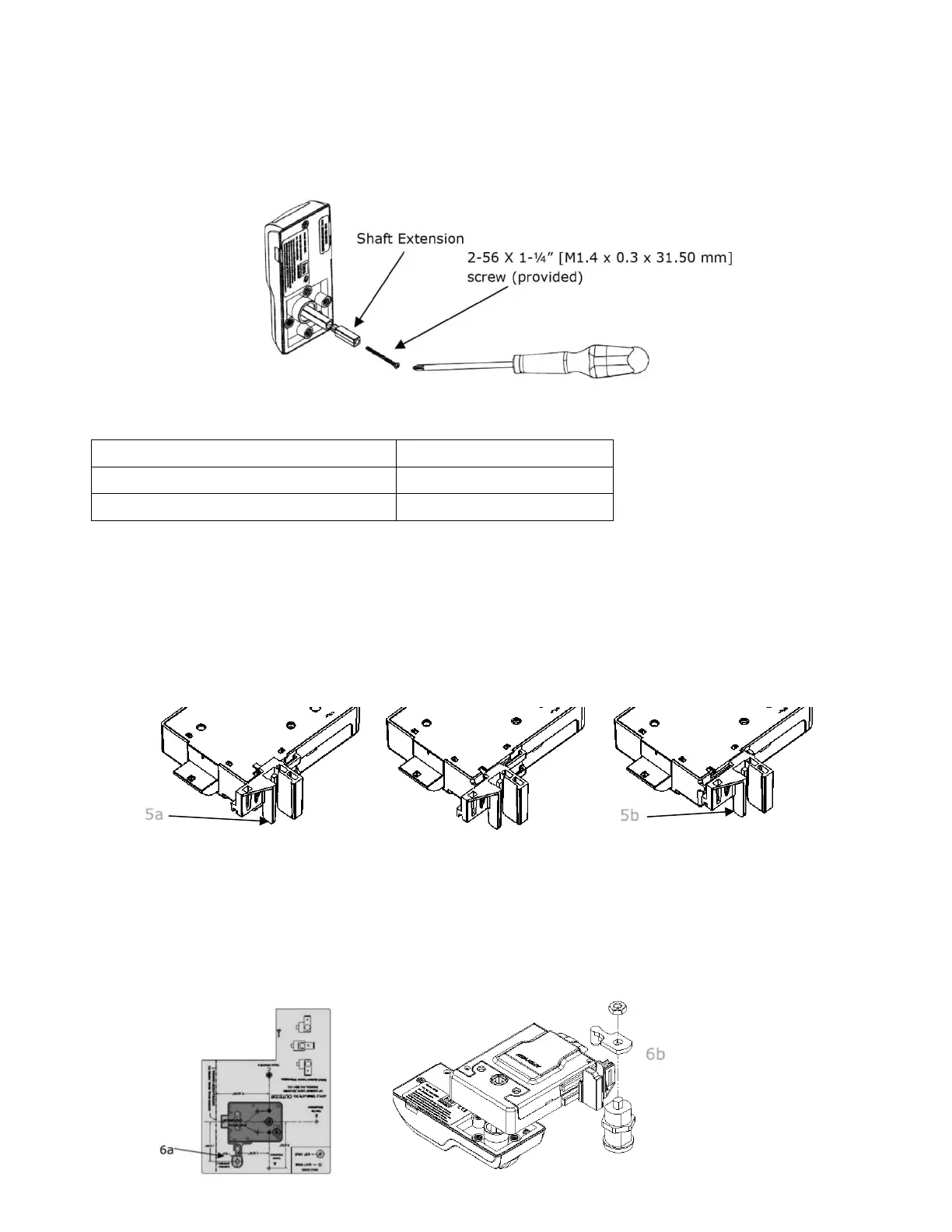
4. INSTALL the shaft extension.
IF the cabinet door thickness is greater than 1/2” [12.70 mm] (see Table 1),
THEN INSTALL the Shaft Extension to the Antenna/Reader as shown below to ensure proper engagement
into the lock. Firmly tighten the screw.
1/16” [1.59 mm] – 1/2” [12.70 mm]
> 1/2” [12.70 mm] – 1-1/2” [38.10 mm]
5. IF a Cam Lock key override will be used,
AND the orientation allows for installation,
THEN INSTALL the Key Override Paddle.
a. INSERT the paddle’s arm into the opening shown, and ALIGN the rails of the paddle to the ones on the lock.
b. SLIDE the paddle gently until it stops.
6. PREPARE the Key Override Door.
NOTE: The Cam Lock is optional and is not included with the HES K200.
a. IF a Key Override is used,
THEN MARK and DRILL a hole for a 3/4” [19.05 mm] Cam Lock in the door using the template as a guide.
b. INSTALL the optional Cam Lock with the Cabinet Lock as shown in the figure.



 To Next Page
 Loading...