4.2.6
Timer setting
(1)
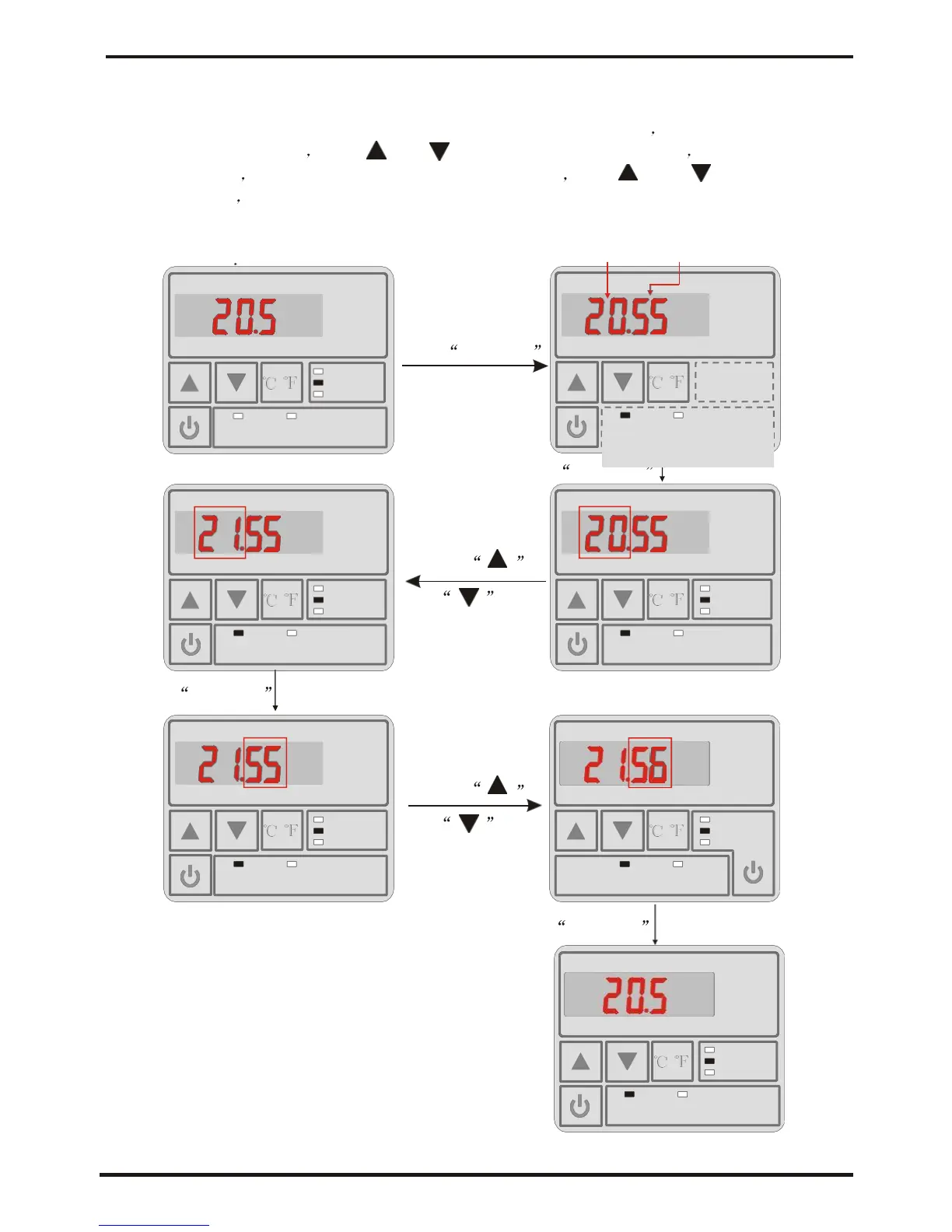
You can set the timer of unit on
In the on or off state, Press "TIME ON" to enter timer-on interface Press "TIME ON" and
time-hour-bit flashing Press " or " " to change the hours value Press "TIME ON"
to save hours At the same time, minutes-bit flashing Press " " or " " to change the
minute value Press "TIME ON" to save and exit. At this time, "TIME ON" LED light is on.
( The time-off setting is to press "TIME OFF", the other operation is the same as
timer-on ) For
example
Hour Munite
AUTO
/
HEAT
MODE
COOL
TIMER ON TIMER OFF CLOCK
Press TIME ON
/
Press TIME ON
Press
AUTO
/
HEAT
MODE
COOL
or
/
AUTO
HEAT
MODE
COOL
TIMER ON TIMER OFF CLOCK
TIMER ON TIMER OFF CLOCK
Press
TIME ON
Press
AUTO AUTO
/
HEAT
MODE
or
COOL
/
HEAT
MODE
COOL
TIMER ON TIMEROFF CLOCK CLOCK TIMER ON TIMEROFF
Press TIME ON
AUTO
/
HEAT
MODE
COOL





 To Next Page