4.2.5
Clock setting
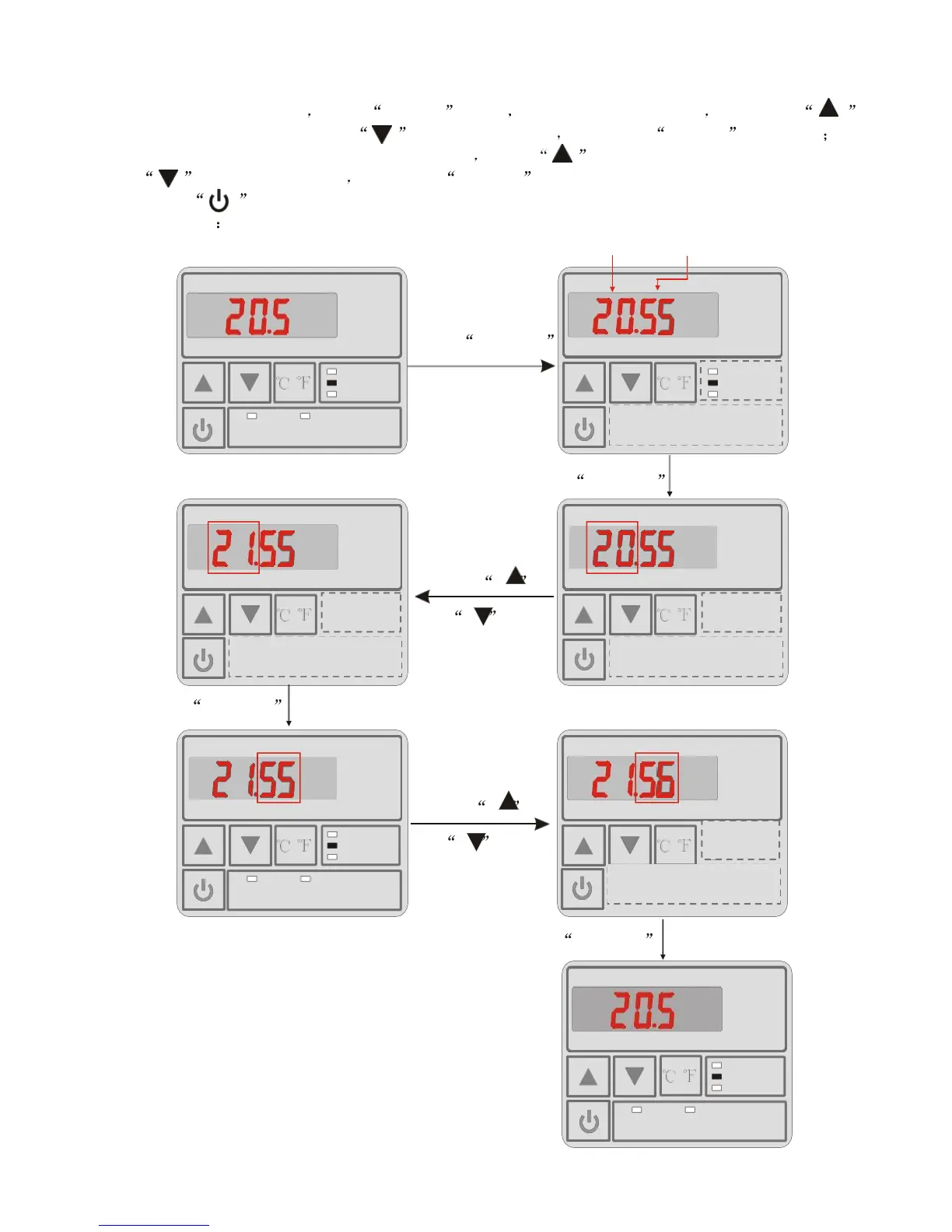
In the main interface press CLOCK twice Hours start to flashing and press
to increase value or press to decrease value and press CLOCK to setting
At the same time, minute start to flashing press to increase value or press
to decrease value and press CLOCK to save setting.
Press can not save setting parameter and back to main interface.
Attention If there is no operation for 5s system will remember parameter setting and
back to the main interface.
Hours Minute
Press CLOCK
AUTO
/
HEAT
MODE
/
COOL
TIMER ON TIMER OFF CLOCK
Press CLOCK
Press
/
or
/
Press CLOCK
Press
AUTO
/
HEAT
MODE
or
/
COOL
TIMER ON TIMER OFF CLOCK
Press CLOCK
AUTO
HEAT
MODE
COOL
AUTO
/
HEAT
MODE
COOL
TIMER ON TIMER OFF CLOCK





 To Next Page