EasyManua.ls Logo

Astralpool 78543 - Operation and Use; Controller Interface Overview

Astralpool 78543
35 pages
Print Icon
To Next Page IconTo Next Page
To Previous Page IconTo Previous Page
Loading...
Operation and use
1.
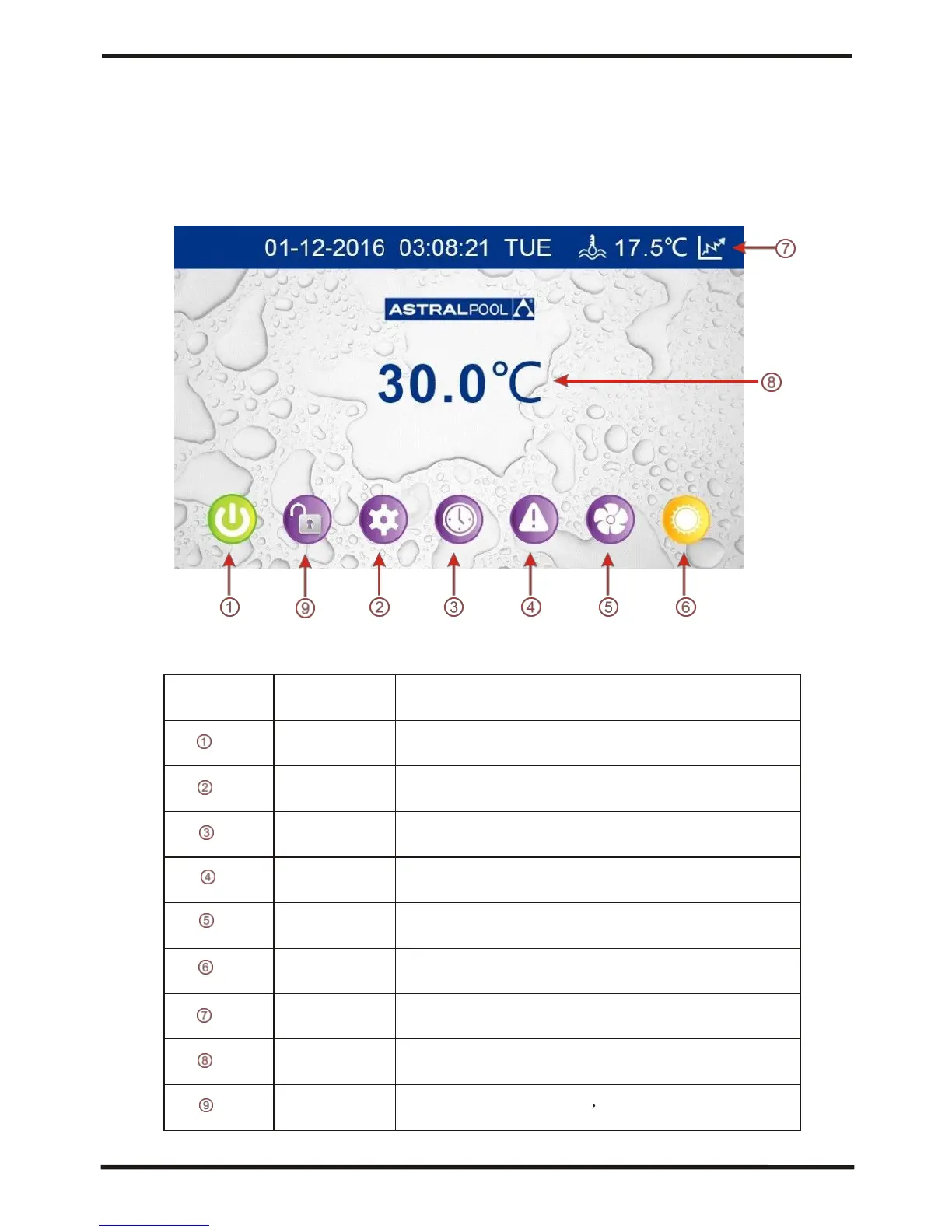
Color screen wire controller interface introduction
1.1 Main interface
1.2 Button Description
NO.
Name
The button function
ON/OFF
Press to start /shut off the unit
Parameter
Click this button to view the unit state
and the
parameter
CLOCK
Press to set the clock,
the timer on or timer off
Fault display
Click to view fault history
Silent setting
Click to turn on/off silent function and to
set
timing
Low speed function.
MODE
Click to enter the mode switch interface
Temp.curve
Click to view the temp. and power curve
Water
Inlet Temp.
Click to enter mode setting and the
target
temp. Setting interface
LOCK
Click to lock the screen Input "22" to unlock
the screen by press the "lock button"
15

Related product manuals